IP SLA (IP Service Level Agreement) is a Cisco IOS feature that allows network engineers to actively monitor and measure network performance.
Before understanding how IP SLA works, it is important to review the concept of a Service Level Agreement (SLA) provided by a service provider. A Service Level Agreement guarantees performance metrics inside the service provider network, as illustrated in Figure 1.
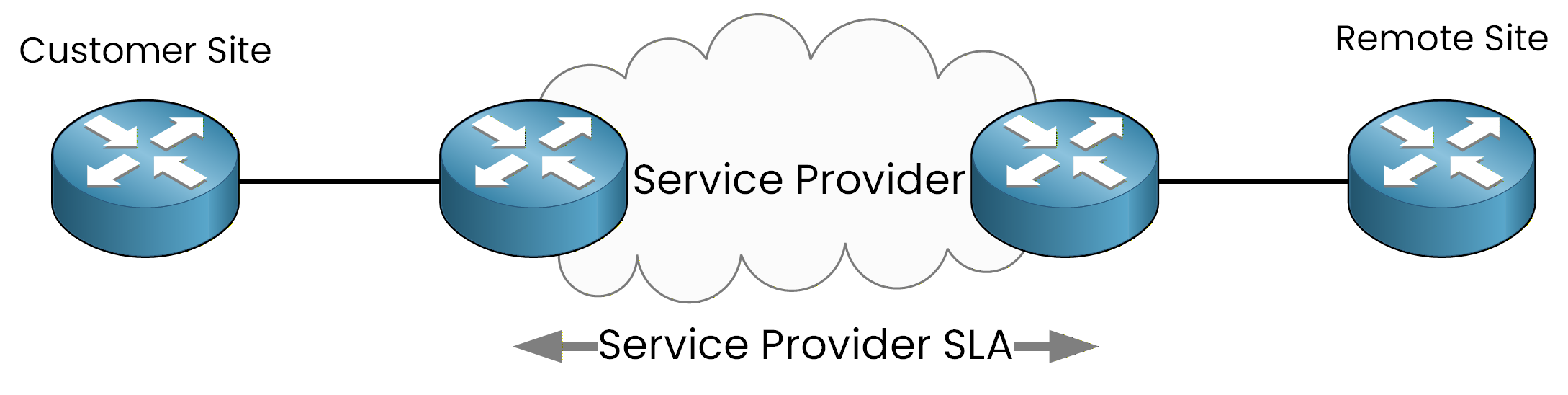
Figure 1 - Service Provider SLA Scope
However, from the customer's point of view, this information remains opaque: the customer has no direct visibility into what happens inside the provider’s infrastructure. This limitation makes it difficult for the customer to independently verify whether the delivered service truly meets the promised SLA.
It is precisely in this context that IP SLA becomes an essential tool.
Answer the question below
What does IP SLA monitor?
What is an IP SLA?
The IP SLA feature allows a router to actively generate test traffic toward a remote device.
In this example, the router at the Customer Site acts as the Source IP SLA Device and sends probes to a router at the Remote Site.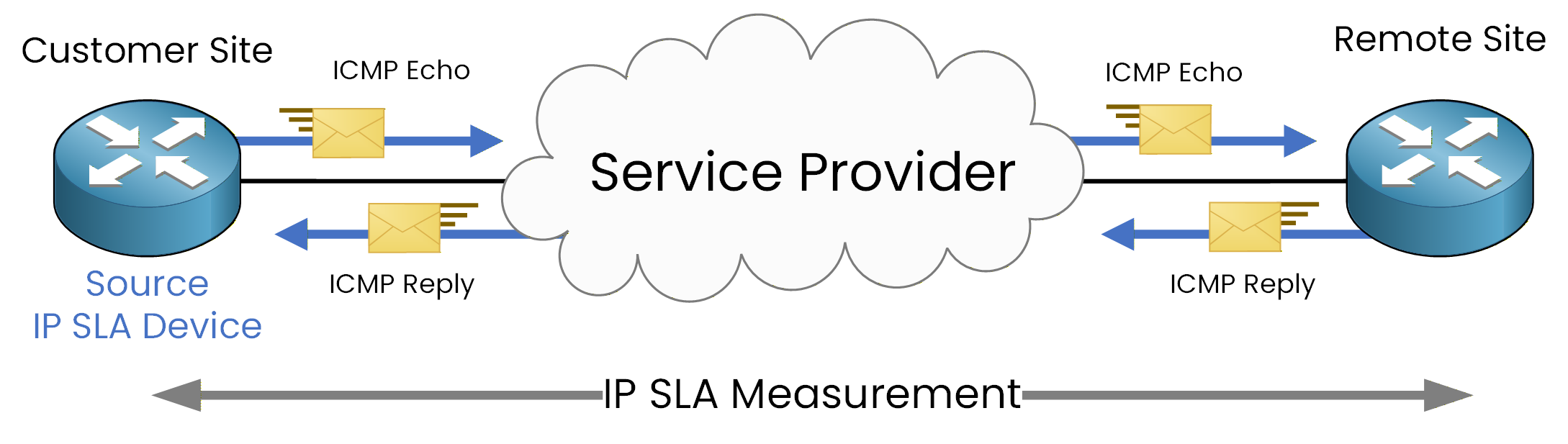
Figure 2 - IP SLA ICMP Echo End-to-End Measurement
Figure 2 illustrates an IP SLA ICMP Echo operation, where probes are sent toward the remote device and responses are returned to the source router. This allows IP SLA to measure the round-trip path, including both the outgoing probe and the returning response.
Based on these probes, the router can calculate accurate performance statistics and monitor network performance metrics such as:
reachability
round-trip time (RTT)
packet loss detection
Answer the question below
What does IP SLA measure?
Now that you understand the IP SLA concept, the next step is to configure an IP SLA operation.
In this example, we assume that you are working on the router located at the Customer Site, and your goal is to monitor network reachability and latency toward the Remote Site.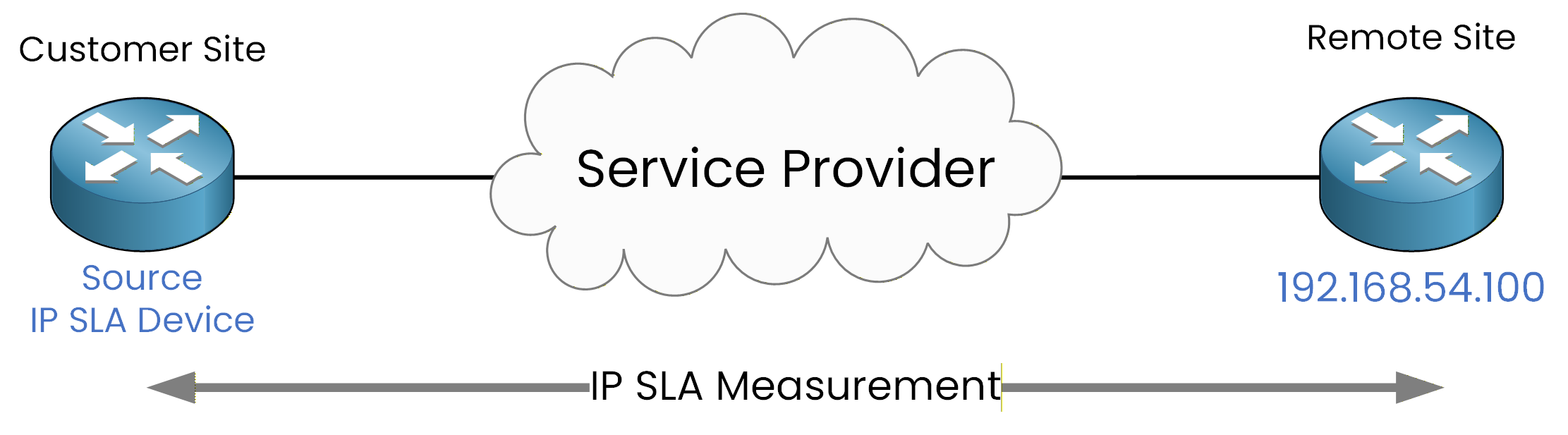
Figure 3 - IP SLA Configuration Topology
IP SLA ICMP Echo Operation
As illustrated in Figure 3, we will configure an IP SLA ICMP Echo operation toward the remote IP address 192.168.54.100, using Loopback0 as the source interface.
R1# conf t
Enter configuration commands, one per line. End with CNTL/Z.
R1(config)# ip sla 1
R1(config-ip-sla)# icmp-echo 192.168.54.100 source-interface Loopback0
R1(config-ip-sla-echo)# frequency 300
R1(config-ip-sla-echo)# end
Using a loopback interface as the source ensures a stable and consistent source address, independent of the physical interface state.
The
frequency 300command specifies that the ICMP Echo probes will be sent every 300 seconds.
At this stage, the IP SLA operation is defined but not yet active.IP SLA Scheduling
An IP SLA operation does not run until it is explicitly scheduled.
Scheduling defines when the operation starts and how long it remains active.To activate IP SLA operation 1 immediately and keep it running indefinitely, use the following command:
R1# conf t
Enter configuration commands, one per line. End with CNTL/Z.
R1(config)# ip sla schedule 1 life forever start-time now
R1(config)# exit
This command schedules IP SLA operation 1 to start immediately and run continuously.
IP SLA Configuration Verification
Once the IP SLA operation is scheduled, it can be verified using the following command:
R1# show ip sla configuration 1
IP SLAs Infrastructure Engine-III
Entry number: 1
Owner:
Tag:
Operation timeout (milliseconds): 5000
Type of operation to perform: icmp-echo
Target address/Source interface: 192.168.54.100/Loopback0
Type Of Service parameter: 0x0
Request size (ARR data portion): 28
Verify data: No
Vrf Name:
Schedule:
 Operation frequency (seconds): 300 (not considered if randomly scheduled)
 Next Scheduled Start Time: Start Time already passed
 Group Scheduled : FALSE
 Randomly Scheduled : FALSE
 Life (seconds): Forever
 Entry Ageout (seconds): never
 Recurring (Starting Everyday): FALSE
 Status of entry (SNMP RowStatus): Active
Threshold (milliseconds): 5000
Distribution Statistics:
 Number of statistic hours kept: 2
 Number of statistic distribution buckets kept: 1
 Statistic distribution interval (milliseconds): 20
Enhanced History:
History Statistics:
 Number of history Lives kept: 0
 Number of history Buckets kept: 15
 History Filter Type: N
This command displays detailed information about the IP SLA operation, including:
the operation number,
the type of operation (ICMP Echo),
the destination IP address,
the source interface,
and the probe frequency.
This verification step is especially useful when troubleshooting or when reviewing an existing IP SLA configuration on a device.
Transition to HTTP IP SLA
So far, we have configured an ICMP Echo IP SLA, which is primarily used to monitor network reachability and latency.
Next, we will explore another commonly used IP SLA operation: HTTP IP SLA, which allows monitoring of application availability rather than basic IP connectivity.
Answer the question below
What must be done for an IP SLA to start?
We will continue using the same topology as in the previous example.
In this scenario, we assume that the router at the Remote Site is hosting an HTTP service that we want to monitor regularly in order to verify application availability.
Figure 4 - HTTP IP SLA Configuration TopologyAs shown in Figure 4, this can be achieved by configuring an HTTP IP SLA operation.
IP SLA HTTP GET Operation
To configure an HTTP IP SLA operation, we first enter IP SLA configuration mode and define a new operation number.
In this example, we configure IP SLA operation 2 to perform an HTTP GET request toward the remote IP address 192.168.54.100.R1# conf t Enter configuration commands, one per line. End with CNTL/Z. R1(config)# ip sla 2 R1(config-ip-sla)# http get http://192.168.54.100 R1(config-ip-sla-http)# frequency 90 R1(config-ip-sla-http)# endThe
http getcommand instructs the router to send an HTTP GET request to the specified URL and verify that the HTTP service responds correctly.The
frequency 90command specifies that the HTTP probe will be sent every 90 seconds.
At this point, the IP SLA operation is defined but not yet active.IP SLA Scheduling
As with any IP SLA operation, the HTTP IP SLA probe must be explicitly scheduled before it can run.
To activate IP SLA operation 2 immediately and keep it running indefinitely, use the following command:R1# conf t Enter configuration commands, one per line. End with CNTL/Z. R1(config)# ip sla schedule 2 start-time now life forever R1(config)# exitThis command ensures that the HTTP IP SLA operation starts immediately and runs continuously.
IP SLA Configuration Verification
Once the operation is scheduled, the configuration can be verified using the following command:
R1# show ip sla configuration 2
IP SLAs Infrastructure Engine-III
Entry number: 2
Type of operation to perform: http
Target address/Source address: 192.168.54.100/0.0.0.0
Target port/Source port: 80/0
Type Of Service parameters: 0x0
Vrf Name:
HTTP Operation: get
HTTP Server Version: 1.0
URL: http://192.168.54.100
Proxy:
Raw String(s):
Cache Control: enable
Owner:
Tag:
Operation timeout (milliseconds): 60000
Schedule:
 Operation frequency (seconds): 90 (not considered if randomly scheduled)
 Next Scheduled Start Time: Start Time already passed
 Group Scheduled : FALSE
 Randomly Scheduled : FALSE
 Life (seconds): Forever
 Entry Ageout (seconds): never
 Recurring (Starting Everyday): FALSE
 Status of entry (SNMP RowStatus): Active
Threshold (milliseconds): 5000
Distribution Statistics:
 Number of statistic hours kept: 2
 Number of statistic distribution buckets kept: 1
 Statistic distribution interval (milliseconds): 20
History Statistics:
 Number of history Lives kept: 0
 Number of history Buckets kept: 15
 History Filter Type: None
This output confirms that:
the operation number is 2,
the type of operation is HTTP,
the target address is 192.168.54.100,
and the probe is scheduled and active.
This verification step confirms that the router is successfully monitoring HTTP service availability on the remote site.
Answer the question below
What does HTTP IP SLA verify?
IP SLA allows network engineers to proactively monitor network performance and application availability from the customer perspective.
Key Takeaways
Using different IP SLA operations, it is possible to monitor various aspects of network behavior, such as:
reachability
latency
application availability
For the CCNP ENCOR level, it is important to understand the IP SLA concept and to be able to configure basic IP SLA operations, such as:
ICMP Echo
HTTP GET
IP SLA only performs measurements.
By itself, it does not generate alerts or trigger configuration changes.At more advanced levels, such as CCNP ENARSI, IP SLA results can be used in combination with other mechanisms to influence network behavior automatically. This is outside the scope of this lesson.
For now, the focus remains on understanding the principles of IP SLA and configuring it in a simple and correct way.
Answer the question below
What does IP SLA NOT do by itself?