Multiprotocol Label Switching (MPLS) is a packet-forwarding method defined in RFC 3031.
Instead of making forwarding decisions based on the destination IP address at every single hop, routers forward packets using a short numerical identifier called a label.Virtually every Service Provider and large enterprise core network runs MPLS. Before looking at the label structure itself, let's examine the problem it originally solved and why it remains vital today.
Traditional IP Routing
Look at the topology below: a packet leaves 192.168.1.0/24, crosses five routers, and reaches a destination host in 192.168.2.0/24.
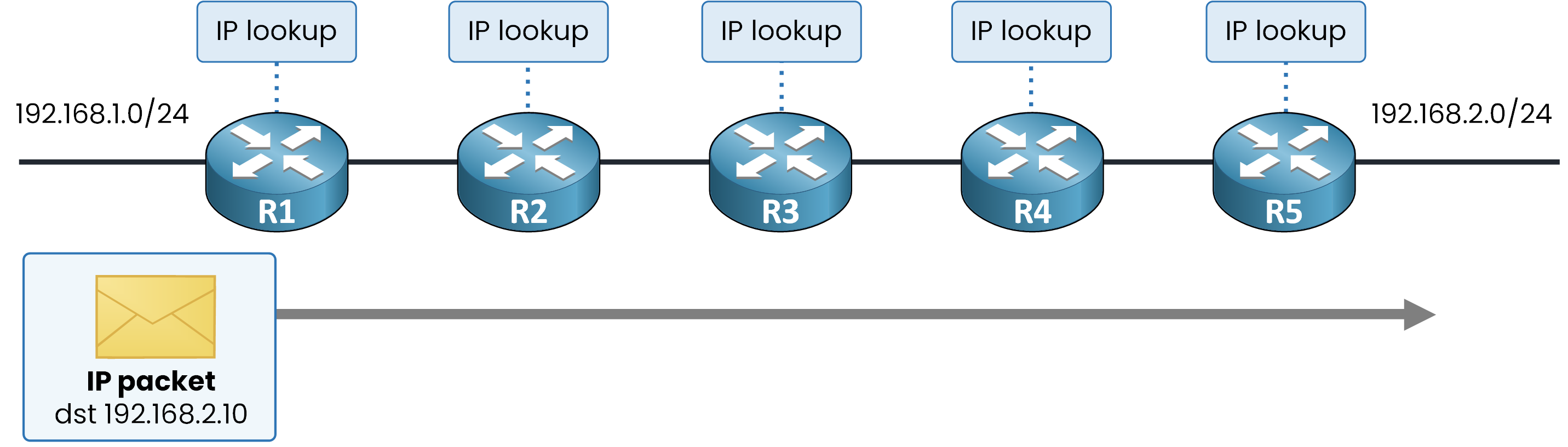
Figure 1 – Traditional IP routing (hop-by-hop)
In a pure IP network, every router along the path performs a longest-prefix match lookup in its routing table (FIB) for every single packet.
In large core networks carrying full Internet routing tables (over 900,000 routes), this creates massive memory and lookup overhead on every router.Answer the question below
Which operation does every router repeat on the packet?
MPLS Label Switching
MPLS keeps the initial lookup at the edge and eliminates IP routing lookups in the core.
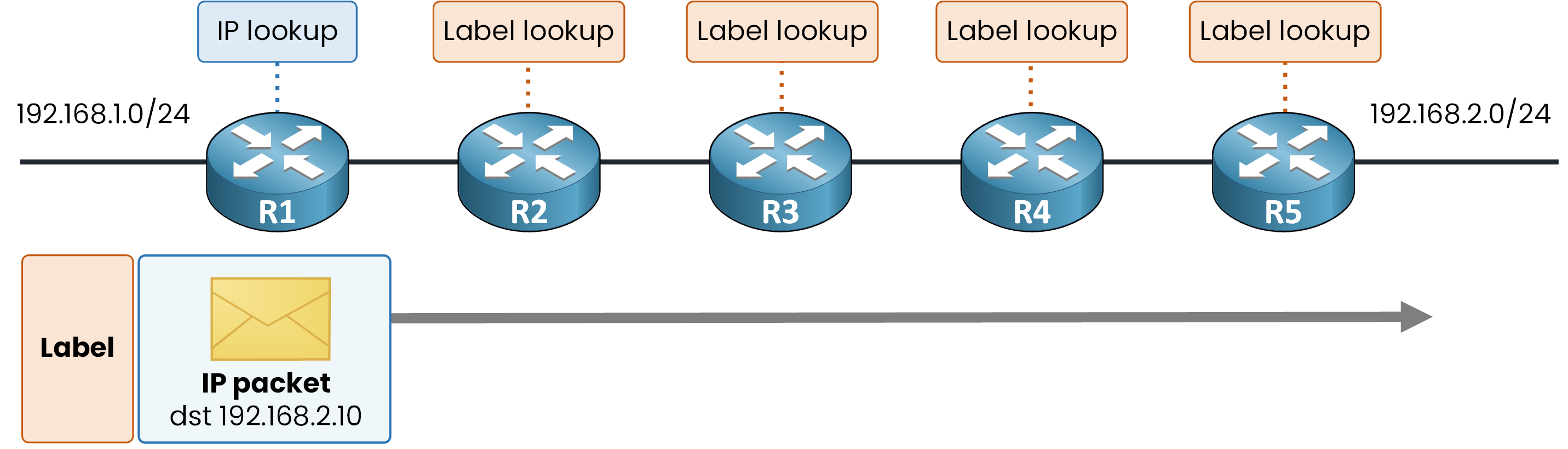
Figure 2 – MPLS label switching concept
When a packet enters the network, R1 performs one initial IP lookup. Instead of simply forwarding the plain IP packet, it attaches (pushes) a short numerical label to the packet header.
From that point forward, intermediate routers (R2, R3, R4, and R5) forward the packet based strictly on the label:A label is a simple, fixed-length number.
Instead of performing a complex longest-prefix match against an IP routing table, each core router performs a single, fast exact match lookup on that label value.
Answer the question below
Which router performs the IP lookup when the packet enters the network?
The Benefits of MPLS
MPLS brings three practical benefits over plain IP routing:
Benefit
What it gives you
Lightweight core
The core forwards on labels alone, without inspecting the IP header.
Multiprotocol
The label can carry almost anything: IPv4, IPv6, or Layer 2 frames like Ethernet.
Services
VPNs, traffic engineering, and QoS built directly on the label.
Table 1 – The three benefits of MPLS
That last row is the focus of this module: the MPLS Layer 3 VPN you will analyze at the end relies entirely on this label mechanism.
Answer the question below
A provider wants to sell VPNs on top of its backbone. Which of the three benefits makes that possible?
Answer the question below
In the MPLS approach, what does R3 read to forward the packet?
A label means something only to a router that runs MPLS.
So where exactly do labels work, and which router does what?The MPLS Domain
The portion of the network where MPLS is enabled is called the MPLS domain.
Every router inside it understands labels and can receive and transmit labeled packets.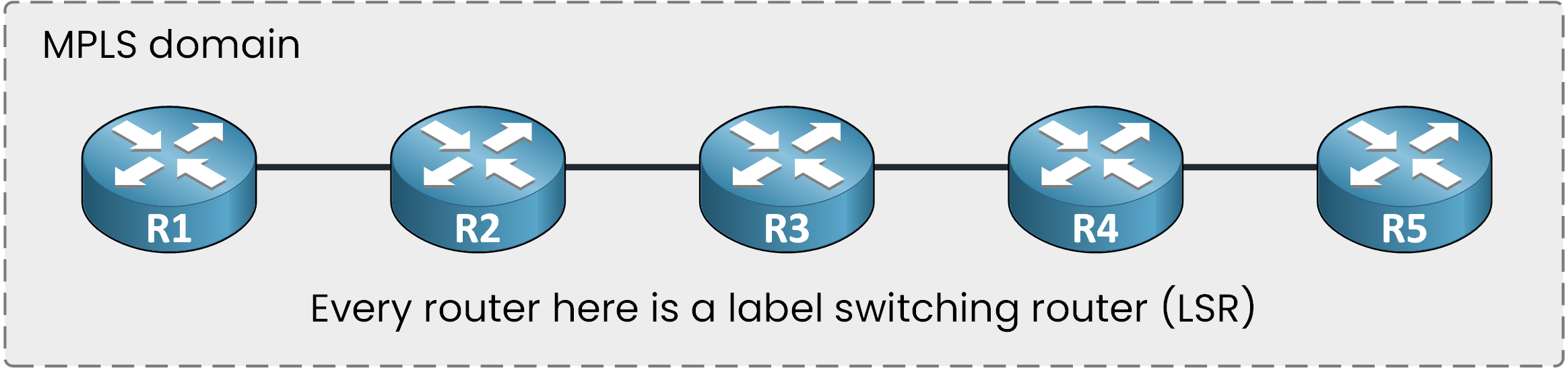
Figure 3 – The MPLS domain and LSRs
Each router in this domain is a Label Switching Router (LSR).
Ask R3 which of its interfaces run MPLS:R3# show mpls interfaces Interface IP Tunnel BGP Static Operational GigabitEthernet0/0 Yes (ldp) No No No Yes GigabitEthernet0/1 Yes (ldp) No No No YesBoth interfaces already run MPLS: this list defines your domain.
You also seeldpnext to them, which indicates the protocol used to distribute labels (covered in detail in a later lesson).Answer the question below
Every router inside the MPLS domain is an ___.
Edge and Intermediate LSRs
As you can see below, the domain splits into two zones:
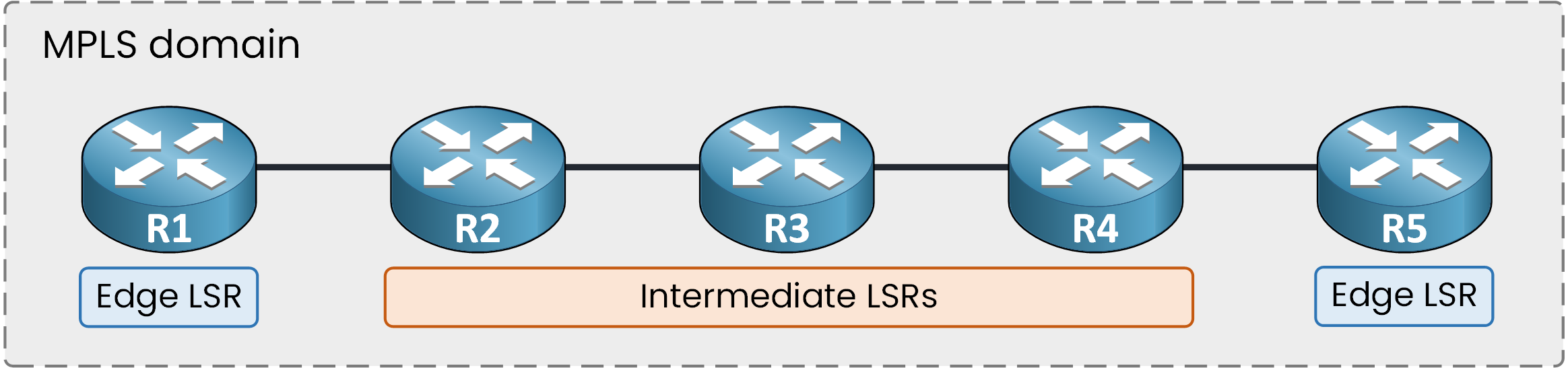
Figure 4 – Edge LSR vs. Intermediate LSR roles
Edge LSRs (R1 and R5): Located at the border of the domain, they handle both sides plain IP on the outside, labels on the inside.
Intermediate LSRs (R2, R3, and R4): Located entirely inside the domain, they forward strictly on label information.
Ingress and Egress LSRs
An edge LSR does not always perform the same operation: its function depends on the direction of the traffic flow.
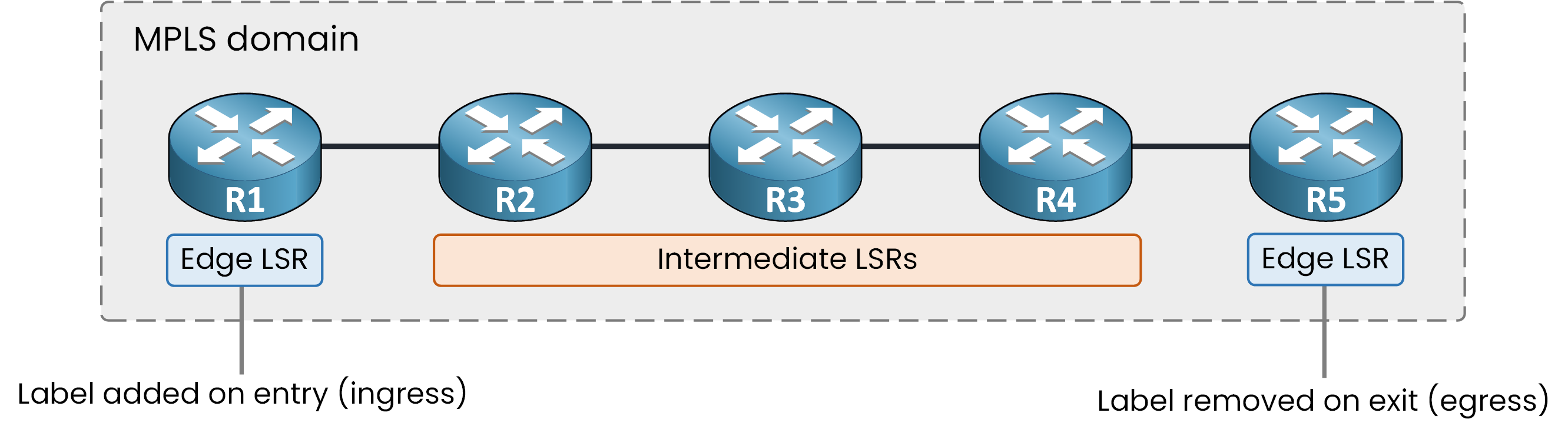
Figure 5 – Label addition (Ingress) and removal (Egress)
Ingress LSR: For a packet entering the domain, the edge LSR acts as the ingress LSR, it adds (pushes) the label.
Egress LSR: For a packet leaving the domain, the edge LSR on the other side acts as the egress LSR, it removes (pops) the label.
Swap the direction of traffic, and the two routers swap their roles.
Ingress and egress are dynamic roles for a given traffic direction, not permanent titles.Answer the question below
Which LSRs sit entirely inside the MPLS domain?
Answer the question below
A packet is entering the MPLS domain. Which role does the edge LSR that adds the label play?
End-to-End Packet Flow
Now follow the complete journey, end to end:

Figure 6 – End-to-end MPLS packet flow
The packet arrives at the edge as plain IP.
The Ingress LSR performs an initial IP lookup, attaches (pushes) a label, and sends the packet into the domain.
The Intermediate LSRs forward the packet strictly on the label alone, without inspecting the IP header along the way.
The Egress LSR removes (pops) the label, and the plain IP packet continues toward the destination LAN.
Notice what the two LANs see: the source sent a standard IP packet, and the destination received a standard IP packet. MPLS is completely transparent to both LANs.
Picture yourself on PC1, in the LAN on the left of R1, pinging a host on the other side:
PC1> ping 192.168.2.10

Pinging 192.168.2.10 with 32 bytes of data:

Reply from 192.168.2.10: bytes=32 time=12ms TTL=123
Reply from 192.168.2.10: bytes=32 time=8ms TTL=123
Reply from 192.168.2.10: bytes=32 time=8ms TTL=123
Reply from 192.168.2.10: bytes=32 time=8ms TTL=123

Ping statistics for 192.168.2.10:
    Packets: Sent = 4, Received = 4, Lost = 0 (0% loss)
Your ping goes through, and nothing in the ICMP output mentions MPLS.
Answer the question below
A packet is leaving the MPLS domain. Which role does the edge LSR that removes its label play?
Answer the question below
For the two LANs, MPLS is completely ___.
So far, the label has simply been attached to the packet.
But where exactly is it located inside the frame?The Shim Header
The label is neither part of the Layer 2 frame header nor part of the Layer 3 IP packet.
It is a shim header: an additional block inserted between the two.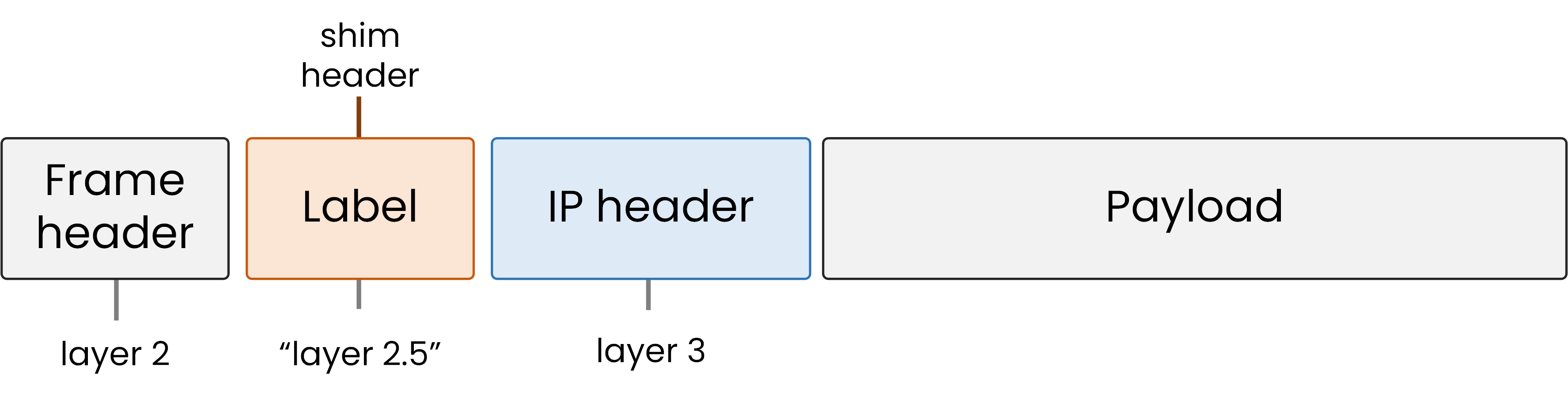
Figure 7 – Layer 2.5 Shim Header location
Because it sits directly between Layer 2 (Data Link) and Layer 3 (Network), network engineers nicknamed it the Layer 2.5 header.
Answer the question below
The shim header position earned MPLS a nickname: Layer ___.
The Four Fields of the Label Header
The shim header is 32 bits (4 bytes) long, split into four distinct fields:

Figure 8 – 32-bit MPLS header fields breakdown
Label (20 bits): The label value read by LSRs (range
0to1,048,575).EXP / TC (3 bits): Quality of Service (QoS) marking (Traffic Class).
S (1 bit): Bottom-of-Stack. Set to
1for the final label, or0if more labels are stacked below.TTL (8 bits): Time-to-Live counter copied from the IP header to prevent loops.
Verifying Labels on the Path
Now ask for the full path from R1:
R1# traceroute 192.168.2.10 source GigabitEthernet0/0
Type escape sequence to abort.
Tracing the route to 192.168.2.10

  1 10.0.12.2 [MPLS: Label 58 Exp 0] 24 msec 20 msec 20 msec
  2 10.0.23.3 [MPLS: Label 31 Exp 0] 20 msec 16 msec 16 msec
  3 10.0.34.4 [MPLS: Label 67 Exp 0] 16 msec 12 msec 12 msec
  4 10.0.45.5 12 msec 8 msec 8 msec
  5 192.168.2.10 8 msec 4 msec 4 msec
Your active labels are visible in the ICMP extension data on the wire:
58,31, and67, each displayed alongside itsExpfield value.Notice that hop 4 carries no label at all, the packet traverses the final link to R5 as plain IP.
The next lesson explains this mechanism (Penultimate Hop Popping).Keep the S bit in mind: in an L3VPN, a packet carries two labels and only the bottom one has S set to 1. For now, a single label is enough. You know what it is, where it sits in the frame, and which routers add and remove it.
What happens to the label at each hop inside the core? That is precisely what we examine next, one router at a time.
Answer the question below
Which field marks the last label of a stack?
Answer the question below
How many bits long is the MPLS shim header?