In the previous lesson, the label appeared at R1 and disappeared at R5.
This lesson follows a single packet across the same five routers to show the exact operation each router performs.Push at the Ingress (R1)
A packet from 192.168.1.0/24 arrives at R1, heading for 192.168.2.10.
As the ingress LSR, R1 performs an IP lookup using its FIB (Forwarding Information Base), the forwarding table built from the routing table.
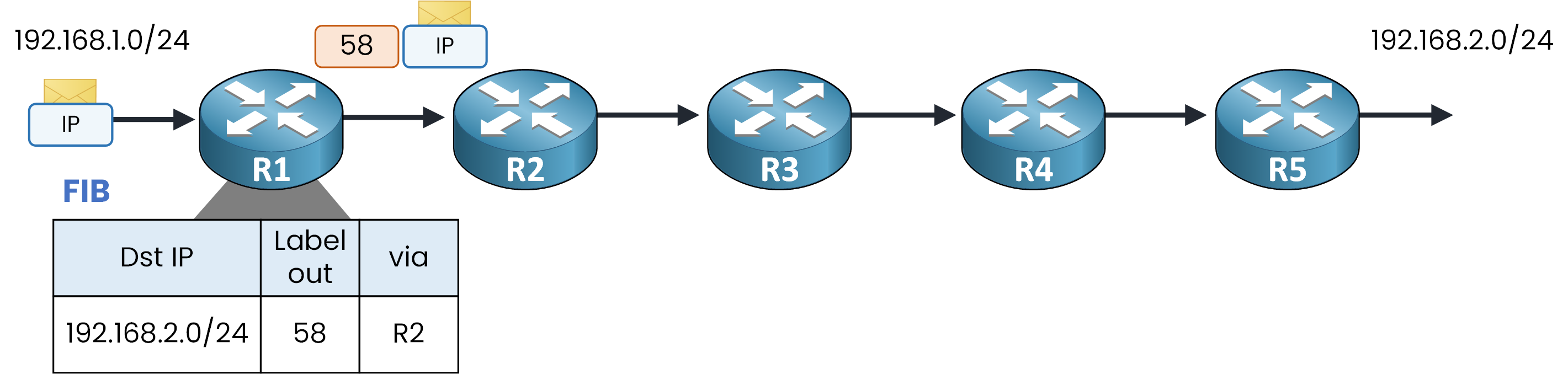
Figure 1 – Ingress label push operation (R1)
Look at R1's FIB entry for destination
192.168.2.0/24.
It provides two essential instructions:The next hop: R2
The label to push:
58
R1 inserts label
58between the frame header and the IP header, then forwards the packet.
This operation is a push.
On Cisco routers, Cisco Express Forwarding (CEF) builds the FIB, which is why you query it withshow ip cef:R1# show ip cef 192.168.2.0 255.255.255.0 detail 192.168.2.0/24, epoch 0, per-destination sharing local label info: global/24 nexthop 10.0.12.2 GigabitEthernet0/1 label 58The
nexthopline indicates both the destination IP address of the next hop (10.0.12.2) and the label (58) to be pushed.Answer the question below
Which table gives R1 both the next hop and the label to push?
Answer the question below
R1 adds the label to the packet. What is this operation called?
Swap at the Intermediate LSR (R2)
R2 receives a labeled packet, so it does not consult the IP routing table at all.
Instead, it uses a dedicated table: the LFIB (Label Forwarding Information Base), indexed directly by the incoming label.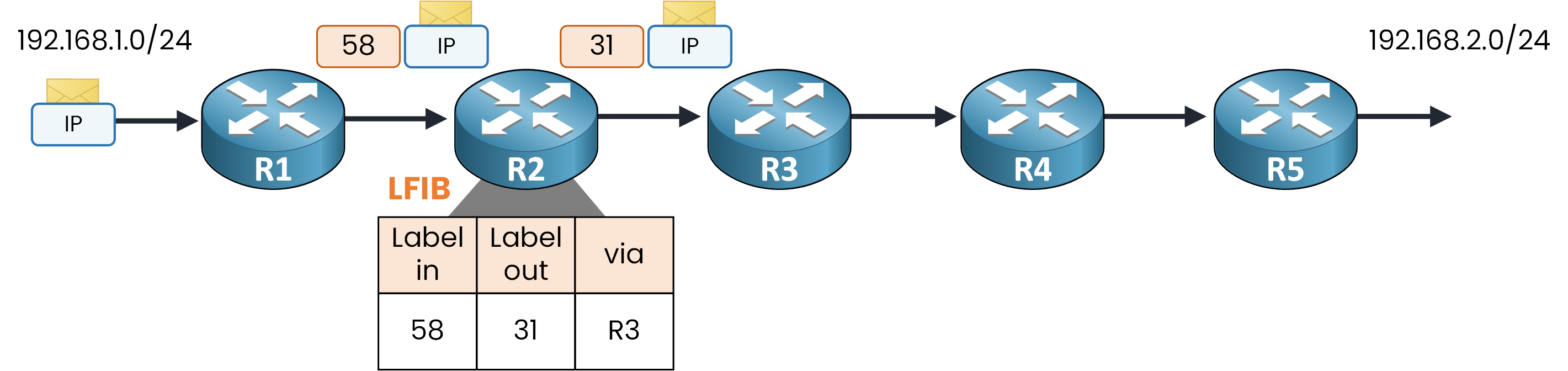
Figure 2 – Intermediate label swap operation (R2)
Think of the LFIB as the label lookup table: incoming label in, outgoing label out, next hop out.
The LFIB entry for incoming label58provides two instructions:The outgoing label:
31The next hop: R3
R2 strips label
58, writes label31, and forwards the packet.
This operation is a swap.Here is the LFIB on R2:
R2# show mpls forwarding-table 192.168.2.0 255.255.255.0
Local      Outgoing   Prefix           Bytes Label   Outgoing   Next Hop
Label      Label      or Tunnel Id     Switched      interface
58         31         192.168.2.0/24   9834          Gi0/1      10.0.23.3
You can clearly see both the local (incoming) label 58 and the outgoing label 31 for destination network 192.168.2.0/24.
Answer the question below
R2 replaces one label with another. What is this operation called?
Swaps Across the Core (R3 and R4)
Notice that the label value changed: labels are locally significant, meaning each router manages its own label space independently.
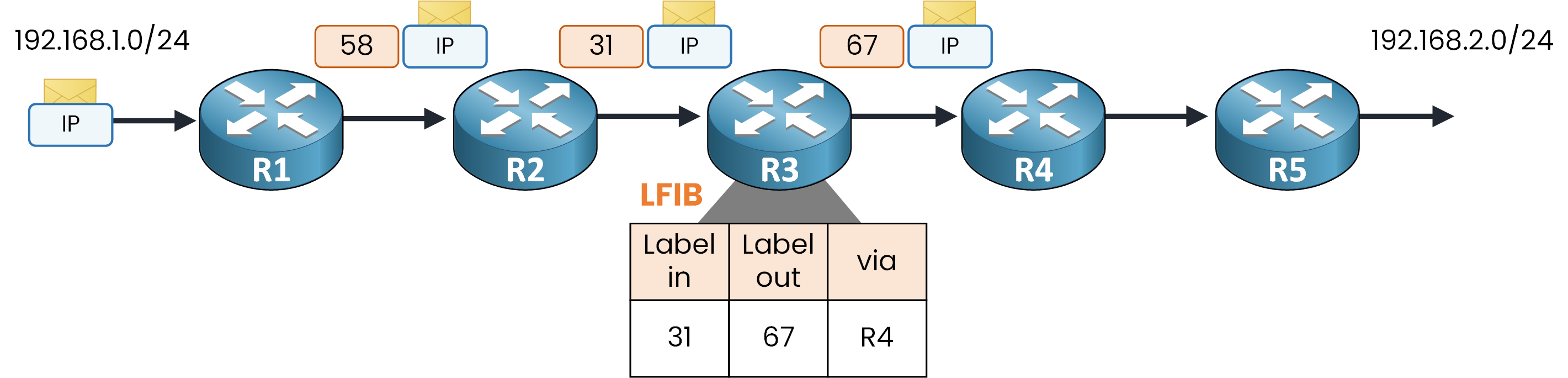
Figure 3 – Intermediate label swap operation (R3)
R3 repeats the exact same lookup process using its own LFIB table.
Label in:
31Label out:
67Next hop: R4
Here is the LFIB on R3:
R3# show mpls forwarding-table 192.168.2.0 255.255.255.0
Local      Outgoing   Prefix           Bytes Label   Outgoing   Next Hop
Label      Label      or Tunnel Id     Switched      interface
31         67         192.168.2.0/24   7215          Gi0/1      10.0.34.4
Same structure as R2, just different values: incoming label 31 maps to outgoing label 67 toward R4.
One intermediate router remains before the egress edge: R4.
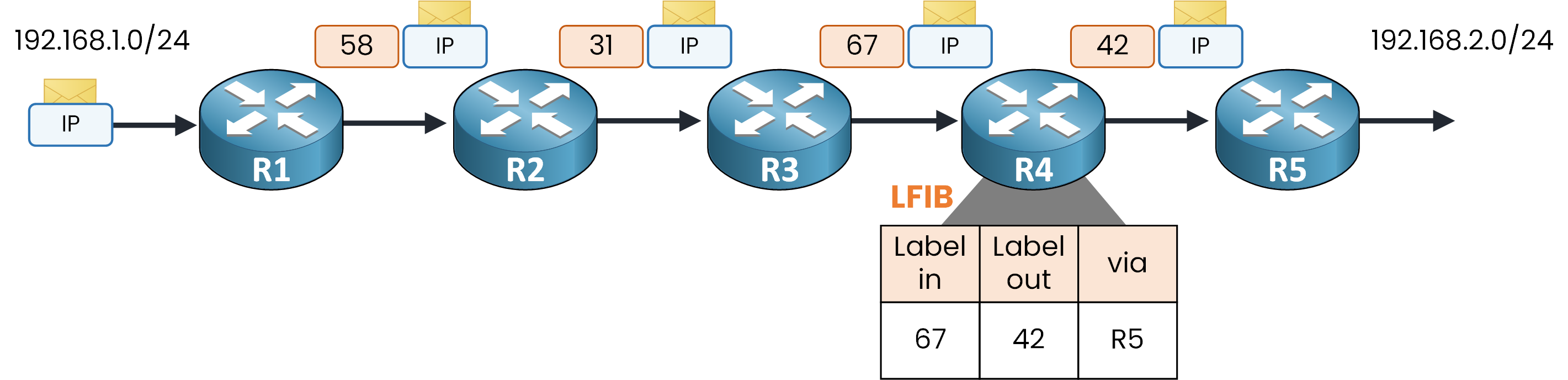
Figure 4 – Intermediate label swap operation (R4)
R4 swaps incoming label
67for outgoing label42and forwards the packet to R5.Notice the key takeaway across the core: no router has inspected the IP header since the packet left R1.
Each intermediate LSR performed a single, fast exact-match lookup in its LFIB.Answer the question below
R2 receives label 58. Which label does it write before forwarding?
Answer the question below
R3 receives label 31. Which label does it write before forwarding?
Pop at the Egress (R5)
R5 is the egress LSR, and its LFIB entry for incoming label
42is different: there is no outgoing label listed.R5 strips the label from the packet.
This operation is a pop.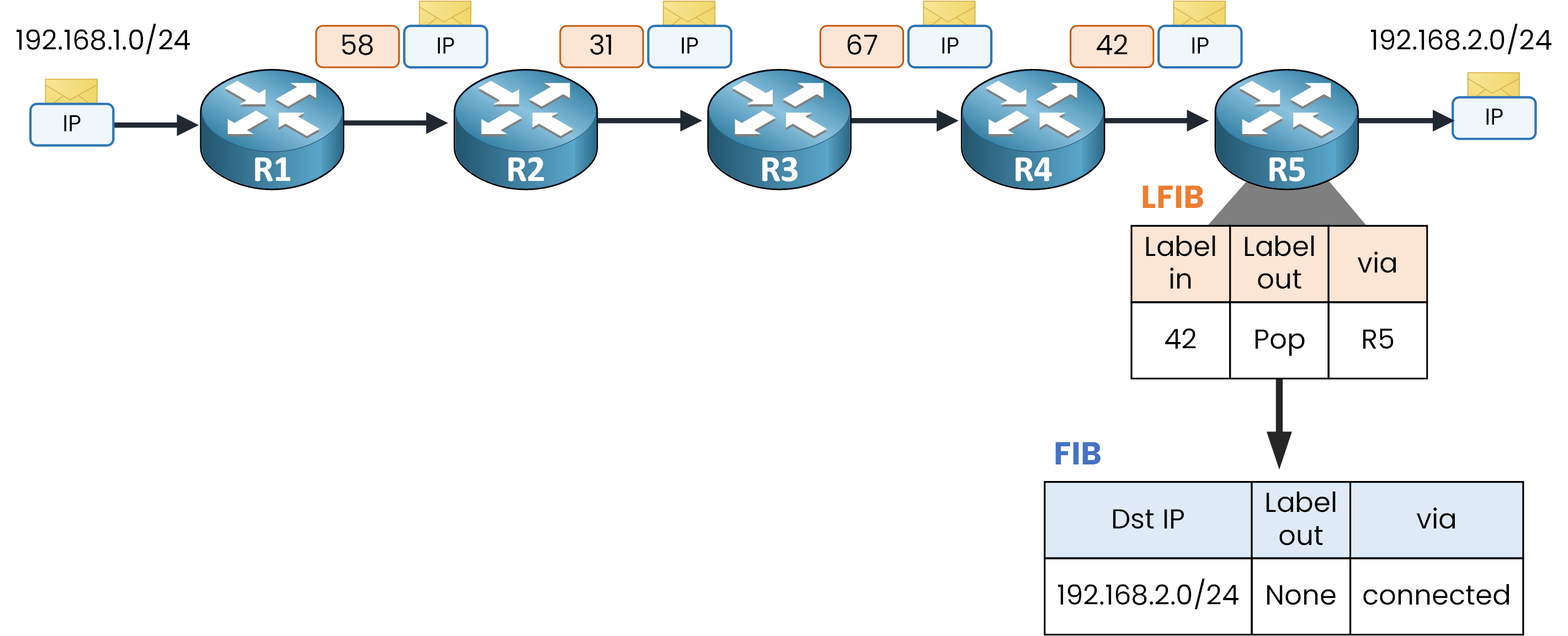
Figure 5 – Label pop and IP lookup (R5)
Because the packet has returned to plain IP, R5 performs a second lookup, using its FIB table this time to determine where to send it.
The FIB lookup confirms that network
192.168.2.0/24is directly connected.
R5 forwards the native IP packet out of the MPLS domain and onto the destination LAN.Note: This double lookup (LFIB first, then FIB) is the exact overhead that the next section on Penultimate Hop Popping (PHP) solves.
Answer the question below
R5 removes the label from the packet. What is this operation called?
Answer the question below
Which table does an intermediate LSR use to forward labeled packets?
Here is a critical concept in MPLS data plane operations.
Without optimization, the label remains attached until the final router. As seen on R5, this forces the egress router to perform two lookups for a single packet: first in the LFIB to pop the label, then in the FIB to route the IP packet.
Penultimate Hop Popping (PHP) eliminates this redundant lookup and is enabled by default on Cisco routers.
Popping One Hop Early
With PHP, the pop operation shifts to the second-to-last router along the path, the penultimate hop.
In this topology, that router is R4.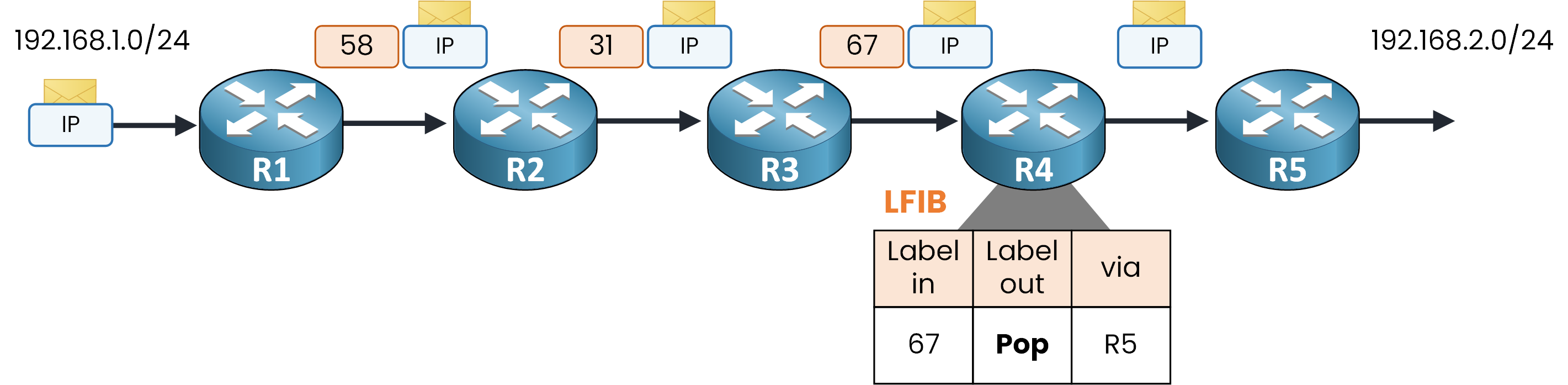
Figure 6 – Penultimate Hop Popping (PHP at R4)
Instead of swapping incoming label
67for an outgoing label, R4's LFIB entry instructs it to perform a Pop.
R4 strips the label entirely and forwards a plain IP packet to R5.Because R4 pops the label before forwarding, R5 never receives a labeled packet.
Here is the LFIB on R4:R4# show mpls forwarding-table 192.168.2.0 255.255.255.0 Local Outgoing Prefix Bytes Label Outgoing Next Hop Label Label or Tunnel Id Switched interface 67 Pop Label 192.168.2.0/24 4521 Gi0/1 10.0.45.5On R4, the local label is
67and the outgoing action is explicitly listed as Pop Label.
R5 triggered this behavior by advertising a reserved MPLS label known as Implicit Null for its directly connected prefix.Answer the question below
With PHP, which router removes the label?
Answer the question below
Which reserved label does R5 advertise to request PHP?
A Single Lookup at the Egress
Now look at R5.
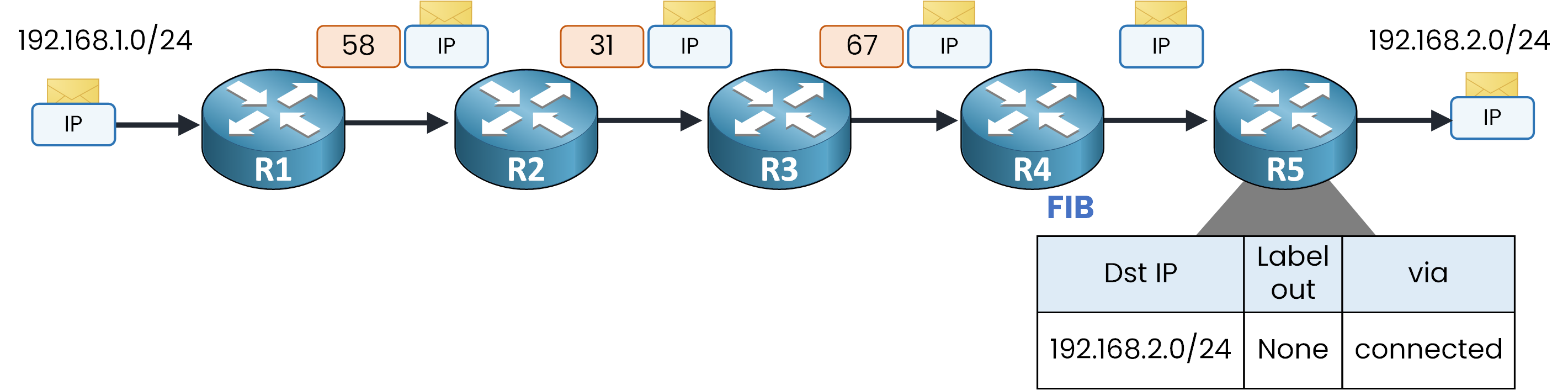
Figure 7 – Native IP forwarding at Egress (R5)
R5 receives a plain, unlabeled packet because R4 already popped the label. As a result, R5 bypasses its LFIB entirely and queries its FIB directly: a single IP lookup, and the packet exits toward
192.168.2.0/24.Look at R5's FIB entry for that prefix:
R5# show ip cef 192.168.2.0 255.255.255.0 detail
192.168.2.0/24, epoch 0
  attached to GigabitEthernet0/1
Compare this entry with R1's entry at the top of the lesson:
R1 had a explicit next hop (
10.0.12.2) and an outgoing label (58) to push.R5 has neither:
192.168.2.0/24is directly connected (attached to GigabitEthernet0/1), allowing the packet to leave on a single fast lookup.
Key Rule: Every LSR maintains both tables (FIB and LFIB). A labeled packet arriving at an interface is processed by the LFIB, while an unlabeled packet is processed by the FIB.
The Complete Data Plane
One push to enter the domain, a swap at each core router, one pop at the penultimate hop, and the packet leaves in plain IP routing.
Here it is, router by router:
Figure 8 – MPLS Data Plane operations summary
R1 pushes the label (ingress)
R2 and R3 swap it (intermediate LSRs)
R4 pops it (penultimate hop)
R5 routes a plain IP packet (egress)
Push, swap, pop: three operations run the entire domain.
Everything you just followed is the data plane: the part of the router that moves packets.
The FIB and the LFIB are built by the control plane. The next lesson shows how.Answer the question below
With PHP enabled, how many lookups does R5 perform?
With PHP in place, the packet you followed used labels 58, 31, and 67 to cross the domain.
That sequence of labeled hops has a name.The Path from Ingress to Egress
Follow the green path from R1 to R5.
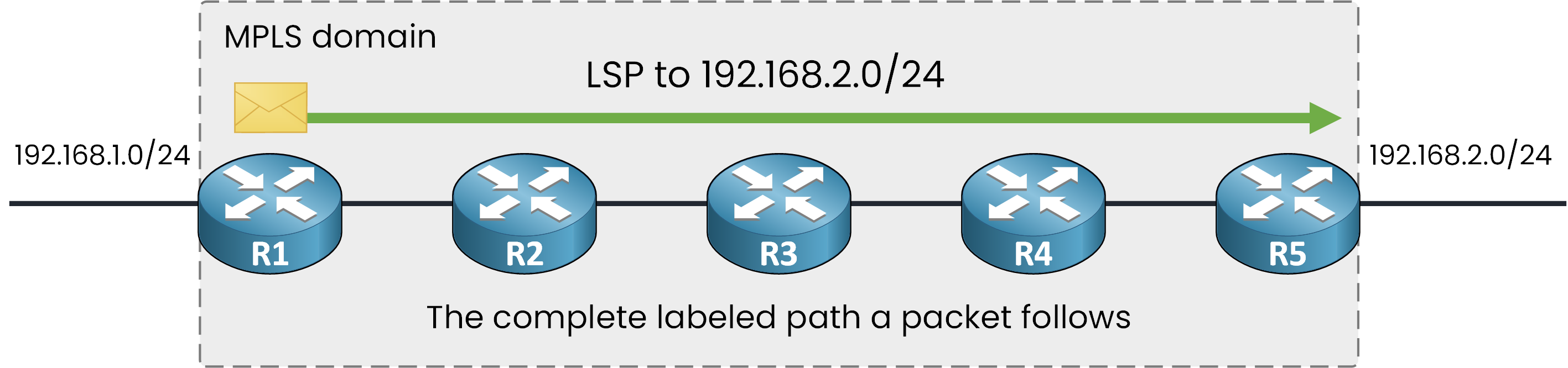
Figure 9 – Unidirectional Label Switched Path (LSP)
The complete path a labeled packet follows from ingress to egress is a Label Switched Path (LSP).
Here, the LSP to 192.168.2.0/24 runs from R1 to R5, through R2, R3, and R4.Answer the question below
The complete path a labeled packet follows is called an ___.
One LSP per Direction
An LSP is unidirectional: it carries traffic in one direction only.
The path you followed only moves packets toward 192.168.2.0/24.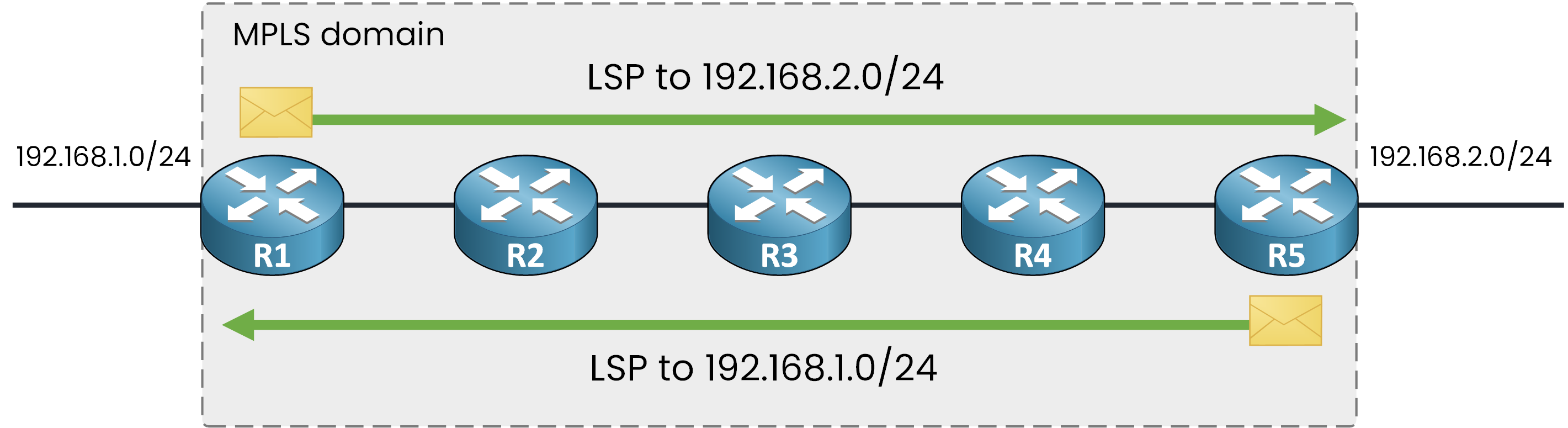
Figure 10 – Bidirectional traffic using separate LSPs
For the return traffic, a second LSP runs from R5 back to R1, with its own labels.
Nothing forces the two to be symmetrical: the return LSP can follow a different path through the domain.Who Chose the Labels?
One question is still open: R1 pushed label 58, and R2 expected exactly that value. Which protocol made the routers agree on these numbers?
That is the topic of the next lesson: the Label Distribution Protocol (LDP).Answer the question below
Traffic flows both ways between the two LANs. How many LSPs are needed?