In the previous lesson, you saw how DMVPN allows branches to build direct tunnels.
Now, let's look under the hood at the core mechanism that makes this dynamic connection possible.The Address Mapping Problem
Take a look at R3 in Chicago. Like every router in your DMVPN architecture, R3 operates with two distinct IP addresses:
Tunnel IP (192.168.100.3): Configured on
Tunnel0. Your internal routing protocols (OSPF, EIGRP, BGP) use this private address.Public IP / NBMA (203.0.113.3): Configured on the physical Internet interface. The public Internet uses this address to route packets between sites.
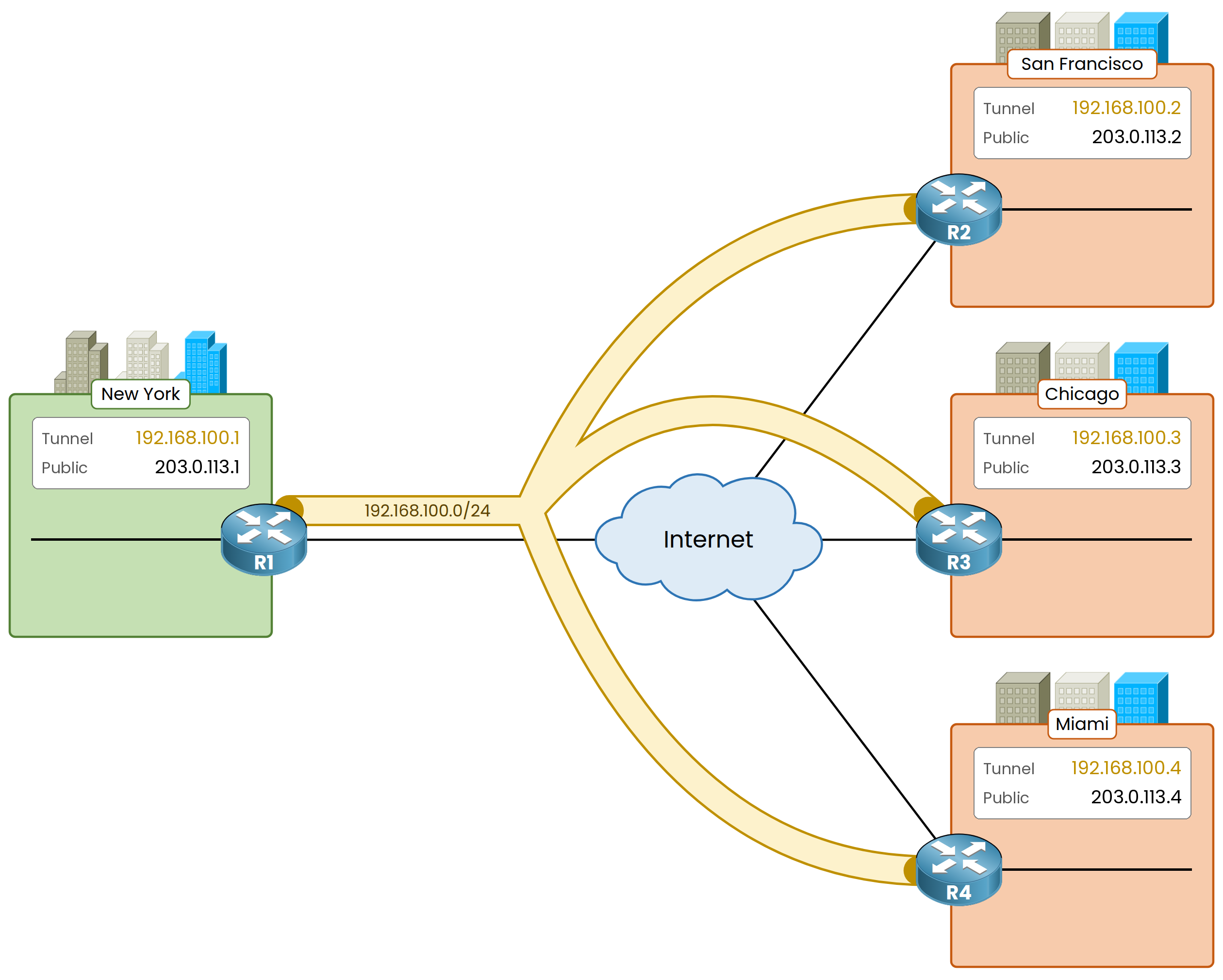
Figure 1 – Two addresses on every router
All routers in your DMVPN network share the private tunnel subnet 192.168.100.0/24.
Remember: the public Internet has zero knowledge of this internal address space.Answer the question below
Click on Complete to continue
The Encapsulation Challenge
Imagine you are sending a file from Chicago to Miami.
R3 must encapsulate your original packet into a GRE header before transmitting it across the public Internet.
Figure 2 – The GRE packet from Chicago to Miami
A DMVPN packet carries two separate IP headers:
Inner IP Header: Source 10.30.30.10 (Chicago user), Destination 10.40.40.10 (Miami server): your original packet, untouched.
Outer IP Header: Source 203.0.113.3 (Chicago Public IP), Destination ??? (Miami Public IP).
Answer the question below
Which IP header carries the public addresses, inner or outer?
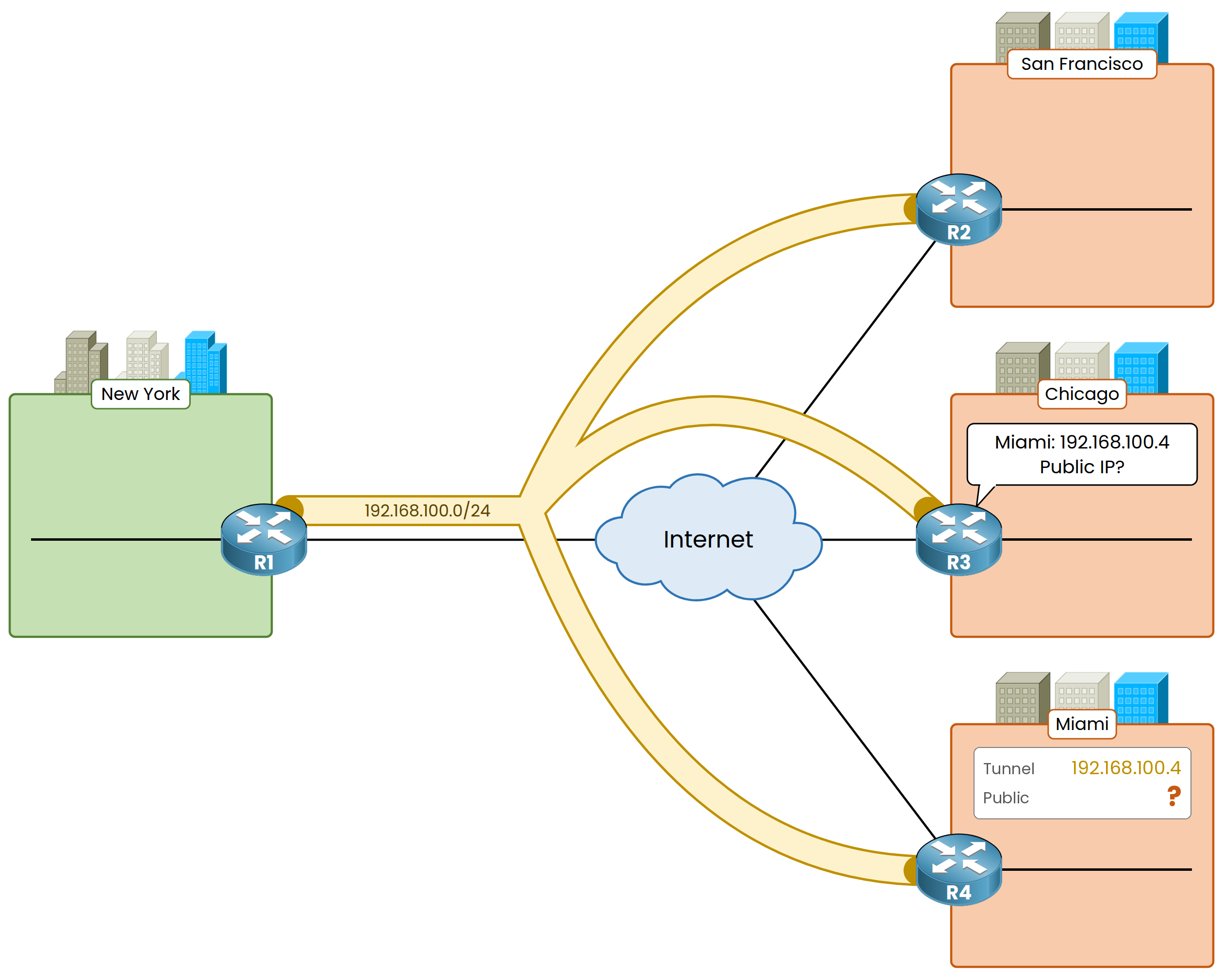
Figure 3 – The spoke does not know the public IP
R3's routing table says the Miami LAN is reachable via next hop 192.168.100.4, the tunnel IP of R4.
However, R3 has no idea what R4's public IP address (203.0.113.4) actually is.Your Challenge: Without that outer destination IP address, R3 cannot construct the transport header or deliver your packet across the Internet.
Answer the question below
Which address of R4 does R3 not know?
This is the job of Next Hop Resolution Protocol (NHRP).
It gives your DMVPN network the mapping it needs to build direct tunnels.The Address Mapping Table
NHRP maintains a central database that maps private Tunnel IP addresses to public transport IP addresses.
For example, NHRP stores the binding 192.168.100.4 → 203.0.113.4.
R3 needs this exact entry to complete its outer IP header towards Miami.The ARP Analogy
Think of NHRP as the WAN equivalent of ARP on your local network:
ARP maps a Layer 3 IP address to a Layer 2 MAC address.
NHRP maps a private Tunnel IP address to a public transport IP (NBMA) address.
Note for your Cisco CLI exams: In Cisco CLI output and official documentation, a router's public IP address in a VPN overlay is referred to as its NBMA address (Non-Broadcast Multi-Access).
Answer the question below
On a LAN, which protocol does the same job as NHRP, mapping one address to another?
Server and Client Roles
NHRP uses a client-server model to store and distribute these address mappings:
NHRP Server / Next Hop Server (NHS): Your Hub (R1) acts as the central database holder, storing all active overlay-to-underlay mappings.
NHRP Clients / Next Hop Clients (NHC): Your Spokes (R2, R3, R4) operate as clients. They register their own IP pairs with the NHS and query it when they need to reach peer spokes.
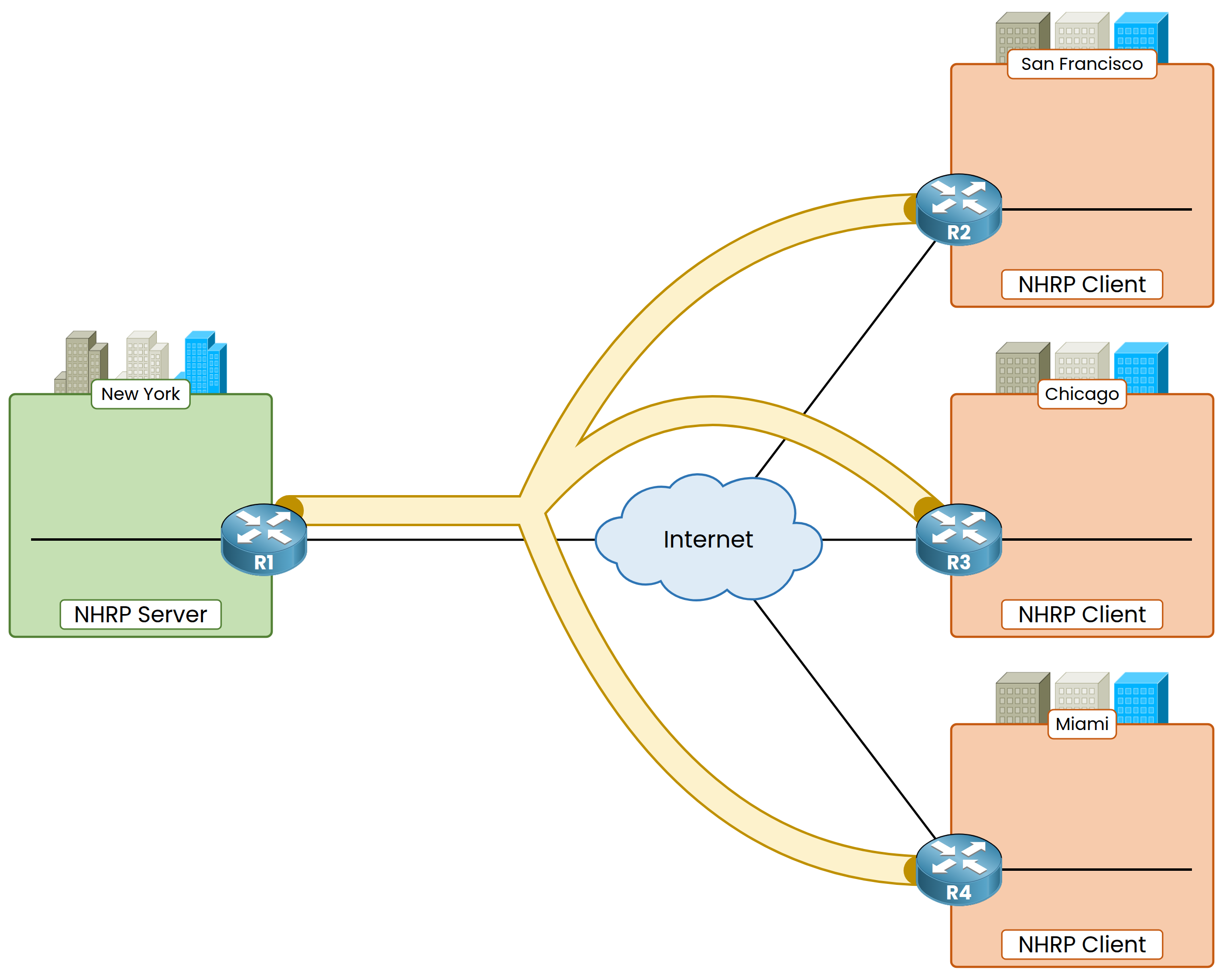
Figure 4 – Hub and spokes, server and clients
When you boot up the network, the NHRP mapping table on the central hub starts completely empty.
Answer the question below
Which router holds the NHRP table?
Here is the best part: you only need to configure the public IP address of the hub on your spokes.
NHRP dynamically discovers every other network mapping on the fly for you.How Spokes Register
When you bring up the Tunnel0 interface on R3, R3 sends an NHRP Registration Request directly to the hub.
The message registers its dual-address pair: "My Tunnel IP is 192.168.100.3, and my Public NBMA IP is 203.0.113.3."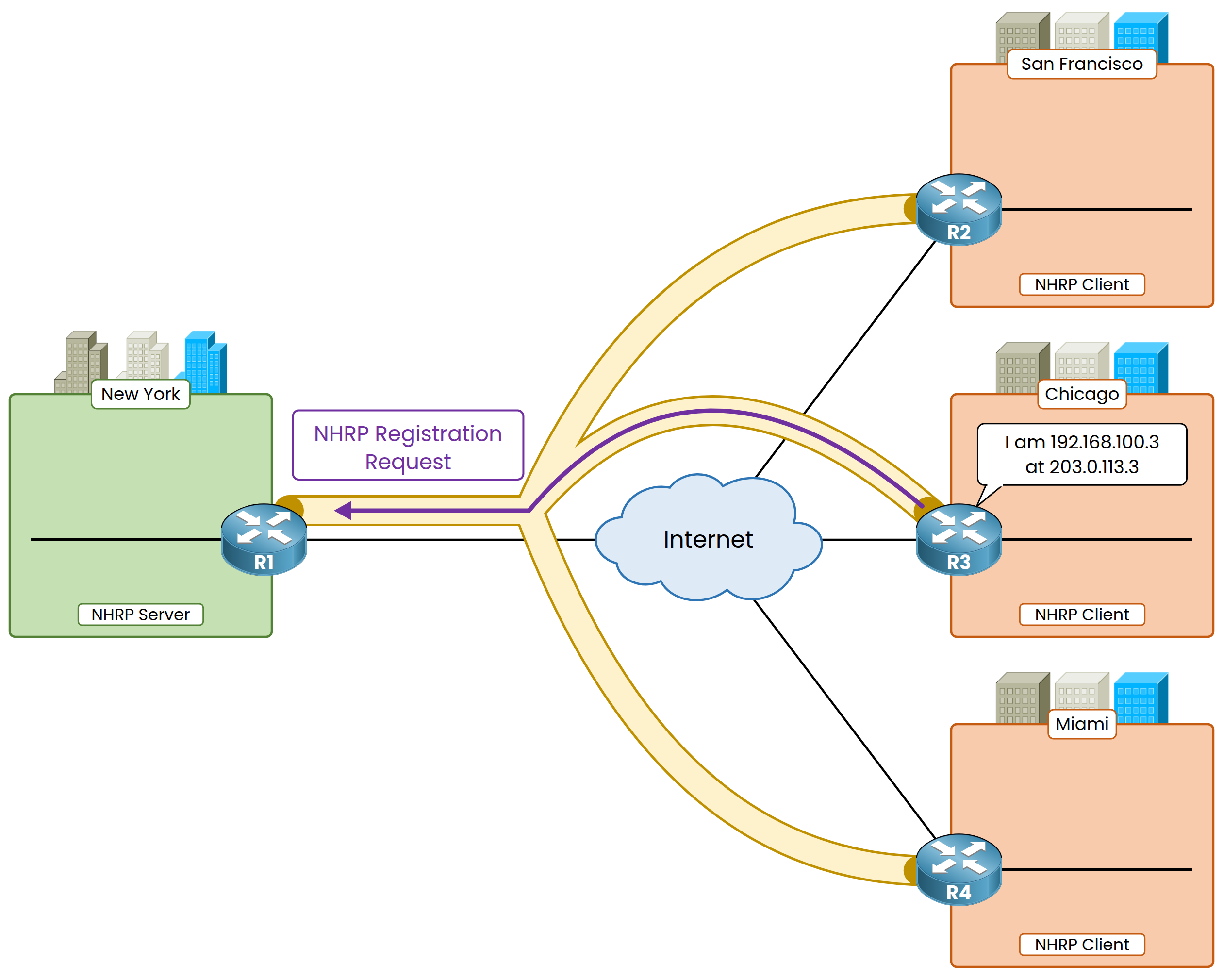
Figure 5 – Spokes register with the hub
R2 and R4 execute the exact same registration flow upon startup, reporting their own IP mappings to R1.
Answer the question below
Which address of the hub must a spoke know before it can register?
Building the Central Cache
R1 receives these registration requests and populates its local NHRP database automatically.
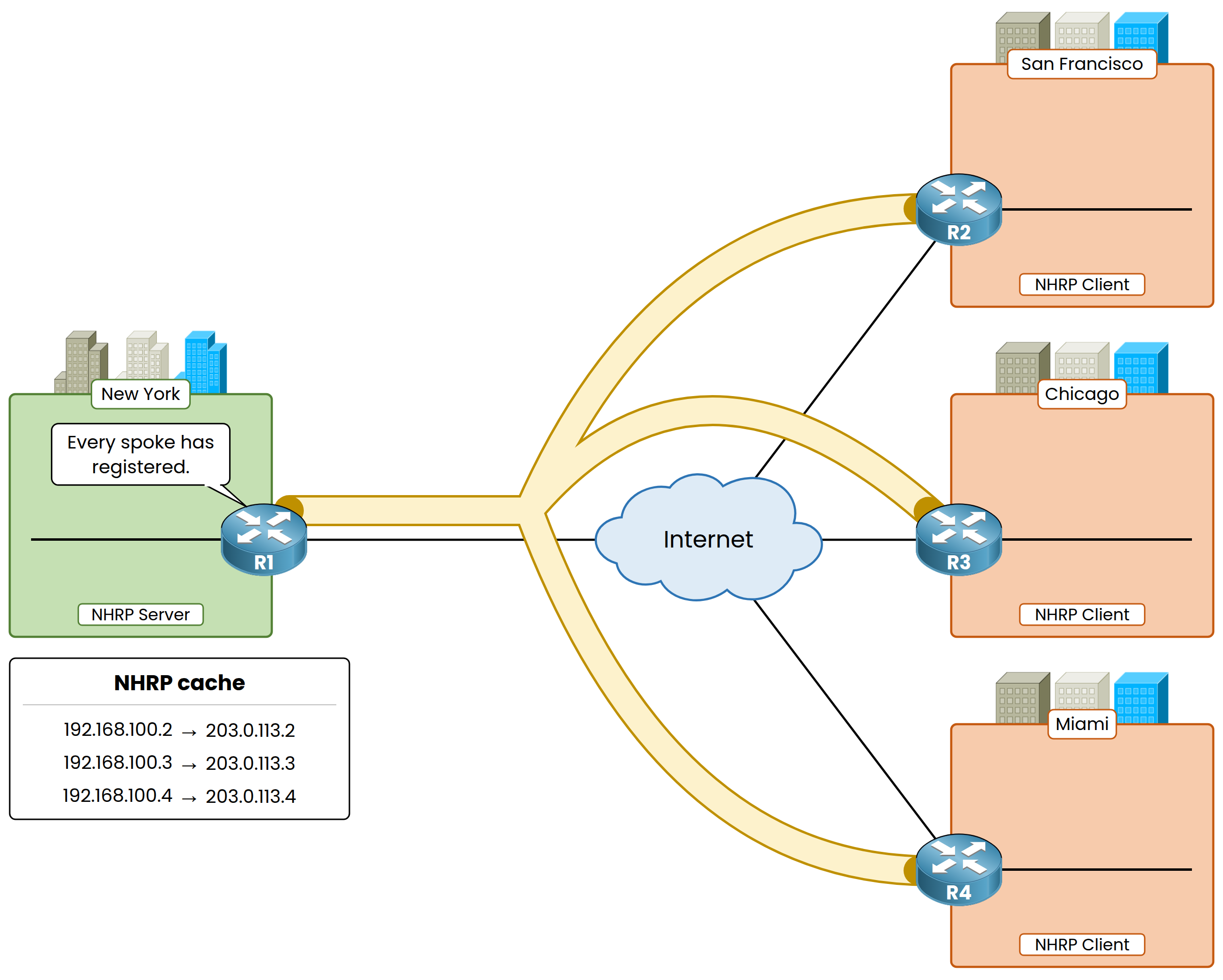
Figure 6 – The hub builds its NHRP cache
Look at what you no longer have to do on the hub:
No spoke addresses to type: You don't configure any spoke IP address on R1.
No new interfaces to add: You don't create extra tunnel interfaces or subnets on the hub.
When you open a new branch, it registers itself automatically, requiring zero configuration changes on your central hub.
Answer the question below
Which NHRP message does a spoke send to the hub when its tunnel comes up?
Once the hub's NHRP database is populated, your spokes can resolve peer addresses on demand to build direct spoke-to-spoke tunnels.
Requesting the Peer Address
When R3 has traffic destined for Miami (192.168.100.4), R3 sends an NHRP Resolution Request to the hub:
"What is the public IP address associated with Tunnel IP 192.168.100.4?"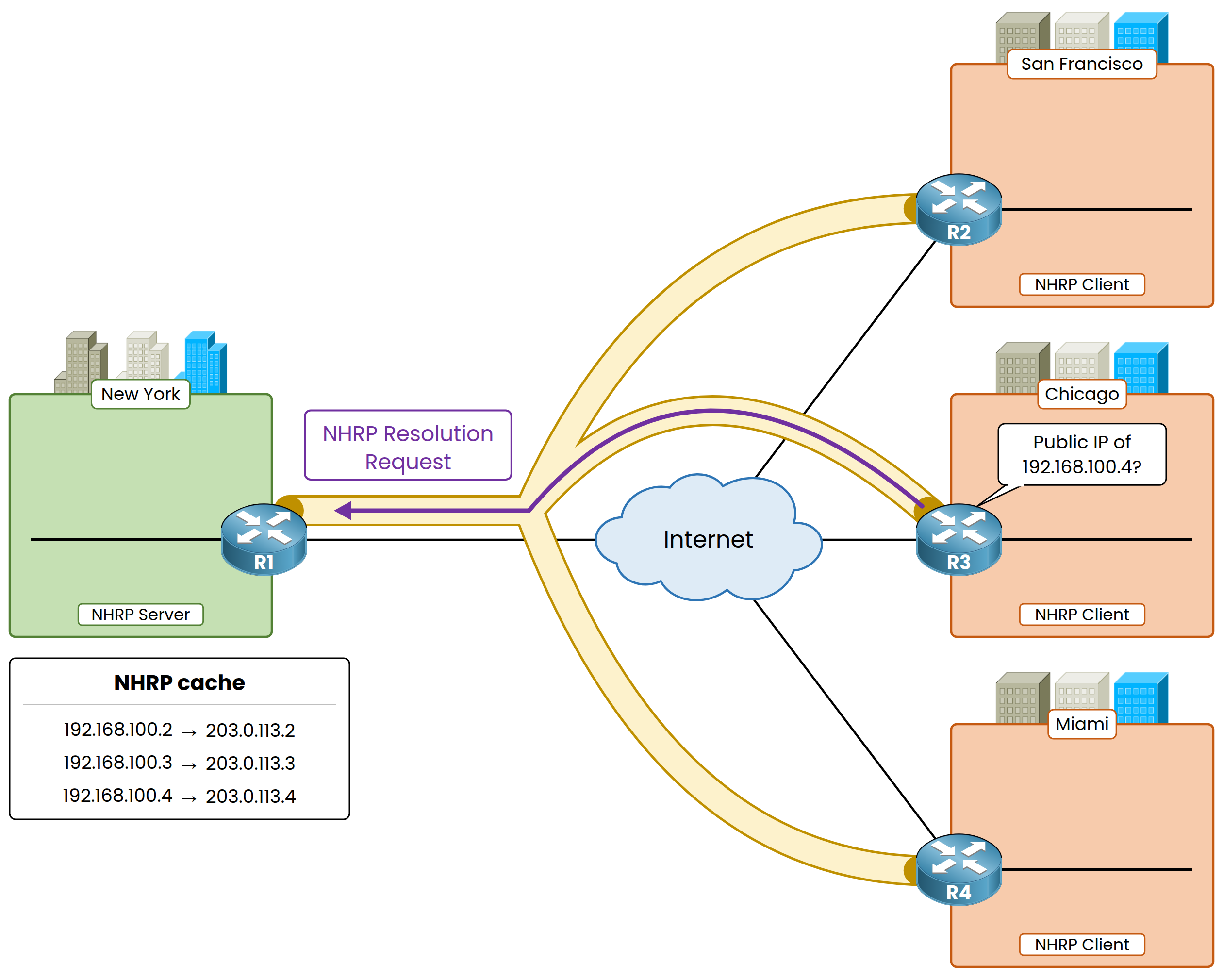
Figure 7 – The spoke asks the hub
Answer the question below
Which router does R3 ask for the public IP of Miami?
Receiving the Mapping
R1 does not answer from its cache: it forwards the request to R4, the spoke that owns 192.168.100.4. R4 then sends an NHRP Resolution Reply directly to R3, with its public IP 203.0.113.4.
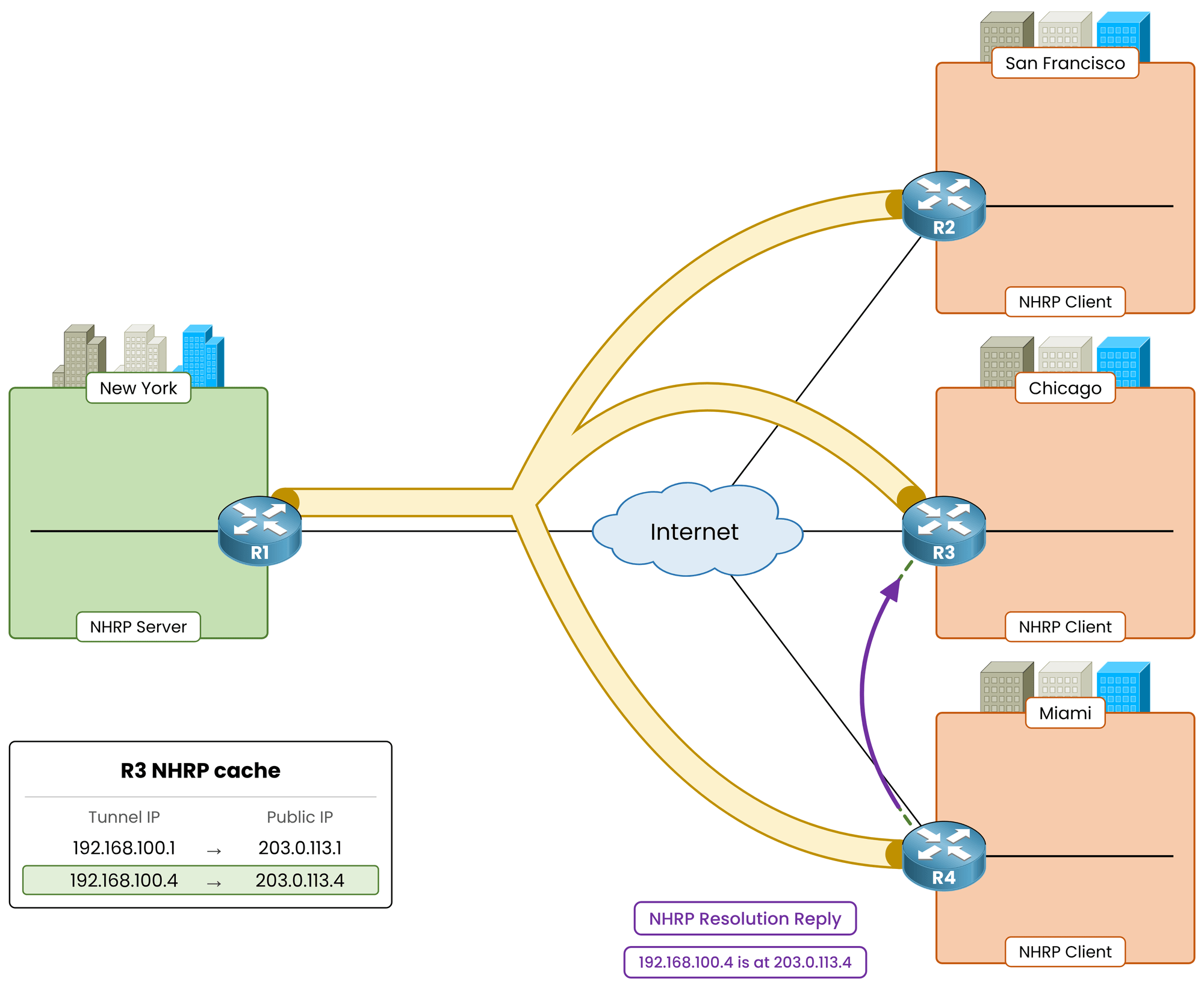
Figure 8 – Miami answers directly
R3 caches this mapping locally so it won't need to query the hub again for your next packets.
Answer the question below
Which message carries the public IP of R4 back to R3?
Establishing the Direct Tunnel
R3 completes the outer IP header using 203.0.113.4 as the destination address and forwards your packet straight to R4 across the Internet.
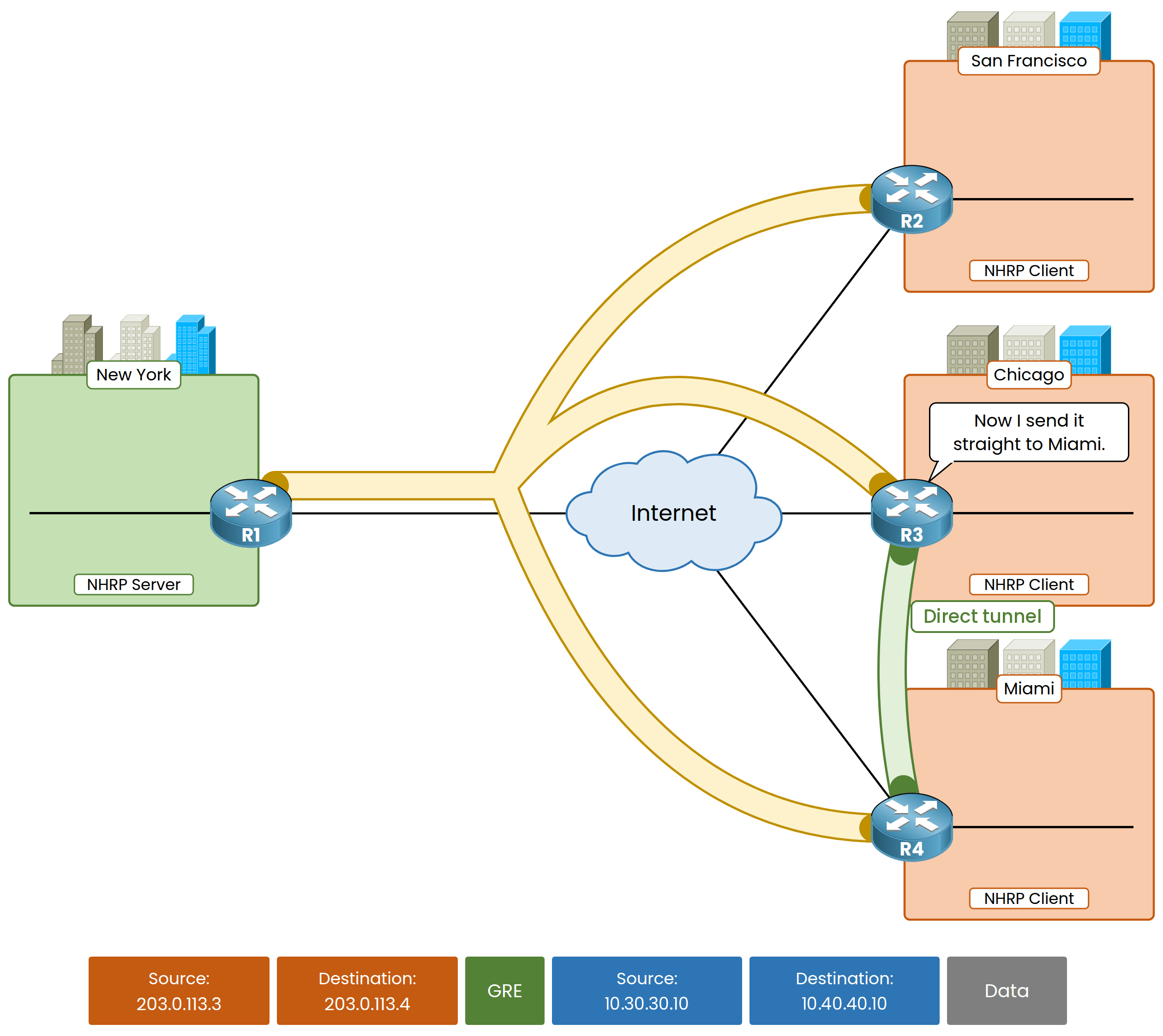
Figure 9 – The direct dynamic tunnel
Your file now travels directly between Chicago and Miami in a single hop.
The hub forwarded one resolution request, but remained completely out of the path for your actual data traffic.Answer the question below
How many times does the file cross the Internet with the direct tunnel?
Put your new skills to the test!
Assign the correct roles, construct the GRE packet, identify the NHRP messages, and capture your flag.Answer the question below
Enter the flag you got from completing the challenge.