In the NetFlow lesson, you saw the limits of classic NetFlow: it is not customizable, and you cannot choose which flow characteristics to measure.
Flexible NetFlow was created to provide more precise traffic analysis by allowing administrators to choose exactly what they want to measure.
It enables:
multiple traffic analyses to run at the same time, and
the reuse of configuration templates.
On paper, this may sound almost magical! Let’s get started.
Flow Record
The flow record defines what a flow is and which information is collected.
Basically, it is an identity card for traffic.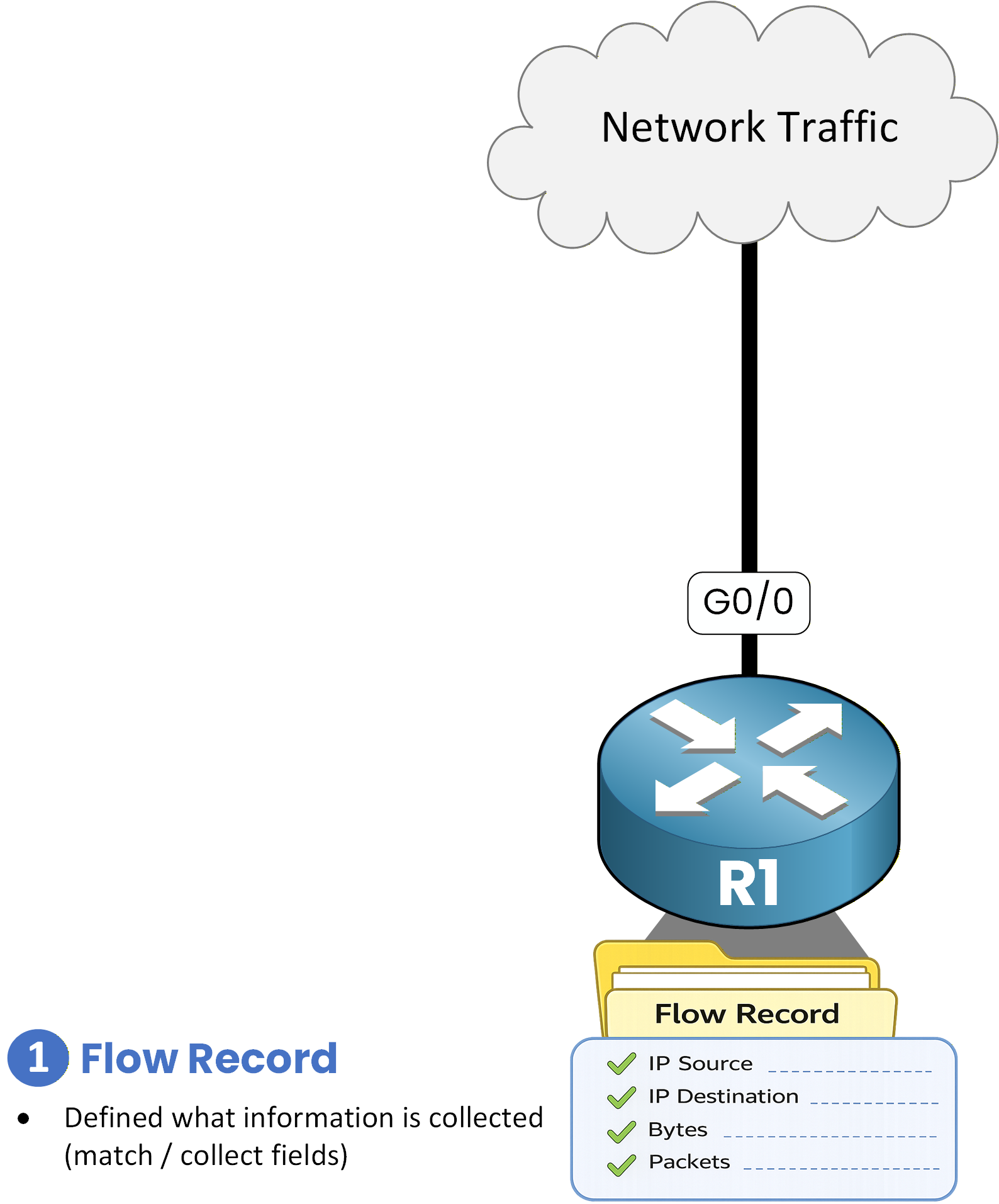
Figure 1 - Flow Record
A Flow Record is made up of two fields:
match: identifies the flow (who the flow belongs to)
collect: gathers statistics related to the flow (what is being measured)
In the example below, the flow named
RECORD1is identified by the IPv4 destination address, and the packet and byte counters are collected.R1# conf t Enter configuration commands, one per line. End with CNTL/Z. R1(config)# flow record RECORD1 R1(config-flow-record)# description IPv4_Destination_Stats R1(config-flow-record)# match ipv4 destination address R1(config-flow-record)# collect counter bytes R1(config-flow-record)# collect counter packets R1(config-flow-record)# endThis Flow Record tells the router:
“For each IPv4 destination address I see, count how many packets and how many bytes are sent.”
Flow Exporter
The Flow Exporter defines where and how NetFlow statistics are sent.
If the Flow Record tells what to measure,
the Flow Exporter tells where to send the results.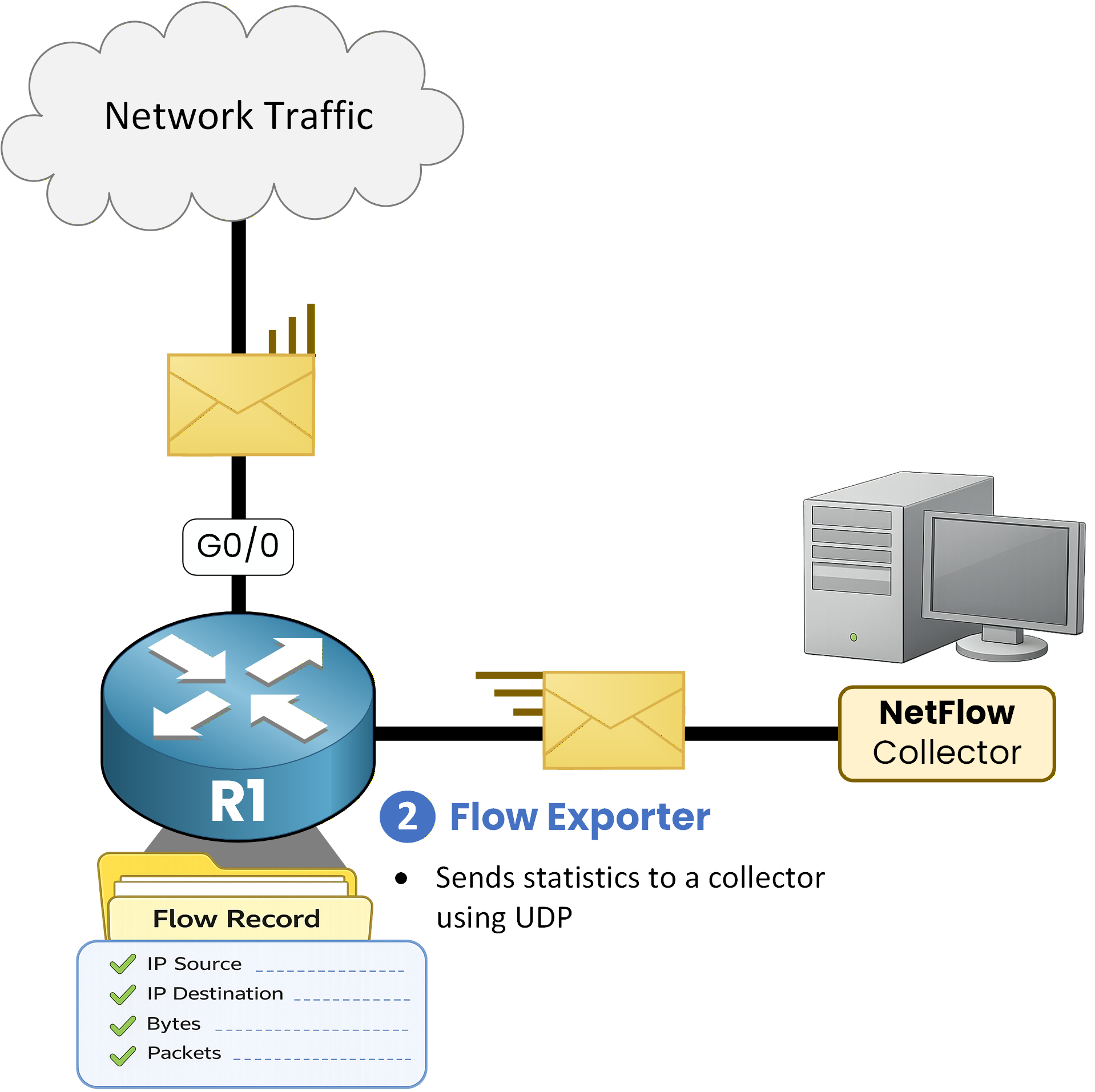
Figure 2 - Flow Exporter
In simple terms, it is the mail carrier that delivers statistics to the collector.
In the configuration of our Flow Exporter, each element defines how to reach the collector.R1# conf t Enter configuration commands, one per line. End with CNTL/Z. R1(config)# flow exporter EXPORT1 R1(config-flow-exporter)# description SEND_TO_COLLECTOR R1(config-flow-exporter)# destination 192.168.54.100 R1(config-flow-exporter)# export-protocol netflow-v9 R1(config-flow-exporter)# transport UDP 9999 R1(config-flow-exporter)# exitThis Flow Exporter tells the router:
“Send NetFlow statistics to 192.168.54.100,
using NetFlow version 9,
over UDP port 9999.”Answer the question below
Which component defines what is measured?
The Flow Monitor is the heart of Flexible NetFlow.
To summarize:
Flow Record → what to measure
Flow Exporter → where to send
Flow Monitor → links the two and stores the data
Basically, the Flow Monitor assembles everything and actually enables NetFlow.
Assembling Record and Exporter
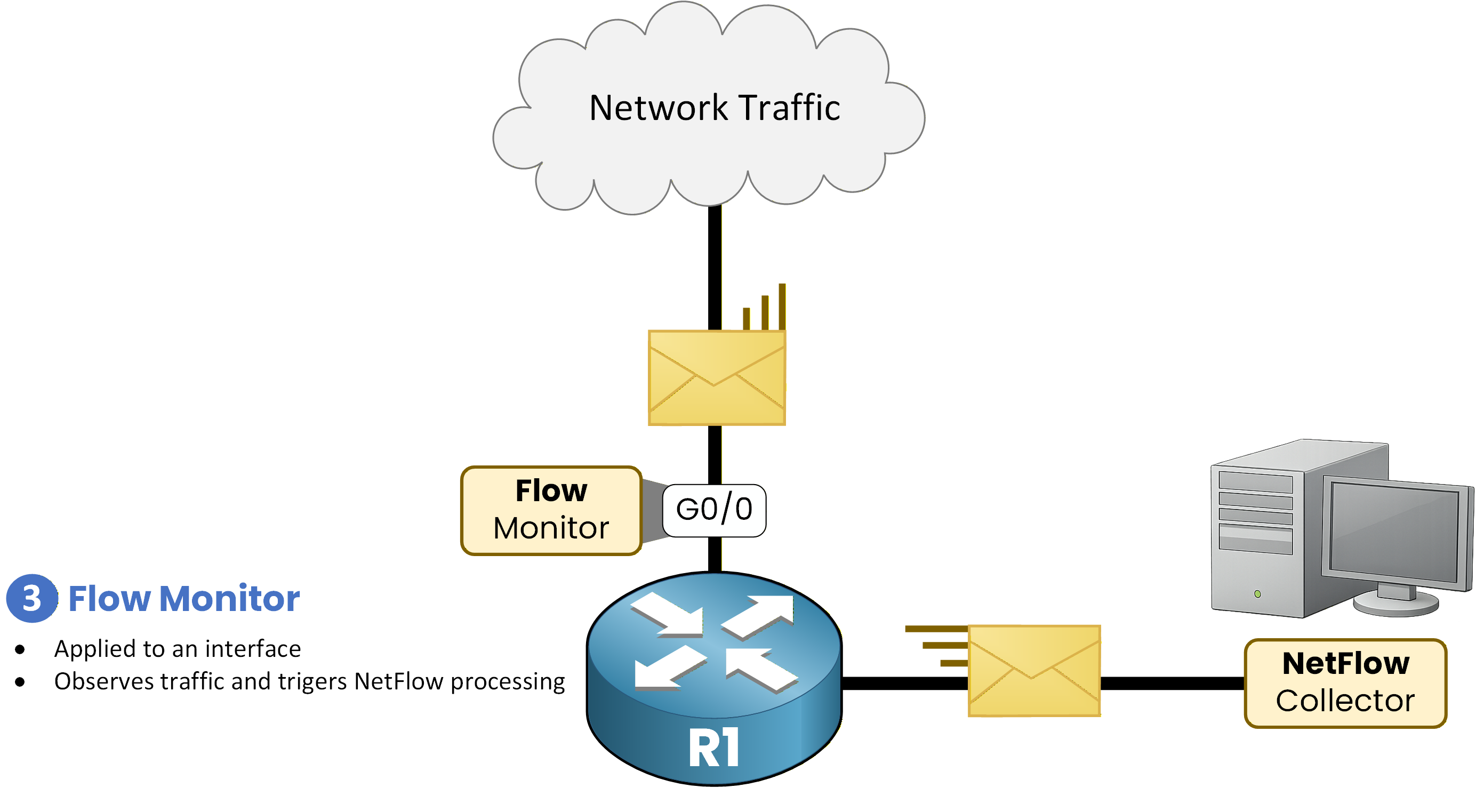
Figure 3 - Flow Monitor
The Flow Monitor acts as the brain:
It uses a Flow Record to know what to analyze
It uses a Flow Exporter to know where to send statistics
It stores flows in a cache in RAM
It decides when data should be exported
R1(config)# flow monitor MONITOR1
R1(config-flow-monitor)# description Uses Flow Record RECORD1 for IPv4
R1(config-flow-monitor)# record RECORD1
R1(config-flow-monitor)# exporter EXPORT1
R1(config-flow-monitor)# cache timeout active 60
R1(config-flow-monitor)# end
This Flow Monitor tells the router:
“Analyze traffic using Flow Record RECORD1,
store the statistics in memory,
and export long-lived flows every 60 seconds using exporter EXPORT1.”Applying the Monitor to an Interface
A Flow Monitor only works if it is applied to an interface.
R1(config-if)# interface g0/0
R1(config-if)# ip flow monitor MONITOR1 input
R1(config-if)# end
Without this command, no flows are collected.
Answer the question below
Which command applies MONITOR1 to incoming traffic on an interface?
Now that Flexible NetFlow is configured, it is essential to know how to verify that it is working properly.
In the CCNP ENCOR exam, you may be asked to:identify a Flow Record
verify a Flow Exporter
understand the role of the Flow Monitor
analyze the flow cache
Let’s review the key commands, component by component.
Flow Record
R1# show flow record RECORD1
flow record RECORD1:
 Description: IPv4_Destination_Stats
 No. of users: 0
 Total field space: 12 bytes
 Fields:
  match ipv4 destination address
  collect counter bytes
  collect counter packets
The flow is identified by the IPv4 destination address, and packet and byte counters are collected.
R1# show run flow record
Current configuration:
!
flow record RECORD1
 description IPv4_Destination_Stats
 match ipv4 destination address
 collect counter bytes
 collect counter packets
This command confirms the exact configuration of the Flow Record used by Flexible NetFlow.
Flow Exporter
R1# show run flow exporter
Current configuration:
!
flow exporter EXPORT1
 description SEND_TO_COLLECTOR
 destination 192.168.54.100
 transport udp 9999
!
This configuration indicates that:
statistics are sent to IP address 192.168.54.100
the transport protocol used is UDP
the destination port is 9999
R1# show flow exporter EXPORT1
Flow Exporter EXPORT1:
 Description: SEND_TO_COLLECTOR
 Export protocol: NetFlow Version 9
 Transport Configuration:
 Destination IP address: 192.168.54.100
 Source IP address: 192.168.54.4
 Transport Protocol: UDP
 Destination Port: 9999
 Source Port: 50192
 DSCP: 0x0
 TTL: 255
 Output Features: Not Used
This output allows you to verify:
the NetFlow version used (NetFlow v9)
the collector’s IP address
the transport protocol (UDP)
the source and destination ports
This confirms that the Flow Exporter is correctly configured to send statistics to the NetFlow collector.
Flow Monitor
R1# show flow monitor MONITOR1
Flow Monitor MONITOR1:
 Description: Uses Flow Record RECORD1 for IPv4
 Flow Record: RECORD1
 Flow Exporter: EXPORT1
 Cache:
  Type: normal
  Status: allocated
  Size: 4096 entries / 0 bytes
  Inactive Timeout: 15 secs
  Active Timeout: 60 secs
  Update Timeout: 1800 secs
  Synchronized Timeout: 600 secs
This command is used to verify:
the Flow Record in use (RECORD1)
the associated Flow Exporter (EXPORT1)
the presence and status of the Flow Monitor cache
R1# show run flow monitor MONITOR1
Current configuration:
!
flow monitor MONITOR1
 description Uses Flow Record RECORD1 for IPv4
 exporter EXPORT1
 cache timeout active 60
 record RECORD1
!
By checking the running configuration, you can clearly see the section dedicated to the Flow Monitor.
Flow Monitor Cache
The Flow Monitor cache contains the flows actually collected by Flexible NetFlow.
This is where you can verify whether traffic is being analyzed and which statistics are being measured.
R1# show flow monitor MONITOR1 cache
Cache type: Normal
Cache size: 4096
Current entries: 2
High Watermark: 2
Flows added: 2
Flows aged: 0
 - Active timeout (60 secs) 0
 - Inactive timeout (15 secs) 0
 - Event aged 0
 - Watermark aged 0
 - Emergency aged 0

IPV4 DST ADDR     Bytes   Pkts
===============  ======  =====
192.168.54.7       8420      8
192.168.54.8       1240      3
This command allows you to:
verify that flows are actually being collected
observe the total number of flows
analyze traffic statistics, including:
IPv4 destination addresses
number of bytes
number of packets
In this example, the router is measuring traffic sent to destinations 192.168.54.7 and 192.168.54.8, confirming that Flexible NetFlow is working correctly.
Answer the question below
Which command shows the Flow Record and Flow Exporter bound to MONITOR1?
Answer the question below
Which command displays the collected flows for MONITOR1?