You start from the DMVPN Phase 3 base configuration with one key change: ten minutes passed without traffic, and the shortcut expired.
Initial EIGRP State: Hub as Next-Hop
Your spokes still learn one EIGRP route per remote LAN.
Both routes point to the hub (192.168.100.1) becausenext-hop-selfis back onTunnel0.The NHRP shortcut you built in the previous lesson lived 600 seconds without traffic, then disappeared.
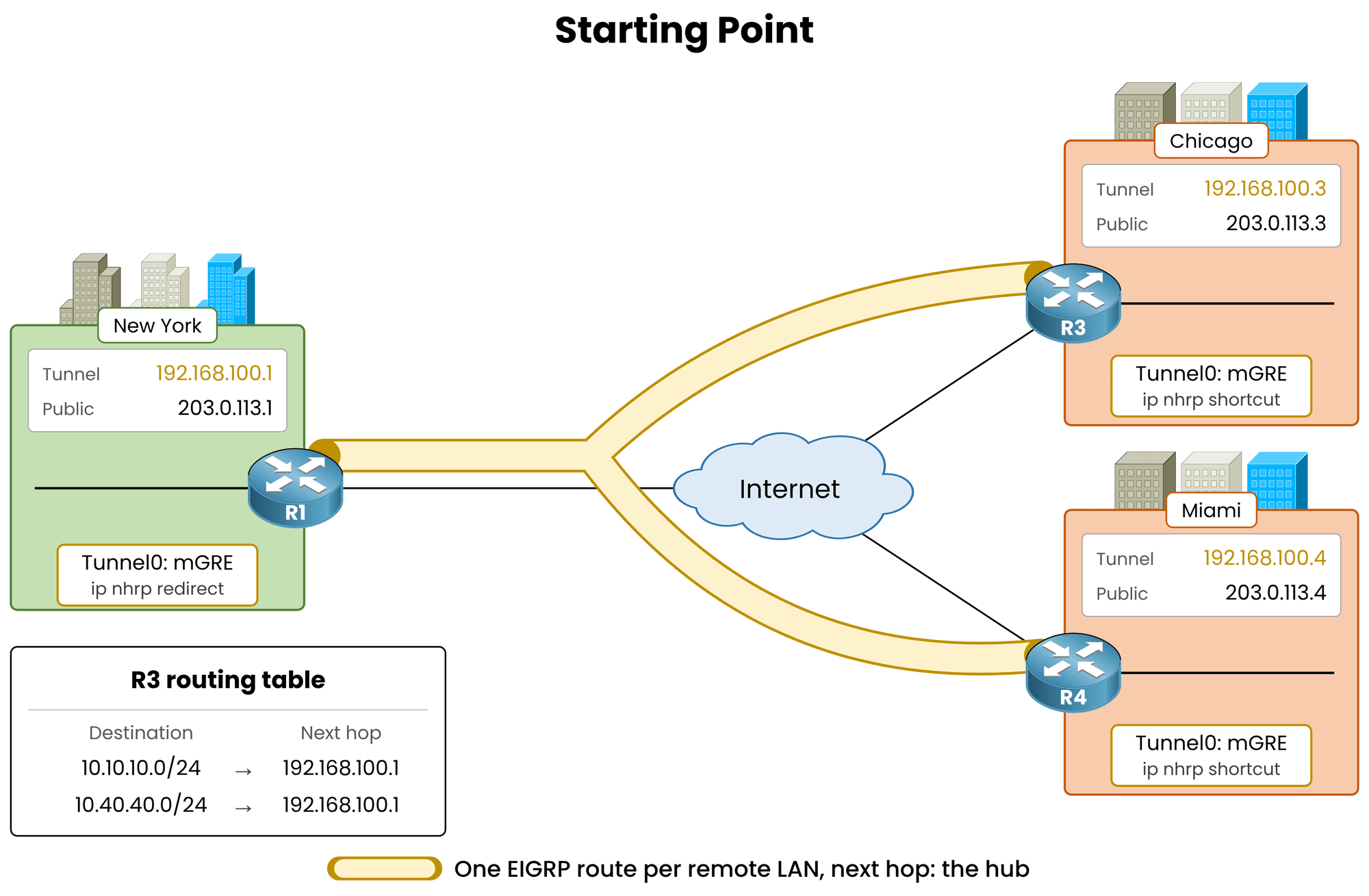
Figure 1 – Shortcut expired: R3 holds one EIGRP route per remote LAN, both via the hub
Check the routing table on Chicago (R3):
R3# show ip route eigrp
! Output omitted for brevity

Gateway of last resort is not set

      10.0.0.0/8 is variably subnetted, 4 subnets, 2 masks
D        10.10.10.0/24 [90/26880256] via 192.168.100.1, 00:12:40, Tunnel0
D        10.40.40.0/24 [90/28160256] via 192.168.100.1, 00:12:40, Tunnel0
Notice the current state:
Two remote LAN routes with
DcodesBoth routes point to
192.168.100.1No
%mark anywhere: the override vanished when the shortcut expired
This is the exact Phase 2 routing state with the hub back in the data path.
Answer the question below
Click on Complete to continue
The Problem Phase 2 Could Not Solve
In Phase 2, summarization breaks spoke-to-spoke tunnels.
Spokes require specific LAN prefixes to resolve remote next hops: a default route hides them behind the hub.
Phase 3 removes this restriction completely.
The real next hop is discovered on demand by NHRP, not by EIGRP.Verify the hub configuration before making any changes:
R1# show running-config interface tunnel0
Building configuration...

Current configuration : 297 bytes
!
interface Tunnel0
 ip address 192.168.100.1 255.255.255.0
 ip mtu 1400
 no ip split-horizon eigrp 100
 ip nhrp authentication DMVPN
 ip nhrp map multicast dynamic
 ip nhrp network-id 100
 ip nhrp redirect
 ip tcp adjust-mss 1360
 tunnel source GigabitEthernet0/0
 tunnel mode gre multipoint
end
Split horizon is disabled,
ip nhrp redirectis enabled, and no summary address is configured yet.Answer the question below
In the R3 routing table, what is the EIGRP metric of 10.40.40.0/24?
Answer the question below
Which NHRP network-id is configured on the hub Tunnel0?
Answer the question below
Which Tunnel0 command on the hub triggers the shortcuts?
Configure the same summary command on the hub as in Phase 1.
In Phase 3, spokes process this default summary differently.Add the Default Summary
On the hub (R1), summarize all routes to
0.0.0.0/0onTunnel0:R1# conf t R1(config)# interface tunnel0 R1(config-if)# ip summary-address eigrp 100 0.0.0.0 0.0.0.0 %DUAL-5-NBRCHANGE: EIGRP-IPv4 100: Neighbor 192.168.100.3 (Tunnel0) is resync: summary configured %DUAL-5-NBRCHANGE: EIGRP-IPv4 100: Neighbor 192.168.100.4 (Tunnel0) is resync: summary configured R1(config-if)# endBoth spoke neighbors resync immediately.
The hub suppresses specific LAN prefixes and advertises a single summary route out of Tunnel0.
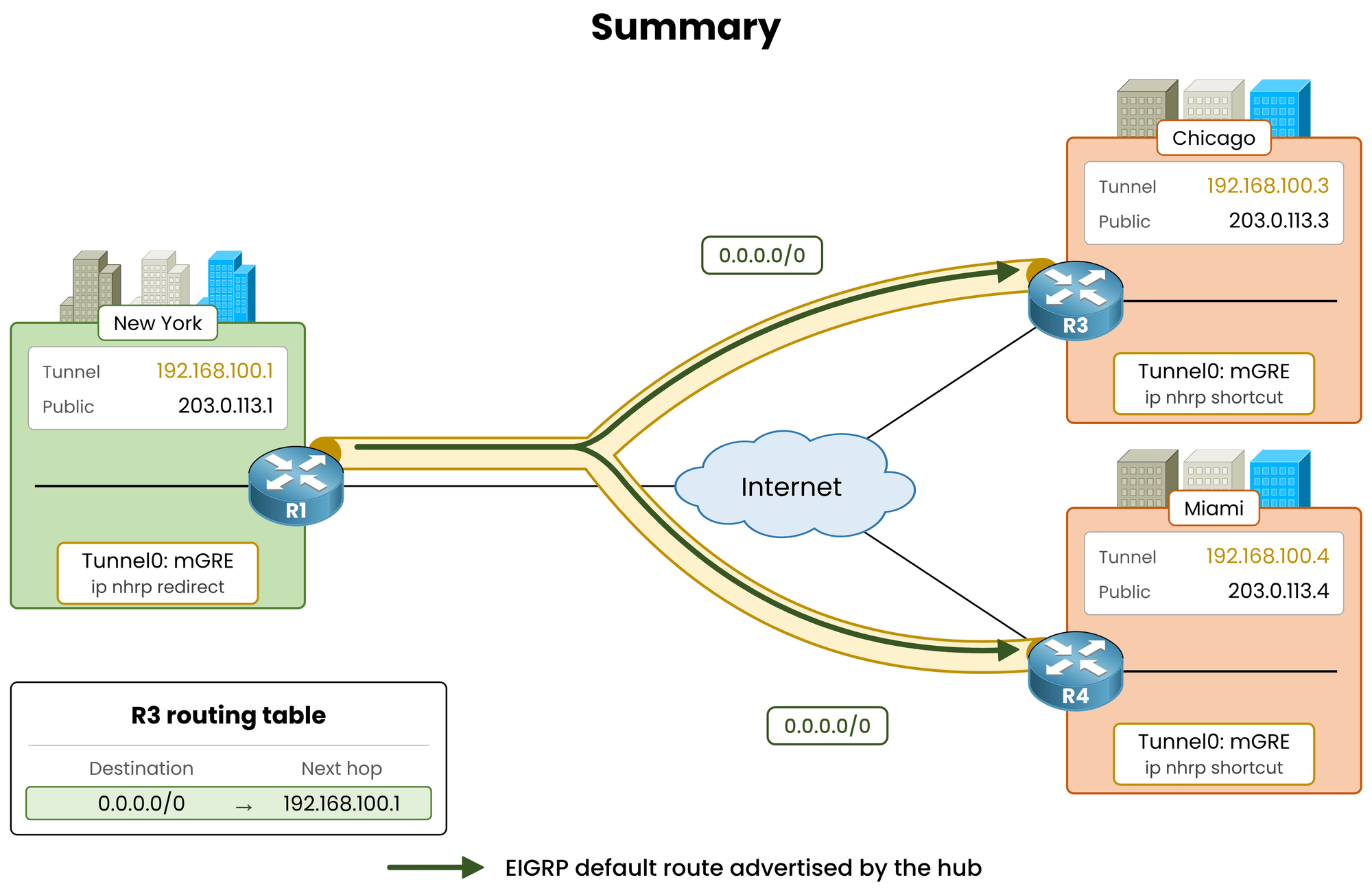
Figure 2 – The hub advertises a single default route to both spokes
The Miami LAN (
10.40.40.0/24) is no longer announced to Chicago.
Chicago holds no explicit route for Miami, only the default route pointing to the hub.Answer the question below
Which prefix does the hub now advertise to the spokes?
Verify Spoke Routing and NHRP Cache
Check the routing table and NHRP cache on Chicago (R3):
R3# show ip route eigrp
! Output omitted for brevity

Gateway of last resort is 192.168.100.1 to network 0.0.0.0

D*    0.0.0.0/0 [90/26880256] via 192.168.100.1, 00:00:18, Tunnel0

R3# show ip nhrp
192.168.100.1/32 via 192.168.100.1
   Tunnel0 created 00:21:04, never expire
   Type: static, Flags: used
   NBMA address: 203.0.113.1
Observe the spoke state:
One single EIGRP candidate default route (
D*) via192.168.100.1NHRP cache contains only the static mapping for the hub
No dynamic shortcuts or specific LAN routes exist yet
Answer the question below
In the EIGRP syslog after the summary, which word describes the neighbor event: down or resync?
Answer the question below
What is the NBMA address of the static NHRP entry on R3?
Holding only a default route, Chicago forwards the initial packet to the hub, triggering shortcut resolution.
First Packet Through the Hub
Send traffic from Chicago (R3) to Miami (R4), then check the NHRP counters on the hub:
R3# traceroute 10.40.40.1 source 10.30.30.1
Type escape sequence to abort.
Tracing the route to 10.40.40.1
VRF info: (vrf in name/id, vrf out name/id)
  1 192.168.100.1 52 msec 52 msec 52 msec
  2 192.168.100.4 104 msec *  78 msec

R1# show ip nhrp traffic
Tunnel0: Max-send limit:10000Pkts/10Sec, Usage:0%
   Sent: Total 15
         4 Resolution Request  0 Resolution Reply  0 Registration Request
         8 Registration Reply  0 Purge Request  0 Purge Reply
         0 Error Indication  3 Traffic Indication  0 Redirect Suppress
   Rcvd: Total 12
         4 Resolution Request  0 Resolution Reply  8 Registration Request
         0 Registration Reply  0 Purge Request  0 Purge Reply
         0 Error Indication  0 Traffic Indication  0 Redirect Suppress
Notice the packet flow:
The first packet follows the default route through the hub (
192.168.100.1)R1 increments its
Traffic Indicationcounter and issues an NHRP Redirect back to ChicagoChicago sends an NHRP Resolution Request, and Miami replies with its LAN prefix
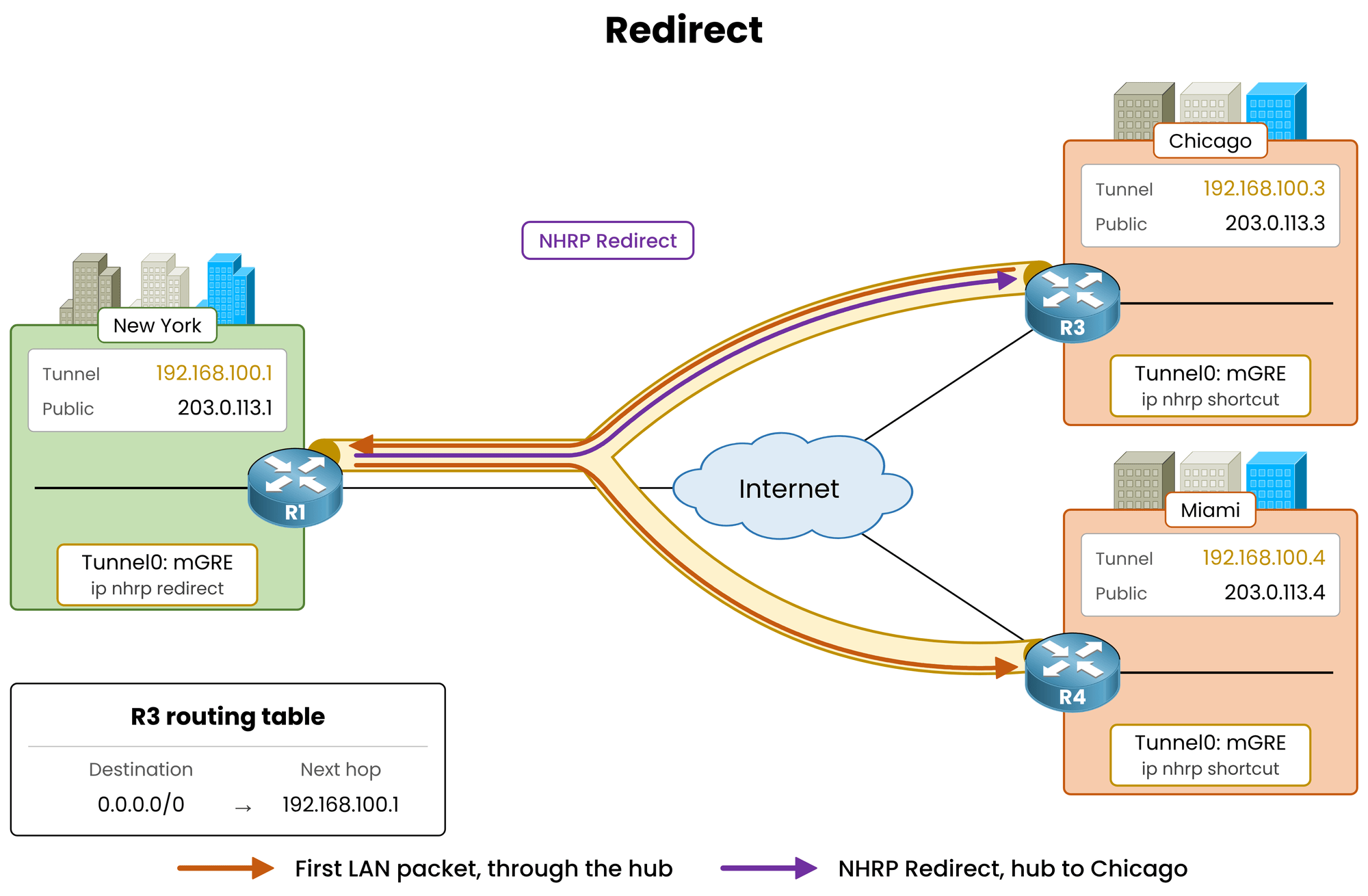
Figure 3 – The first packet follows the default route and triggers an NHRP redirect
Answer the question below
How many Traffic Indications has the hub sent in total?
NHRP Installs a Route
In Phase 3, NHRP does not merely override an existing EIGRP next hop.
It installs a brand-new route directly into the routing table.Check the NHRP-installed routes on Chicago (R3):
R3# show ip route nhrp
! Output omitted for brevity

Gateway of last resort is 192.168.100.1 to network 0.0.0.0

      10.0.0.0/8 is variably subnetted, 3 subnets, 2 masks
H        10.40.40.0/24 [250/255] via 192.168.100.4, 00:00:09, Tunnel0
      192.168.100.0/24 is variably subnetted, 3 subnets, 2 masks
H        192.168.100.4/32 is directly connected, 00:00:09, Tunnel0
Key observations:
Code
Hstands for NHRP-installed routeAdministrative Distance is set to 250
As a more specific prefix than
0.0.0.0/0, Longest Prefix Match selects theHroute for all subsequent traffic.
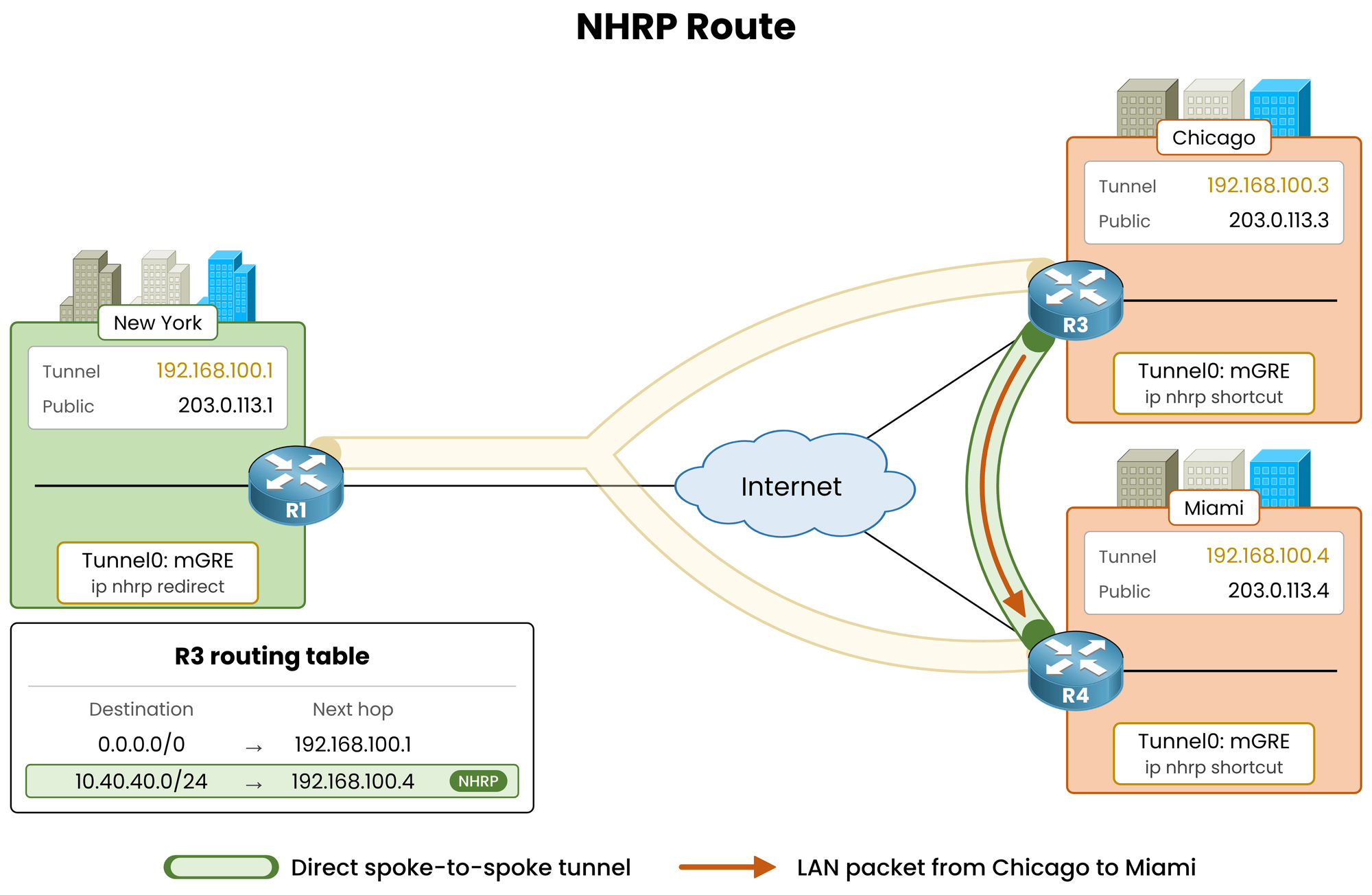
Figure 4 – NHRP installs an H route for 10.40.40.0/24 next to the default route
Answer the question below
Which route code marks a route installed by NHRP?
Next Packets Go Direct
Trace the path again from Chicago:
R3# traceroute 10.40.40.1 source 10.30.30.1
Type escape sequence to abort.
Tracing the route to 10.40.40.1
VRF info: (vrf in name/id, vrf out name/id)
  1 192.168.100.4 52 msec *  52 msec
Traffic now flows directly spoke-to-spoke in a single hop, bypassing the hub entirely.
Answer the question below
What administrative distance does the H route to 10.40.40.0/24 have?
Answer the question below
How many hops does the second traceroute show?
Override vs Installed Route
In Basic Configuration, a specific EIGRP route already existed.
NHRP merely modified its next hop, marked the route with
%inshow ip route, and displayedDT2(nexthop-override) inshow dmvpn.In Phase 3 with summarization, no specific EIGRP route exists. NHRP installs its own route directly into the routing table.
Check how
show dmvpnreports the tunnel status on Chicago (R3):R3# show dmvpn Legend: Attrb --> S - Static, D - Dynamic, I - Incomplete N - NATed, L - Local, X - No Socket T1 - Route Installed, T2 - Nexthop-override C - CTS Capable, I2 - Temporary # Ent --> Number of NHRP entries with same NBMA peer NHS Status: E --> Expecting Replies, R --> Responding, W --> Waiting UpDn Time --> Up or Down Time for a Tunnel ========================================================================== Interface: Tunnel0, IPv4 NHRP Details Type:Spoke, NHRP Peers:2, # Ent Peer NBMA Addr Peer Tunnel Add State UpDn Tm Attrb ----- --------------- --------------- ----- -------- ----- 2 203.0.113.4 192.168.100.4 UP 00:00:41 DT1 203.0.113.4 192.168.100.4 UP 00:00:41 DT1 1 203.0.113.1 192.168.100.1 UP 00:22:10 SKey attribute distinctions:
DT1indicates Route Installed (NHRP owns the route)DT2indicates Nexthop-override (NHRP modified an existing EIGRP route)
Answer the question below
How many NHRP entries does show dmvpn count for the peer 203.0.113.4?
NHRP Cache Flags
The NHRP cache details the active RIB integration:
R3# show ip nhrp
10.30.30.0/24 via 192.168.100.3
   Tunnel0 created 00:00:51, expire 00:09:09
   Type: dynamic, Flags: router unique local
   NBMA address: 203.0.113.3
    (no-socket)
10.40.40.0/24 via 192.168.100.4
   Tunnel0 created 00:00:53, expire 00:09:07
   Type: dynamic, Flags: router used rib
   NBMA address: 203.0.113.4
192.168.100.1/32 via 192.168.100.1
   Tunnel0 created 00:22:22, never expire
   Type: static, Flags: used
   NBMA address: 203.0.113.1
192.168.100.4/32 via 192.168.100.4
   Tunnel0 created 00:00:53, expire 00:09:07
   Type: dynamic, Flags: router nhop rib
   NBMA address: 203.0.113.4
The
ribflag confirms NHRP injected this prefix into the routing table.Active traffic resets the 600-second expiration timer.
Answer the question below
Which show ip nhrp flag tells you NHRP installed a route in the routing table?
When the Shortcut Expires
If traffic between Chicago and Miami stops for 10 minutes, the NHRP cache entry expires and the
Hroute is removed from the routing table.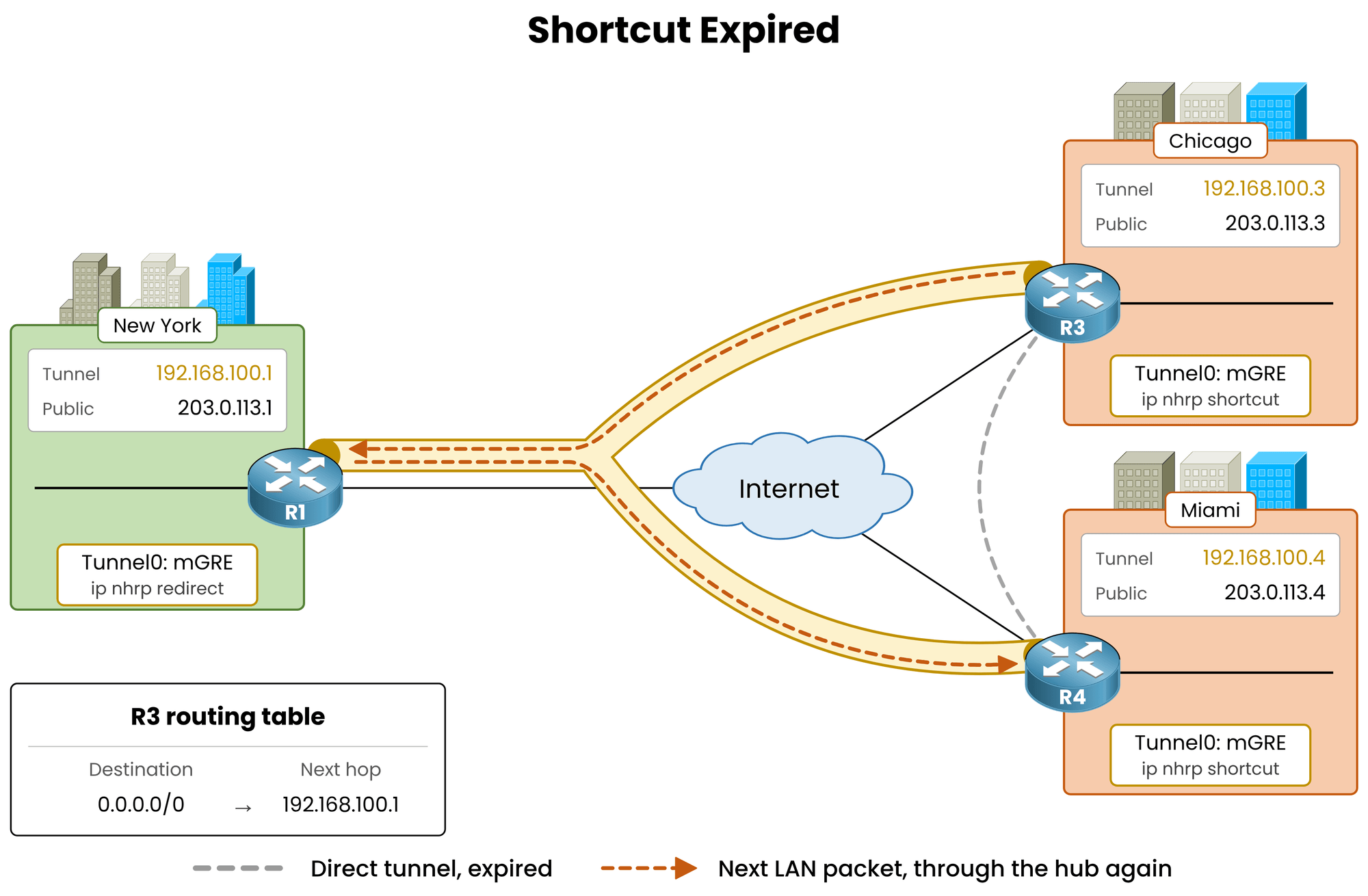
Figure 5 – After 600 seconds without traffic, the H route disappears and the default route takes over
Verify the routing table on Chicago after the timer expires:
R3# show ip route nhrp
! Output omitted for brevity

Gateway of last resort is 192.168.100.1 to network 0.0.0.0

R3# show ip route eigrp
! Output omitted for brevity

Gateway of last resort is 192.168.100.1 to network 0.0.0.0

D*    0.0.0.0/0 [90/26880256] via 192.168.100.1, 00:11:35, Tunnel0
The default route remains active continuously.
When new traffic arrives, packets flow to the hub, trigger an NHRP Redirect, and dynamically rebuild the shortcut route.
Answer the question below
Which show dmvpn attribute marks a Route Installed entry?
Answer the question below
In the NHRP cache output, how much time remains before the 10.40.40.0/24 entry expires?
Answer the question below
What is the default lifetime of the NHRP route, in seconds?
Architectural trade-offs across all three phases in a 300-site enterprise network:
Routes per Spoke Comparison
Compare the routing table scale and traffic paths across all three phases:
Phase
EIGRP Routes per Spoke
Spoke-to-Spoke Traffic
Phase 1
1 (default route)
Through the hub
Phase 2
299 (one per remote LAN)
Direct
Phase 3
1 (default route) + active NHRP routes
Direct
Table 1 – Routes held by one spoke in a 300-site DMVPN
Phase 3 combines the minimal routing table size of Phase 1 with the direct data path performance of Phase 2.
NHRP routes exist only for active traffic flows and automatically clean themselves up after 10 minutes of inactivity.
A spoke communicating with five remote sites maintains six routes total instead of 299.Answer the question below
In a 300-site DMVPN, how many EIGRP routes does a Phase 2 spoke hold?
Key Takeaway
Summarize on the hub with
ip summary-address eigrp <as> 0.0.0.0 0.0.0.0onTunnel0and let NHRP dynamically install spoke-to-spoke shortcut routes on demand.
On branch sites with Direct Internet Access (DIA), summarize corporate ranges (e.g.,
10.0.0.0/8) instead of0.0.0.0/0to keep local internet traffic off the hub.
EIGRP made this simple because a summary is one interface command.
In the next lesson, DMVPN Phase 3 OSPF Routing, you get the same result with a link-state protocol, where summarization follows different rules.
Answer the question below
For a 300-site DMVPN, how many EIGRP routes does each Phase 3 spoke need?