You know how the three DMVPN phases work. It is time to build your first one!
In this lesson, you configure Phase 1 across New York, Chicago, and Miami, and watch both spokes register with the hub.Lab Topology and Addressing
New York (R1) is the hub, Chicago (R3) and Miami (R4) are the spokes:
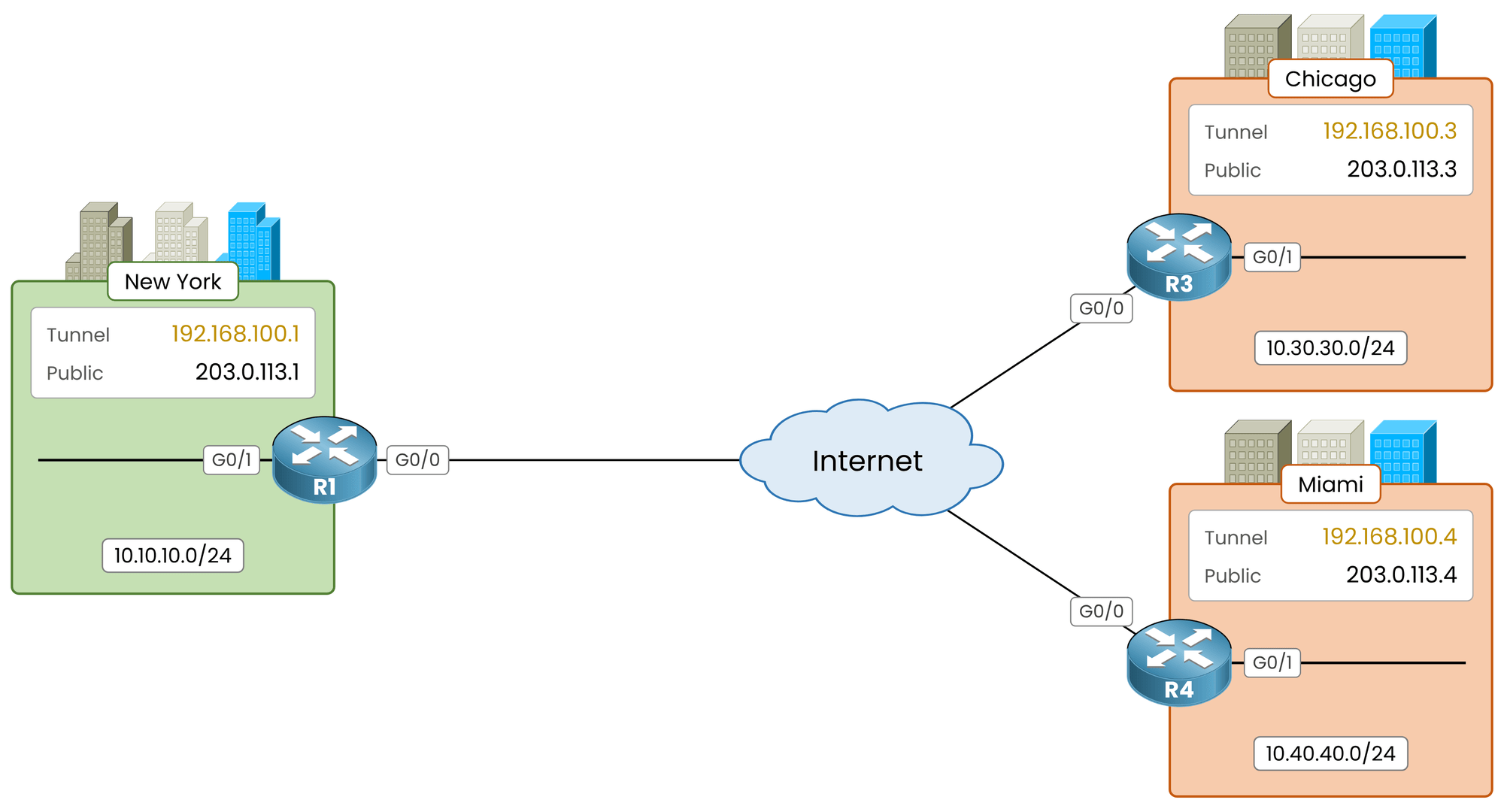
Figure 1 – The lab topology
Every router uses three addresses:
Public IP: on
G0/0, facing the Internet.Tunnel IP: on
Tunnel0, in192.168.100.0/24.LAN: on
G0/1, behind each site.
Router
Public IP (NBMA)
Tunnel IP
LAN
R1, New York
203.0.113.1
192.168.100.1
10.10.10.0/24
R3, Chicago
203.0.113.3
192.168.100.3
10.30.30.0/24
R4, Miami
203.0.113.4
192.168.100.4
10.40.40.0/24
Table 1 – Addresses used in this lesson
Public addresses carry the packets, tunnel addresses carry the routing: DMVPN builds its network on top of the Internet, independent of the carrier.
Answer the question below
Click on Complete to continue
Testing Underlay Connectivity
Nothing works on top of a broken underlay.
From Chicago, ping the public IP of the hub:R3# ping 203.0.113.1 Type escape sequence to abort. Sending 5, 100-byte ICMP Echos to 203.0.113.1, timeout is 2 seconds: .!!!! Success rate is 80 percent (4/5), round-trip min/avg/max = 10/11/13 msR3 reaches R1 across the Internet: the first echo is lost while R3 resolves the MAC address of the hub, the next four answer. If every echo fails, no tunnel will ever come up.
Answer the question below
Which address of the hub must every spoke reach across the Internet?
The hub needs a single
Tunnel0shared by every spoke.Tunnel0 Configuration on R1
Build the tunnel interface:
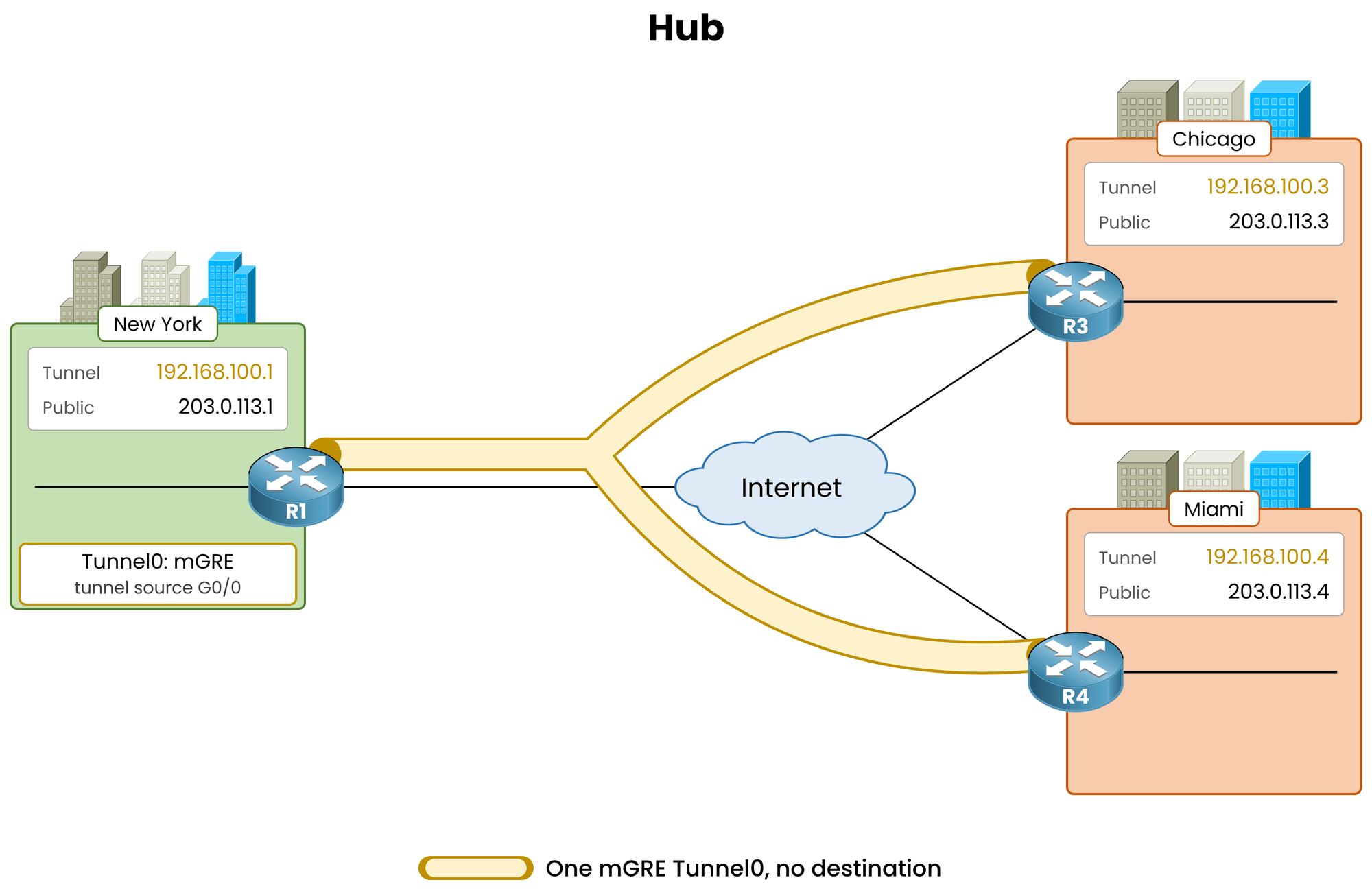
Figure 2 – One mGRE Tunnel0 on the hub
R1# conf t
R1(config)# interface tunnel0
R1(config-if)# ip address 192.168.100.1 255.255.255.0
R1(config-if)# tunnel source gigabitethernet0/0
R1(config-if)# tunnel mode gre multipoint
R1(config-if)# end
Three lines:
ip address 192.168.100.1 255.255.255.0is the tunnel IP, the address the spokes route to.tunnel source gigabitethernet0/0is the public side.tunnel mode gre multipointturns the tunnel into mGRE. The default is point-to-point GRE.
No
tunnel destination. One interface on the hub serves any number of spokes.Answer the question below
Which tunnel command from a standard GRE tunnel is missing on the hub: tunnel ___________
Verify the mGRE Tunnel
Before adding NHRP, look at the interface:
R1# show interfaces tunnel0

Tunnel0 is up, line protocol is up
  Hardware is Tunnel
  Internet address is 192.168.100.1/24
  MTU 17916 bytes, BW 100 Kbit/sec, DLY 50000 usec,
     reliability 255/255, txload 1/255, rxload 1/255
  Encapsulation TUNNEL, loopback not set
  Keepalive not set
  Tunnel linestate evaluation up
  Tunnel source 203.0.113.1 (GigabitEthernet0/0)
  Tunnel Subblocks:
     src-track:
        Tunnel0 source tracking subblock associated with GigabitEthernet0/0
         Set of tunnels with source GigabitEthernet0/0, 1 member (includes iterators), on interface <OK>
  Tunnel protocol/transport multi-GRE/IP
    Key disabled, sequencing disabled
    Checksumming of packets disabled
  Tunnel TTL 255, Fast tunneling enabled
  Tunnel transport MTU 1476 bytes
  Tunnel transmit bandwidth 8000 (kbps)
  Tunnel receive bandwidth 8000 (kbps)
  Last input never, output never, output hang never
  Last clearing of "show interface" counters 00:00:41
  Input queue: 0/75/0/0 (size/max/drops/flushes); Total output drops: 0
  Queueing strategy: fifo
  Output queue: 0/0 (size/max)
  5 minute input rate 0 bits/sec, 0 packets/sec
  5 minute output rate 0 bits/sec, 0 packets/sec
     0 packets input, 0 bytes, 0 no buffer
     Received 0 broadcasts (0 IP multicasts)
     0 runts, 0 giants, 0 throttles
     0 input errors, 0 CRC, 0 frame, 0 overrun, 0 ignored, 0 abort
     0 packets output, 0 bytes, 0 underruns
     0 output errors, 0 collisions, 0 interface resets
     0 unknown protocol drops
     0 output buffer failures, 0 output buffers swapped out
In the output:
Tunnel source 203.0.113.1, with no destination after it.Tunnel protocol/transport multi-GRE/IP, multipoint mode is active.
Answer the question below
How many Tunnel interfaces does the hub need to serve its two spokes?
The tunnel is up, but it is only a tunnel. NHRP turns R1 into the Next Hop Server the spokes register with.
NHRP Configuration on R1
Go back to
Tunnel0on R1:R1# conf t R1(config)# interface tunnel0 R1(config-if)# ip nhrp authentication DMVPN R1(config-if)# ip nhrp network-id 100 R1(config-if)# ip nhrp map multicast dynamicThree lines, three jobs:
ip nhrp authentication DMVPNputs a shared key in every NHRP packet. A spoke with the wrong key never registers.ip nhrp network-id 100enables NHRP on the interface. The ID is locally significant, but keep it identical on every router, it keeps troubleshooting readable.ip nhrp map multicast dynamiclets the hub send multicast to every registered spoke. EIGRP hellos need it.
Answer the question below
Which command lets the hub forward multicast to every registered spoke?
MTU and MSS Configuration
GRE adds 24 bytes to every packet. A 1500-byte packet from the LAN no longer fits once encapsulated.
Two lines fix that on every DMVPN tunnel:
R1(config-if)# ip mtu 1400
R1(config-if)# ip tcp adjust-mss 1360
R1(config-if)# end
Skip them and small pings work while large transfers stall.
Verify the Hub DMVPN State
The hub is ready. Look at its DMVPN state:
R1# show dmvpn
Legend: Attrb --> S - Static, D - Dynamic, I - Incomplete
        N - NATed, L - Local, X - No Socket
        T1 - Route Installed, T2 - Nexthop-override
        C - CTS Capable, I2 - Temporary
        # Ent --> Number of NHRP entries with same NBMA peer
        NHS Status: E --> Expecting Replies, R --> Responding, W --> Waiting
        UpDn Time --> Up or Down Time for a Tunnel
==========================================================================
In the output:
The legend, and nothing under it: no spoke has registered yet, so the box has no tunnel to list. The
Type:Hubblock appears with the first registration.
Answer the question below
Which keyword replaces the tunnel destination on the hub: tunnel mode gre __________
In Phase 1, a spoke uses a point-to-point GRE tunnel to the hub, plus the address of its NHS.
Configure Chicago first, then copy the recipe to Miami.
Tunnel0 Configuration on R3
Build the tunnel toward the public IP of the hub:
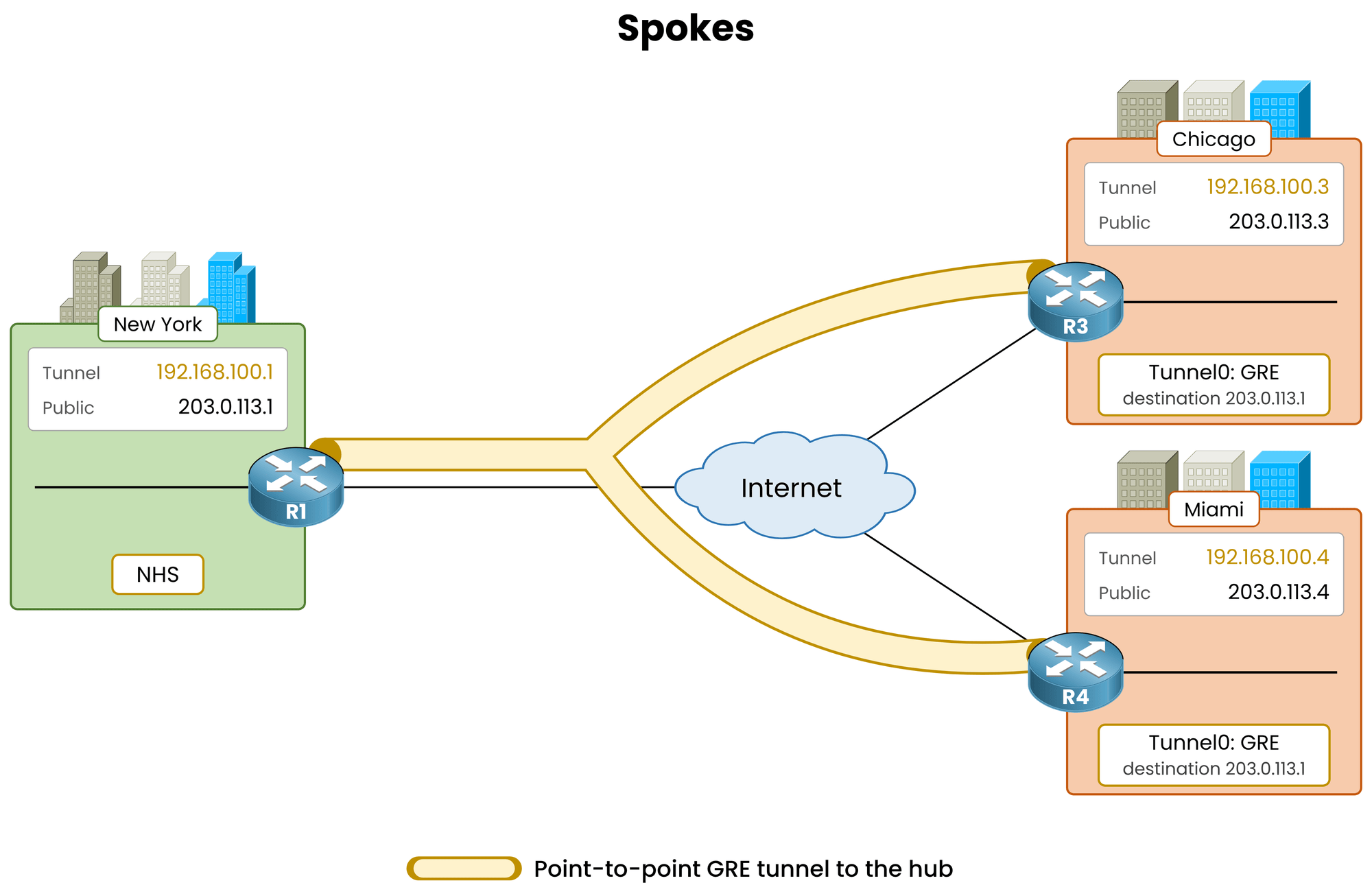
Figure 3 – Each spoke points to the hub
R3# conf t
R3(config)# interface tunnel0
R3(config-if)# ip address 192.168.100.3 255.255.255.0
R3(config-if)# tunnel source gigabitethernet0/0
R3(config-if)# tunnel destination 203.0.113.1
R3(config-if)# end
No
tunnel mode gre multipointhere. Withtunnel destination 203.0.113.1, the tunnel stays point-to-point.That one line defines Phase 1: R3 can only send to R1.
Answer the question below
In Phase 1, which router is the only one R3 can send to through Tunnel0?
Verify the GRE Tunnel
Same interface check as on the hub:
R3# show interfaces tunnel0

Tunnel0 is up, line protocol is up
  Hardware is Tunnel
  Internet address is 192.168.100.3/24
  MTU 17916 bytes, BW 100 Kbit/sec, DLY 50000 usec,
     reliability 255/255, txload 1/255, rxload 1/255
  Encapsulation TUNNEL, loopback not set
  Keepalive not set
  Tunnel linestate evaluation up
  Tunnel source 203.0.113.3 (GigabitEthernet0/0), destination 203.0.113.1
  Tunnel Subblocks:
     src-track:
        Tunnel0 source tracking subblock associated with GigabitEthernet0/0
         Set of tunnels with source GigabitEthernet0/0, 1 member (includes iterators), on interface <OK>
  Tunnel protocol/transport GRE/IP
    Key disabled, sequencing disabled
    Checksumming of packets disabled
  Tunnel TTL 255, Fast tunneling enabled
  Tunnel transport MTU 1476 bytes
  Tunnel transmit bandwidth 8000 (kbps)
  Tunnel receive bandwidth 8000 (kbps)
  Last input never, output never, output hang never
  Last clearing of "show interface" counters 00:01:05
  Input queue: 0/75/0/0 (size/max/drops/flushes); Total output drops: 0
  Queueing strategy: fifo
  Output queue: 0/0 (size/max)
  5 minute input rate 0 bits/sec, 0 packets/sec
  5 minute output rate 0 bits/sec, 0 packets/sec
     0 packets input, 0 bytes, 0 no buffer
     Received 0 broadcasts (0 IP multicasts)
     0 runts, 0 giants, 0 throttles
     0 input errors, 0 CRC, 0 frame, 0 overrun, 0 ignored, 0 abort
     0 packets output, 0 bytes, 0 underruns
     0 output errors, 0 collisions, 0 interface resets
     0 unknown protocol drops
     0 output buffer failures, 0 output buffers swapped out
Compare with the hub:
Hub:
multi-GRE/IP, no destination.Spoke:
GRE/IP, with a destination.
That is the whole Phase 1 model: mGRE on the hub, point-to-point GRE on every spoke.
Answer the question below
What does show interfaces tunnel0 print as transport on a spoke: GRE/IP or multi-GRE/IP?
The tunnel is up, but R1 does not know Chicago exists yet.
NHRP Configuration on R3
Go back to
Tunnel0on R3 and name its Next Hop Server:R3# conf t R3(config)# interface tunnel0 R3(config-if)# ip nhrp authentication DMVPN R3(config-if)# ip nhrp network-id 100 R3(config-if)# ip nhrp nhs 192.168.100.1 nbma 203.0.113.1 multicast R3(config-if)# ip mtu 1400 R3(config-if)# ip tcp adjust-mss 1360 R3(config-if)# endRead the
ip nhrp nhsline, it carries both addresses of the hub:192.168.100.1, the tunnel IP of the server.nbma 203.0.113.1, its public IP.multicast, a multicast mapping to the hub, so routing hellos can leave the tunnel.
Exam Tip: Older configs and exam questions split this into three lines,
ip nhrp map,ip nhrp map multicastandip nhrp nhs. Both forms work the same.Answer the question below
Which MTU value do you set on every DMVPN tunnel in this lesson?
Verify the Spoke Registration
Check the peer status on R3:
R3# show dmvpn
Legend: Attrb --> S - Static, D - Dynamic, I - Incomplete
        N - NATed, L - Local, X - No Socket
        T1 - Route Installed, T2 - Nexthop-override
        C - CTS Capable, I2 - Temporary
        # Ent --> Number of NHRP entries with same NBMA peer
        NHS Status: E --> Expecting Replies, R --> Responding, W --> Waiting
        UpDn Time --> Up or Down Time for a Tunnel
==========================================================================

Interface: Tunnel0, IPv4 NHRP Details
Type:Spoke, NHRP Peers:1,

  # Ent  Peer NBMA Addr Peer Tunnel Add State  UpDn Tm Attrb
 ----- --------------- --------------- ----- -------- -----
     1 203.0.113.1        192.168.100.1   UP 00:00:17     S
One peer, the hub, in state
UP.
The attributeSmeans static: this entry comes from yourip nhrp nhsline.Apply Configuration to Miami (R4)
The whole spoke config fits in one interface block. Read it back on R3:
R3# show running-config interface tunnel0

Building configuration...

Current configuration : 276 bytes
!
interface Tunnel0
 ip address 192.168.100.3 255.255.255.0
 ip mtu 1400
 ip nhrp authentication DMVPN
 ip nhrp network-id 100
 ip nhrp nhs 192.168.100.1 nbma 203.0.113.1 multicast
 ip tcp adjust-mss 1360
 tunnel source GigabitEthernet0/0
 tunnel destination 203.0.113.1
end
Paste the same block on R4, with tunnel IP 192.168.100.4:
R4# conf t
R4(config)# interface tunnel0
R4(config-if)# ip address 192.168.100.4 255.255.255.0
R4(config-if)# tunnel source gigabitethernet0/0
R4(config-if)# tunnel destination 203.0.113.1
R4(config-if)# ip nhrp authentication DMVPN
R4(config-if)# ip nhrp network-id 100
R4(config-if)# ip nhrp nhs 192.168.100.1 nbma 203.0.113.1 multicast
R4(config-if)# ip mtu 1400
R4(config-if)# ip tcp adjust-mss 1360
R4(config-if)# end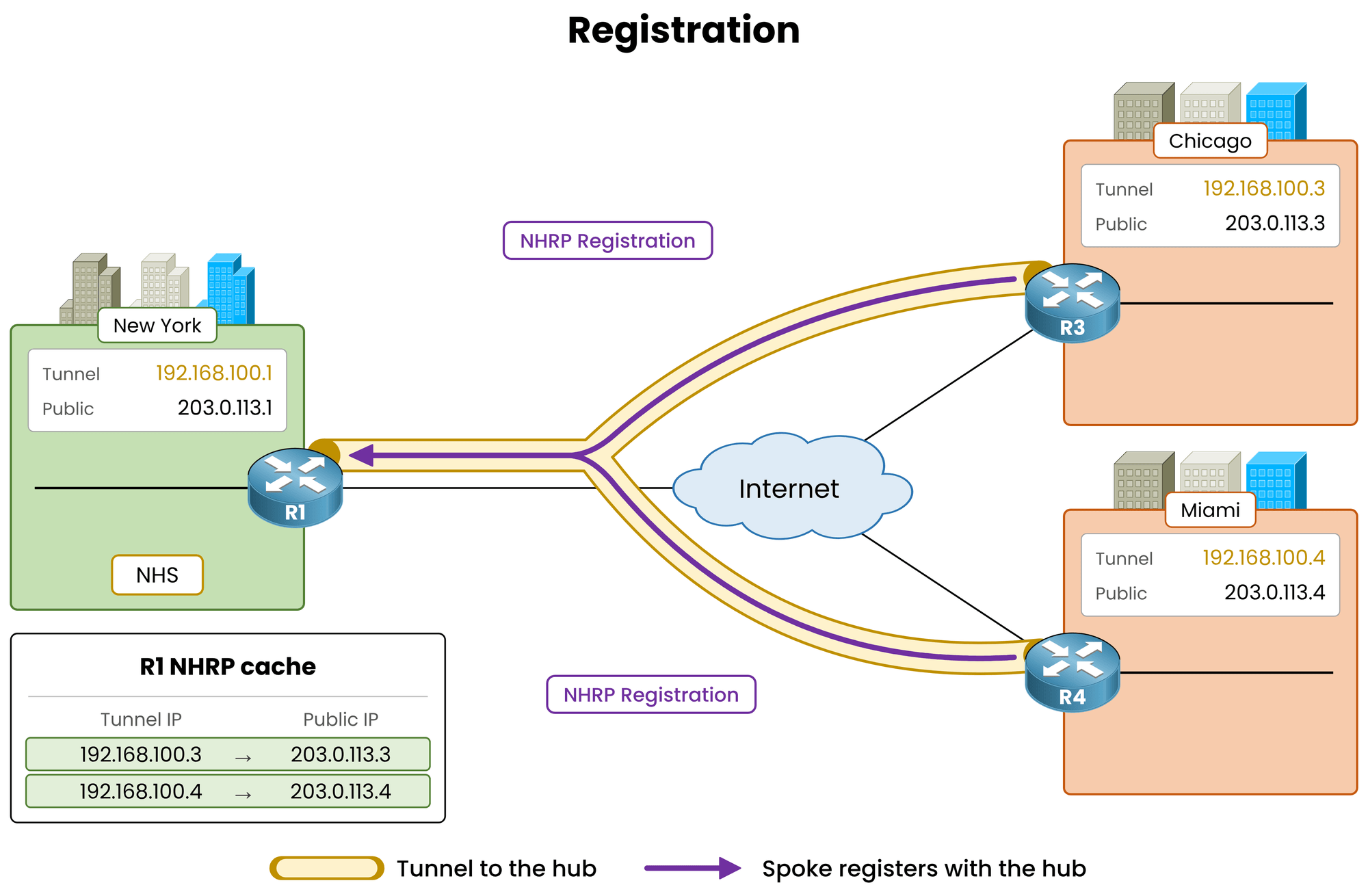
Figure 4 – Each spoke registers, the hub fills its cache
Verify Both Registrations on the Hub
Back on R1, check that both spokes registered:
R1# show dmvpn
Legend: Attrb --> S - Static, D - Dynamic, I - Incomplete
        N - NATed, L - Local, X - No Socket
        T1 - Route Installed, T2 - Nexthop-override
        C - CTS Capable, I2 - Temporary
        # Ent --> Number of NHRP entries with same NBMA peer
        NHS Status: E --> Expecting Replies, R --> Responding, W --> Waiting
        UpDn Time --> Up or Down Time for a Tunnel
==========================================================================

Interface: Tunnel0, IPv4 NHRP Details
Type:Hub, NHRP Peers:2,

  # Ent  Peer NBMA Addr Peer Tunnel Add State  UpDn Tm Attrb
 ----- --------------- --------------- ----- -------- -----
     1 203.0.113.3        192.168.100.3   UP 00:00:29     D
     1 203.0.113.4        192.168.100.4   UP 00:00:09     D
Both spokes are
UPwith attributeD, dynamic.
You never typed a spoke address on R1. The spokes introduced themselves.Answer the question below
In ip nhrp nhs 192.168.100.1 nbma 203.0.113.1, which address is the public IP of the hub?
Answer the question below
If Miami used NHRP network-id 200 instead of 100, how many peers would the hub list?
Everything is configured. Now prove it works before leaving the room.
Verify NHRP Cache
show dmvpnshows the peers. Its companion,show ip nhrp, shows the full NHRP cache on R1:R1# show ip nhrp 192.168.100.3/32 via 192.168.100.3 Tunnel0 created 00:00:29, expire 00:09:31 Type: dynamic, Flags: registered nhop NBMA address: 203.0.113.3 192.168.100.4/32 via 192.168.100.4 Tunnel0 created 00:00:09, expire 00:09:51 Type: dynamic, Flags: registered nhop NBMA address: 203.0.113.4Each entry maps a tunnel IP to a public IP:
192.168.100.3/32 via 192.168.100.3, the tunnel IP of Chicago.NBMA address: 203.0.113.3, its public IP.Flags: registered, the spoke sent this entry. You never typed it on R1.
Dynamic entries expire. As long as the spoke keeps re-registering, the hub keeps the mapping.
Answer the question below
Which command displays the NHRP cache on the hub?
Debug NHRP Registration
The cache shows the result.
debug nhrpshows the exchange itself.
RestartTunnel0on R3 to trigger a registration now:R3# debug nhrp NHRP protocol debugging is on R3# conf t R3(config)# interface tunnel0 R3(config-if)# shutdown R3(config-if)# no shutdownYour console shows the exchange:
NHRP: Send Registration Request via Tunnel0 vrf global(0x0), packet size: 105
      src: 192.168.100.3, dst: 192.168.100.1
NHRP: Receive Registration Reply via Tunnel0 vrf global(0x0), packet size: 125
NHRP: NHS-UP: 192.168.100.1
Three events:
Send Registration Request: R3 announces its tunnel IP and public IP to the NHS.Receive Registration Reply: R1 accepted and stored the mapping.NHS-UP: 192.168.100.1: the NHS is active on R3.
Troubleshooting Note: with a wrong
ip nhrp authenticationkey, the Request leaves R3 but no Reply comes back. The NHS stays in state E, Expecting Replies.Answer the question below
Which NHRP message does R3 send when Tunnel0 comes up?
Finally, prove that the overlay carries traffic. The tunnel subnet is directly connected on every router, so no routing protocol is needed yet.
Ping Hub to Spokes
From R1, ping both spokes:
R1# ping 192.168.100.3
Type escape sequence to abort.
Sending 5, 100-byte ICMP Echos to 192.168.100.3, timeout is 2 seconds:
!!!!!
Success rate is 100 percent (5/5), round-trip min/avg/max = 10/11/12 ms
R1# ping 192.168.100.4
Type escape sequence to abort.
Sending 5, 100-byte ICMP Echos to 192.168.100.4, timeout is 2 seconds:
!!!!!
Success rate is 100 percent (5/5), round-trip min/avg/max = 11/12/14 ms
Both spokes answer on their tunnel IP.
Hub to spoke, spoke to hub, and spoke to spoke only through the hub: that is Phase 1.Answer the question below
Does the hub need a routing protocol to ping the tunnel IP of its spokes? (yes/no)
Ping Spoke to Spoke
Chicago has no tunnel to Miami, only to the hub.
From R3, ping the tunnel IP of Miami, then its LAN:R3# ping 192.168.100.4 Type escape sequence to abort. Sending 5, 100-byte ICMP Echos to 192.168.100.4, timeout is 2 seconds: !!!!! Success rate is 100 percent (5/5), round-trip min/avg/max = 21/23/25 ms R3# ping 10.40.40.1 Type escape sequence to abort. Sending 5, 100-byte ICMP Echos to 10.40.40.1, timeout is 2 seconds: ..... Success rate is 0 percent (0/5)Two results:
The first ping works:
192.168.100.4is on the tunnel subnet. R3 sends the packet to R1, which relays it to Miami. The round trip is about double a hub ping: every spoke-to-spoke packet in Phase 1 goes through the hub.The second ping fails: R3 has no route to
10.40.40.0/24. NHRP registers tunnel addresses, it does not carry LAN routes.
Routing the LANs over Tunnel0 is the job of the next lesson, DMVPN Phase 1 EIGRP Routing.
Answer the question below
From the hub, which address of Chicago do you ping to test the overlay?
Answer the question below
Right after Chicago pings 192.168.100.4, how many NHRP peers does Chicago list?