RA Guard closed the door on rogue Router Advertisements.
But an RA is not the only way to get an address in IPv6!DHCPv6 is the other one and it has the exact same weakness.
DHCPv6 Solicit
In this example, PC1 has just joined the network and sends a DHCPv6 Solicit to the all-DHCP-servers multicast address FF02::1:2.
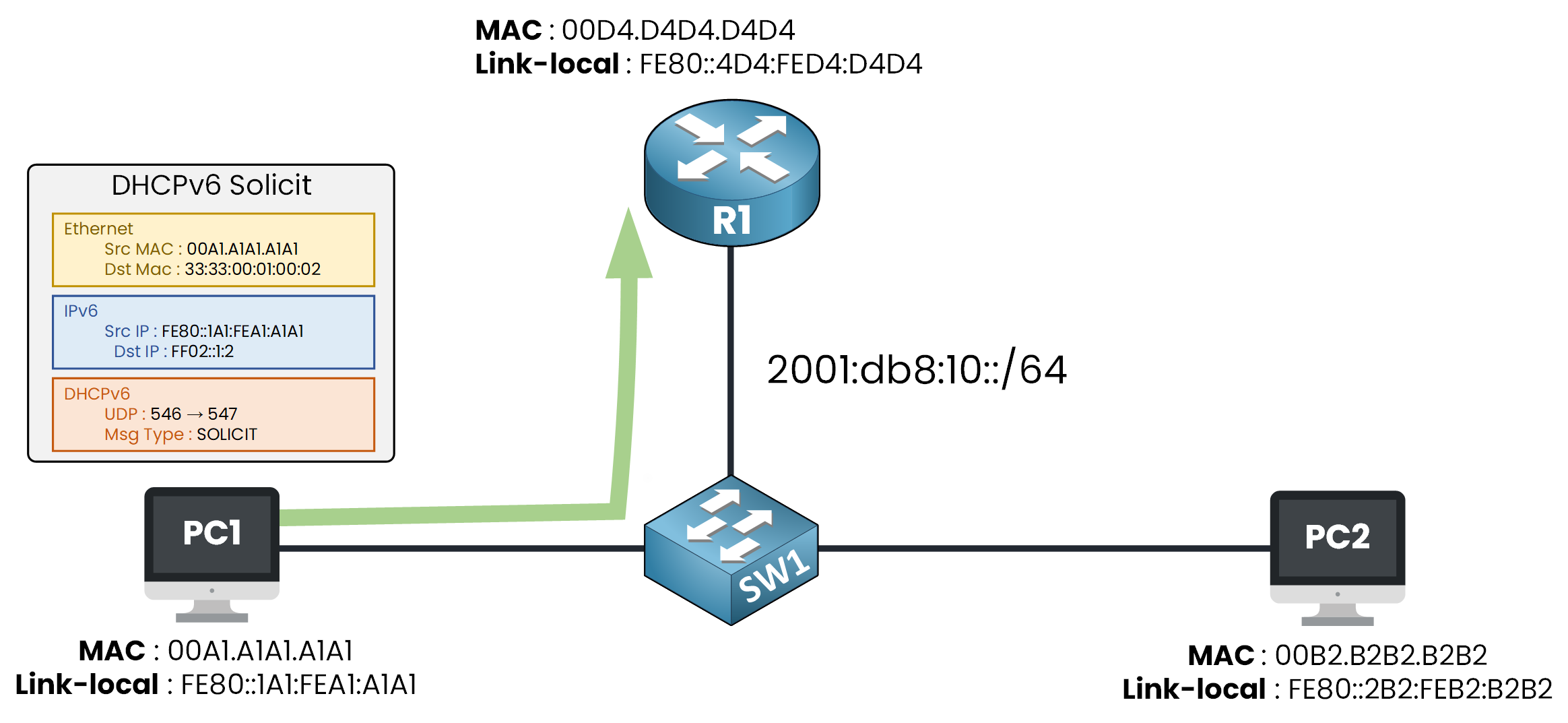
Figure 1 – A host sends a DHCPv6 Solicit to find a server
PC1 is looking for a DHCPv6 server to get an address and a DNS server.
Every DHCPv6 server on the segment receives the Solicit.Answer the question below
To which multicast address does a host send its DHCPv6 Solicit?
DHCPv6 Advertise
R1 answers with a DHCPv6 Advertise, sent in unicast to PC1 only.
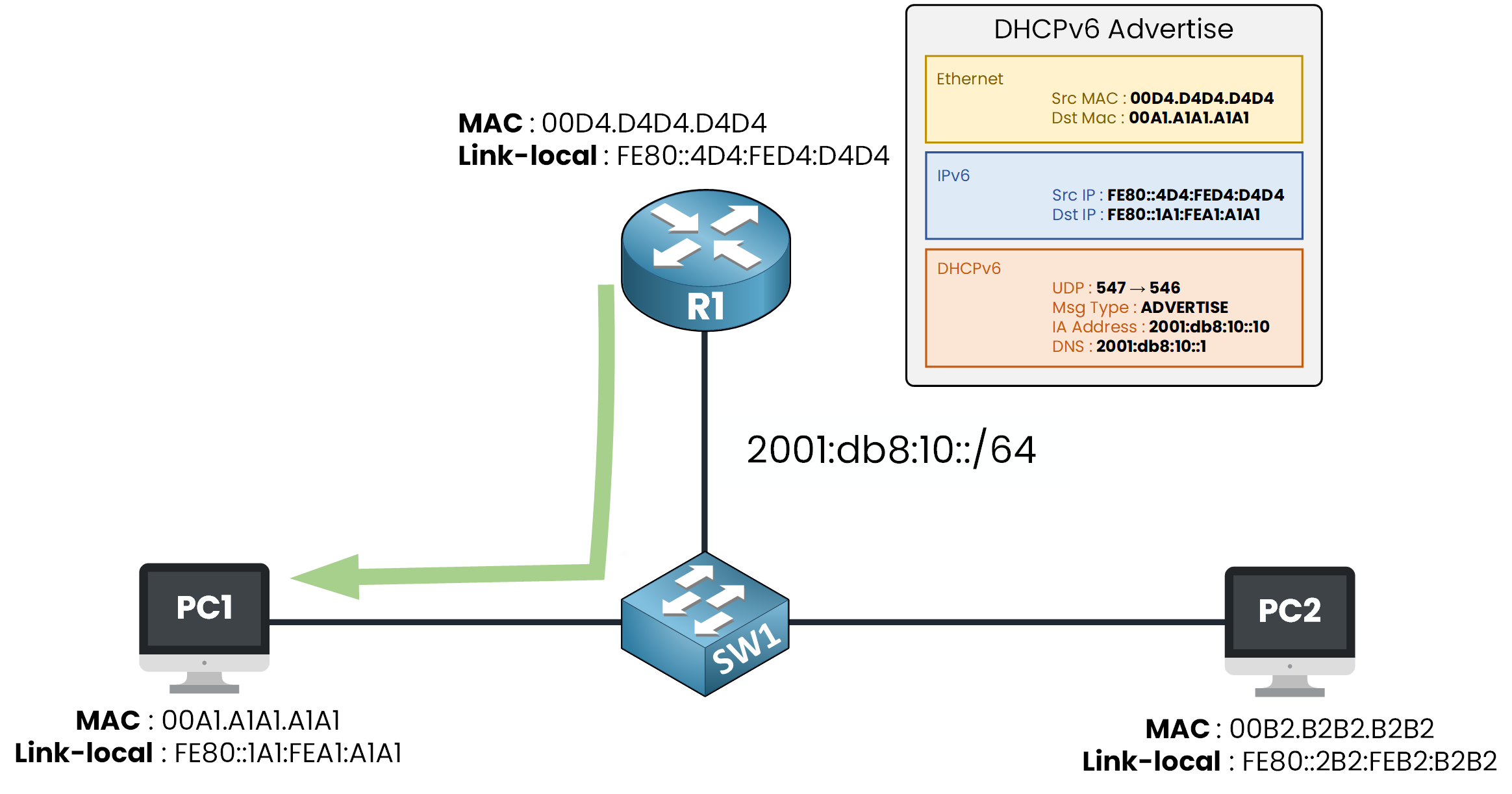
Figure 2 – The server replies with a DHCPv6 Advertise
It carries everything PC1 asked for:
an IPv6 address, 2001:db8:10::10, reserved for PC1
the DNS server to use, 2001:db8:10::1
Getting an address takes four DHCPv6 messages, in this order:
Solicit — the client looks for a server
Advertise — the server offers an address and DNS
Request — the client accepts the offer
Reply — the server confirms the address for good
The attack targets the second message: whoever sends the first Advertise wins, because nobody checks it is really the server answering.
Rogue DHCPv6 Server
In this example, the Hacker answers PC1's Solicit before R1 does.
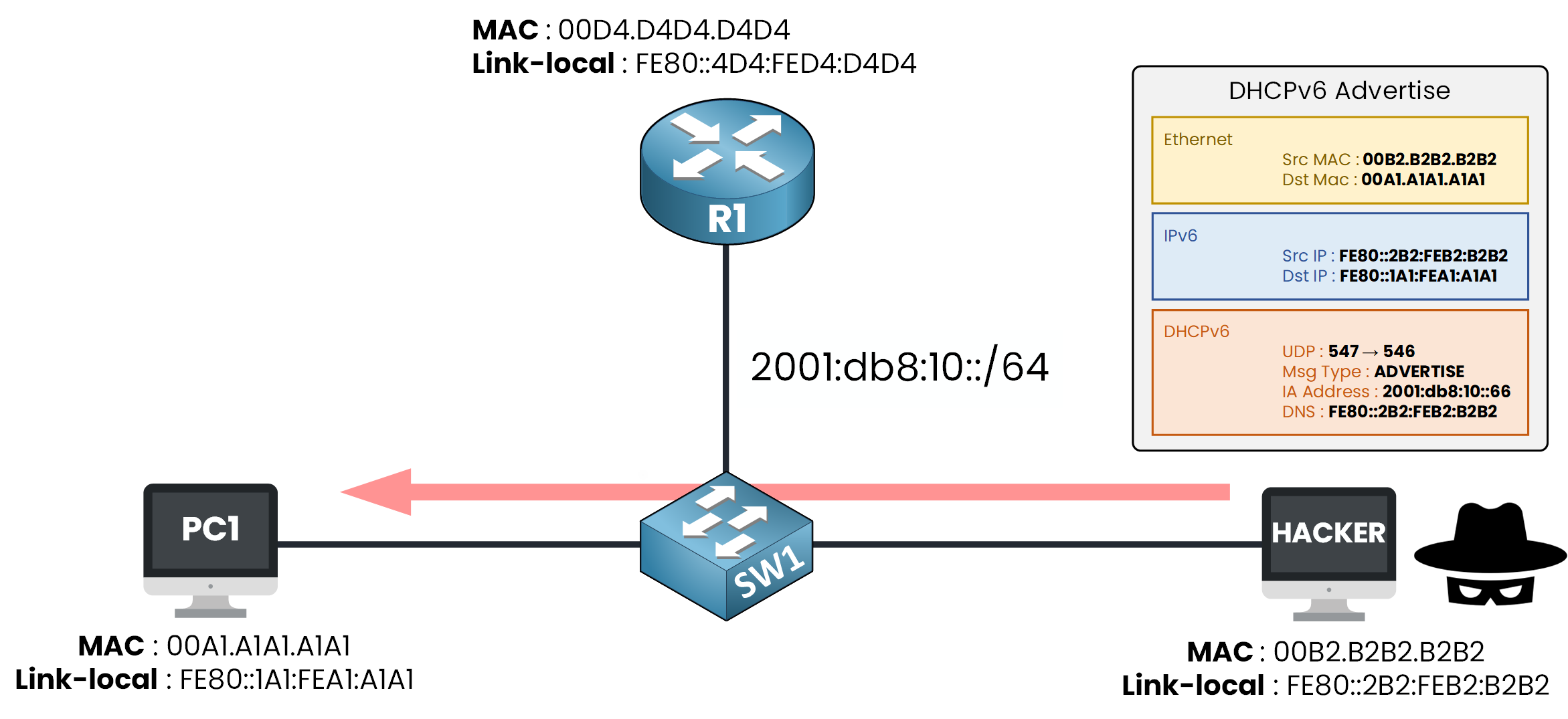
Figure 3 – A rogue Advertise from the Hacker
PC1 takes the first Advertise it receives, exactly like it trusted the first RA.
The Hacker hands out its own address as the DNS server, so every name PC1 resolves now goes through the attacker.Answer the question below
Which DHCPv6 message does a server send to answer a Solicit?
By using DHCPv6 Guard, you can configure your ports to only accept server messages where a server should be.
DHCPv6 Guard is based on this principle, which you can use to protect your segment.DHCPv6 Guard Roles
With DHCPv6 Guard, you tag each port on your switch with a role: client or server.
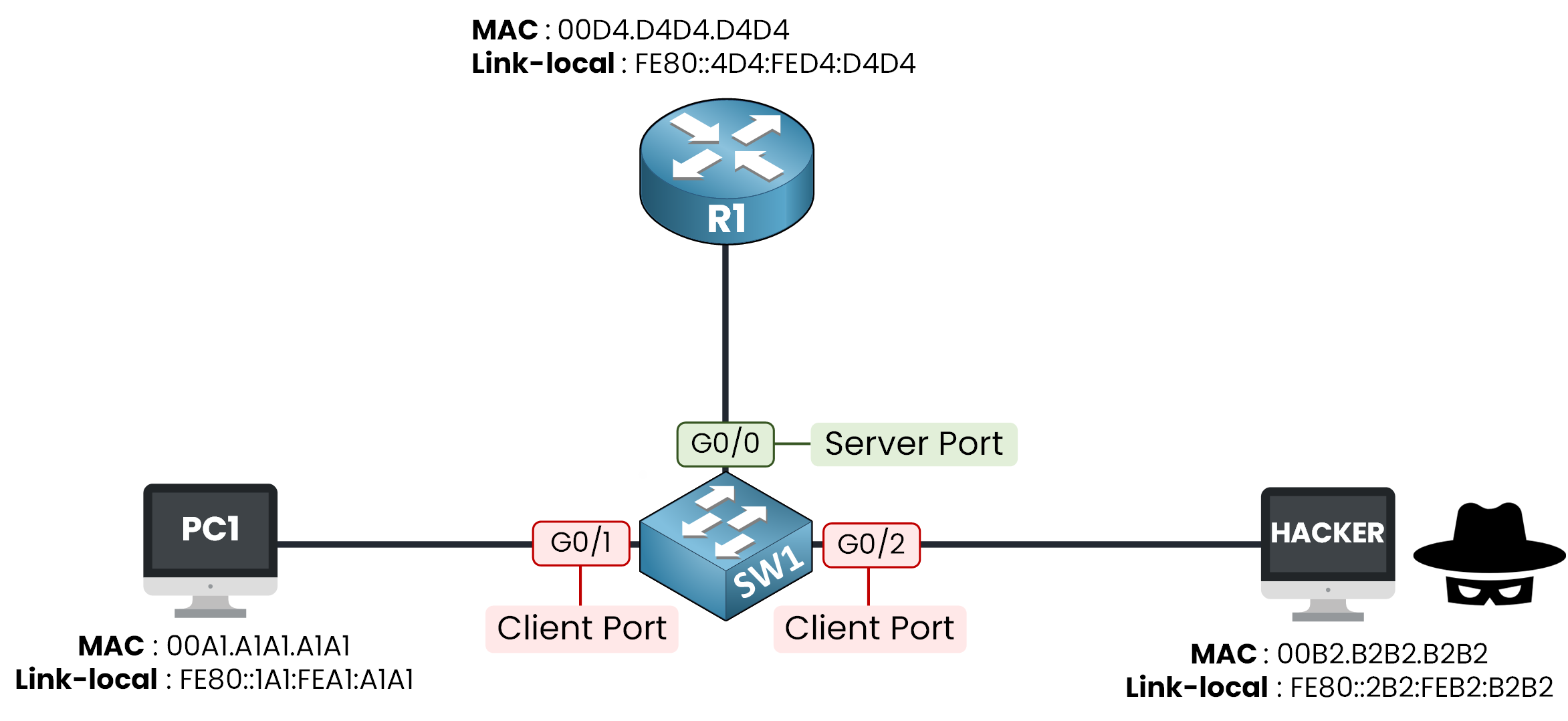
Figure 4 – Server role on G0/0, client role on G0/1 and G0/2
In this example, G0/0 faces R1 so it gets the server role.
G0/1 and G0/2 face PC1 and the Hacker so they get the client role.
Each role decides only one thing: is a server message allowed through this port?Server Port
This is the role for the port facing your real DHCPv6 server:
Server messages, Advertise and Reply, are allowed through
It is the only port where a server should ever sit
Client Ports
This is the role for every port facing an end device:
Server messages are dropped immediately, an end device has no reason to answer a Solicit
Client messages, Solicit and Request, always pass, whatever the role.
With these roles in place, the rogue Advertise from earlier would never leave G0/2: SW1 drops it before PC1 even sees it.Answer the question below
Which role is assigned to the port facing R1?
Answer the question below
Which DHCPv6 messages always pass, whatever the role?
Time to practice, you start with the policy for the server port.
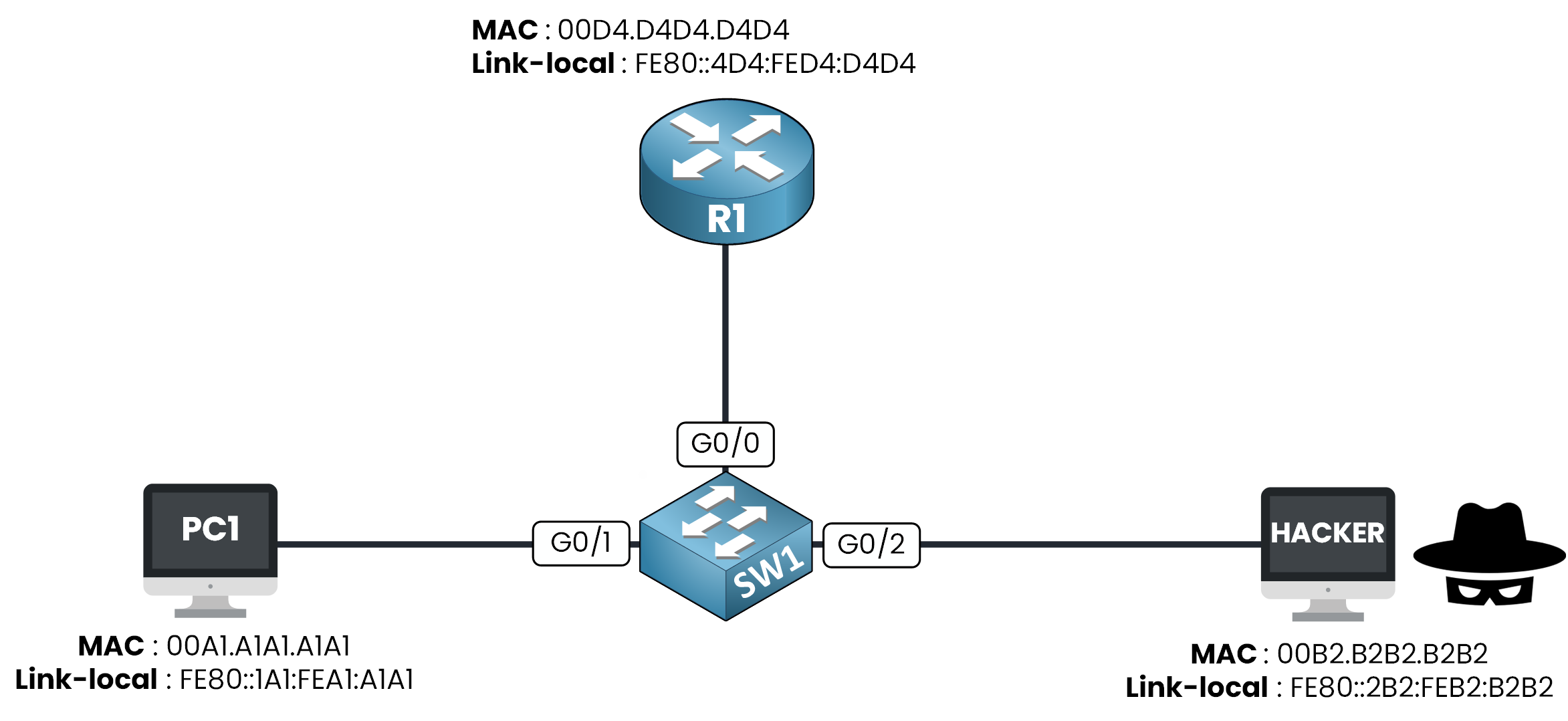
Figure 5 – The lab topology
The configuration follows the same logic as RA Guard:
you create a policy that defines a role
you attach this policy to the ports you want
you verify that it is applied
Step 1 — Create the policy
You create the policy SERVER_POLICY with the server role.
SW1# conf t
Enter configuration commands, one per line. End with CNTL/Z.
SW1(config)# ipv6 dhcp guard policy SERVER_POLICY
SW1(config-dhcp-guard)# device-role server
SW1(config-dhcp-guard)# end
Be careful, the default role is client.
Skip this command on the server port and the switch drops your own server's replies.
A policy does nothing until you attach it to an interface.Step 2 — Attach it to the server port
You attach SERVER_POLICY to G0/0, the port facing R1.
SW1# conf t
Enter configuration commands, one per line. End with CNTL/Z.
SW1(config)# int g0/0
SW1(config-if)# ipv6 dhcp guard attach-policy SERVER_POLICY
SW1(config-if)# end
R1's replies are now trusted on that port.
Step 3 — Verify
You verify that the policy is applied on G0/0.
SW1# show ipv6 dhcp guard policy SERVER_POLICY
Dhcp guard policy: SERVER_POLICY
        Device Role: dhcp server
        Target: Gi0/0
        Max Preference: 255
        Min Preference: 0
The output confirms the server role and the target port Gi0/0.
The two Preference lines are default values, you can ignore them for now.Answer the question below
What is the default role of a DHCPv6 Guard policy?
Answer the question below
Which keyword attaches a policy to an interface?
Same logic for the client policy: create, attach, verify.
Step 1 — Create the policy
You create the policy CLIENT_POLICY with the client role.
SW1# conf t
Enter configuration commands, one per line. End with CNTL/Z.
SW1(config)# ipv6 dhcp guard policy CLIENT_POLICY
SW1(config-dhcp-guard)# device-role client
SW1(config-dhcp-guard)# end
Now you attach it, but this time to two ports instead of one.
Step 2 — Attach it to the client ports
You attach CLIENT_POLICY to G0/1, facing PC1, and to G0/2, facing the Hacker.
Missing one of them leaves that port wide open.SW1# conf t Enter configuration commands, one per line. End with CNTL/Z. SW1(config)# int g0/1 SW1(config-if)# ipv6 dhcp guard attach-policy CLIENT_POLICY SW1(config-if)# exit SW1(config)# int g0/2 SW1(config-if)# ipv6 dhcp guard attach-policy CLIENT_POLICY SW1(config-if)# endEvery user-facing port is covered now.
Step 3 — Verify
You verify that the policy is applied on G0/1 and G0/2.
SW1# show ipv6 dhcp guard policy CLIENT_POLICY
Dhcp guard policy: CLIENT_POLICY
        Device Role: dhcp client
        Target: Gi0/1 Gi0/2
Both client ports show up as targets, your segment is closed to rogue DHCPv6 servers.
Time to prove it actually works.Answer the question below
Which field of the verify output lists the ports a policy is applied on?
Answer the question below
How many ports receive CLIENT_POLICY?
Everything is configured, now launch the attack scenario below.
You take the Hacker's place, run the attack yourself, and watch how the switch reacts.Complete every task in the scenario and enter the flag you earned below.
Answer the question below
Enter the Flag
The Rogue Advertise Is Dropped
The Hacker's Advertise never gets past SW1, it is dropped at G0/2, the port with the client role.
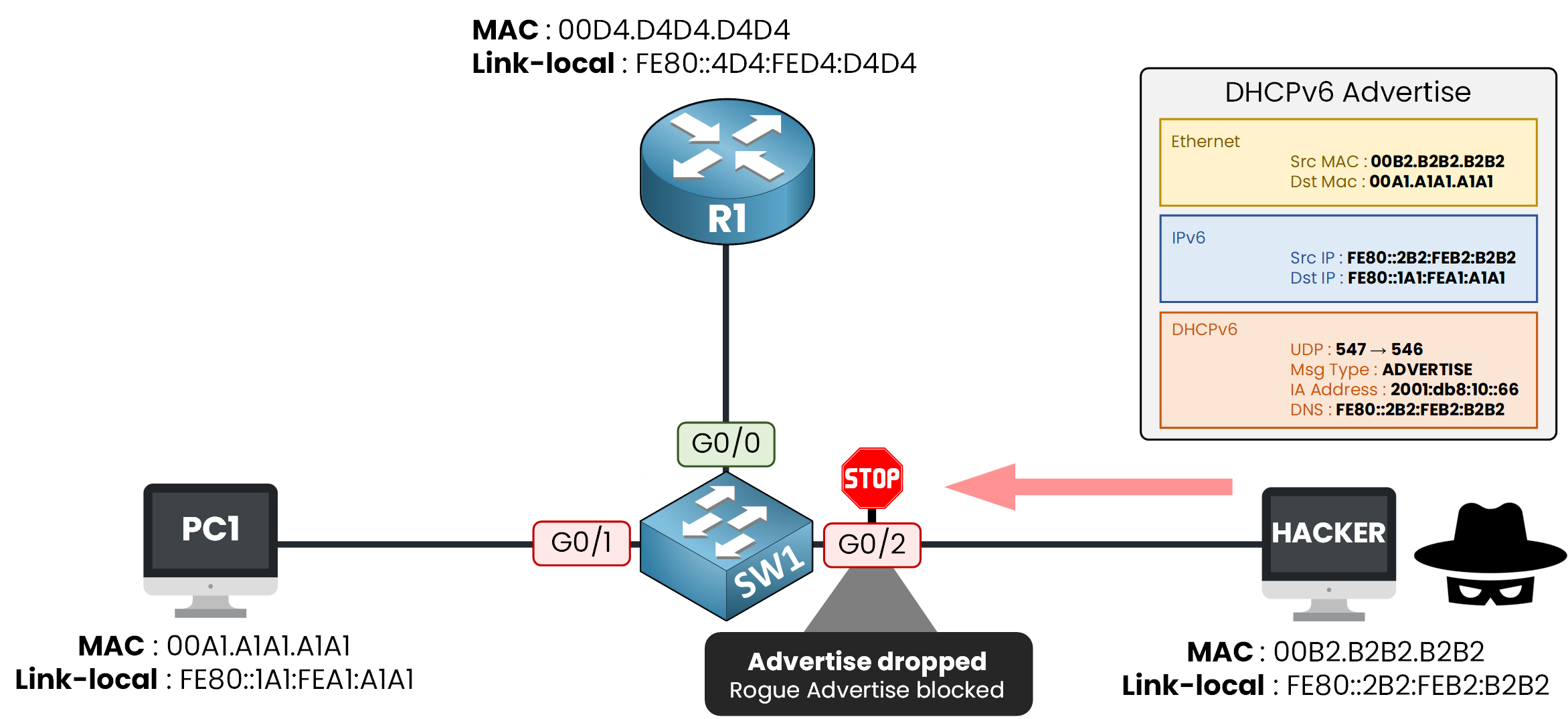
Figure 6 – The rogue Advertise is blocked at G0/2
A server message arriving on a client port, so the switch denies it.
The Legitimate Advertise Still Gets Through
R1's Advertise still reaches PC1 because G0/0 carries the server role.
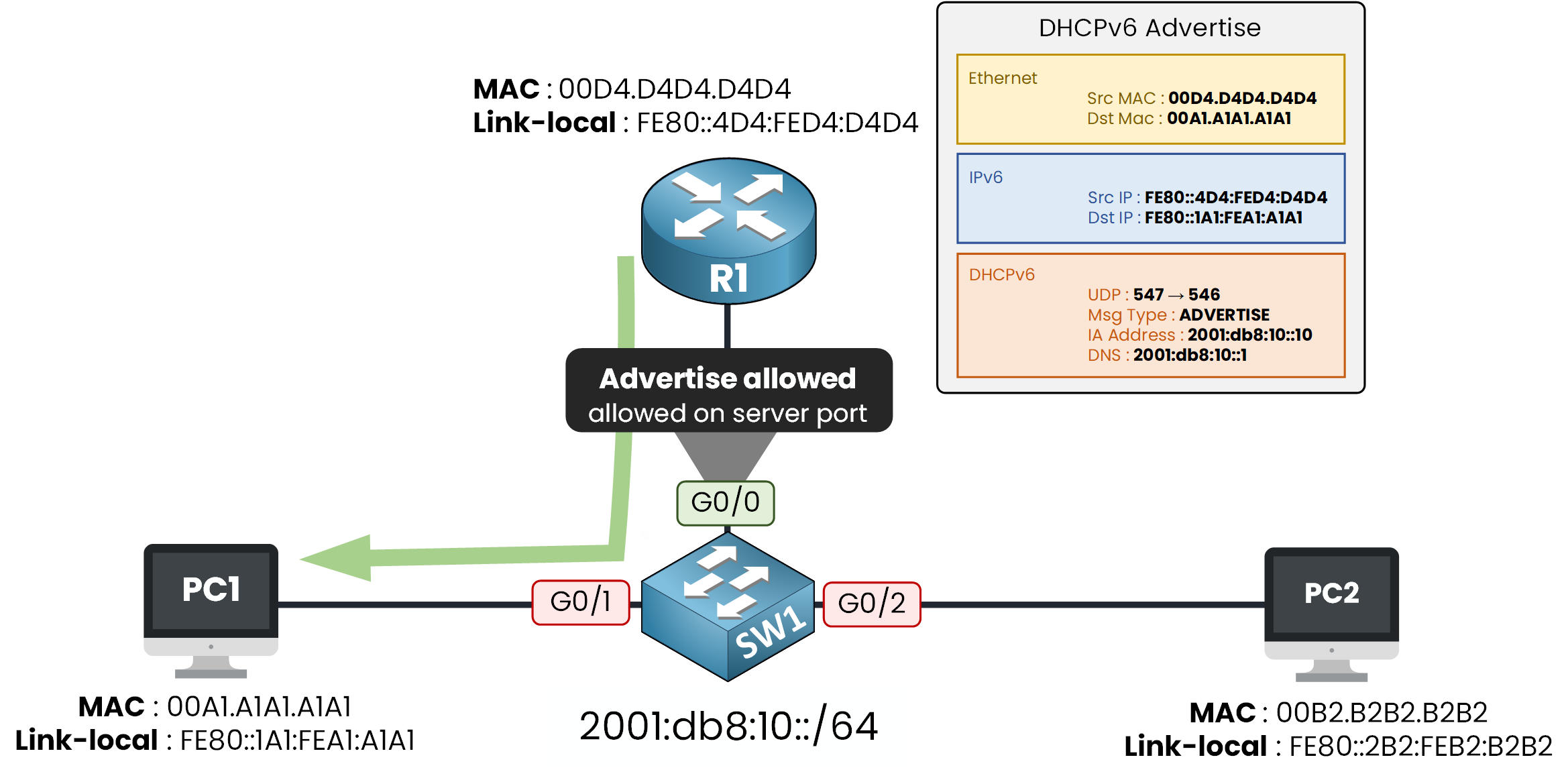
Figure 7 – The legitimate Advertise still gets through on the server port
DHCPv6 Guard isn't blocking DHCPv6 everywhere, it's blocking server messages from anywhere except the one trusted port.
Answer the question below
Which port still forwards server messages after the configuration?