BGP does not use its own transport protocol; instead, it relies entirely on a long-lived TCP connection over port 179. While this design makes BGP reliable, it introduces a critical security vulnerability: TCP session hijacking.
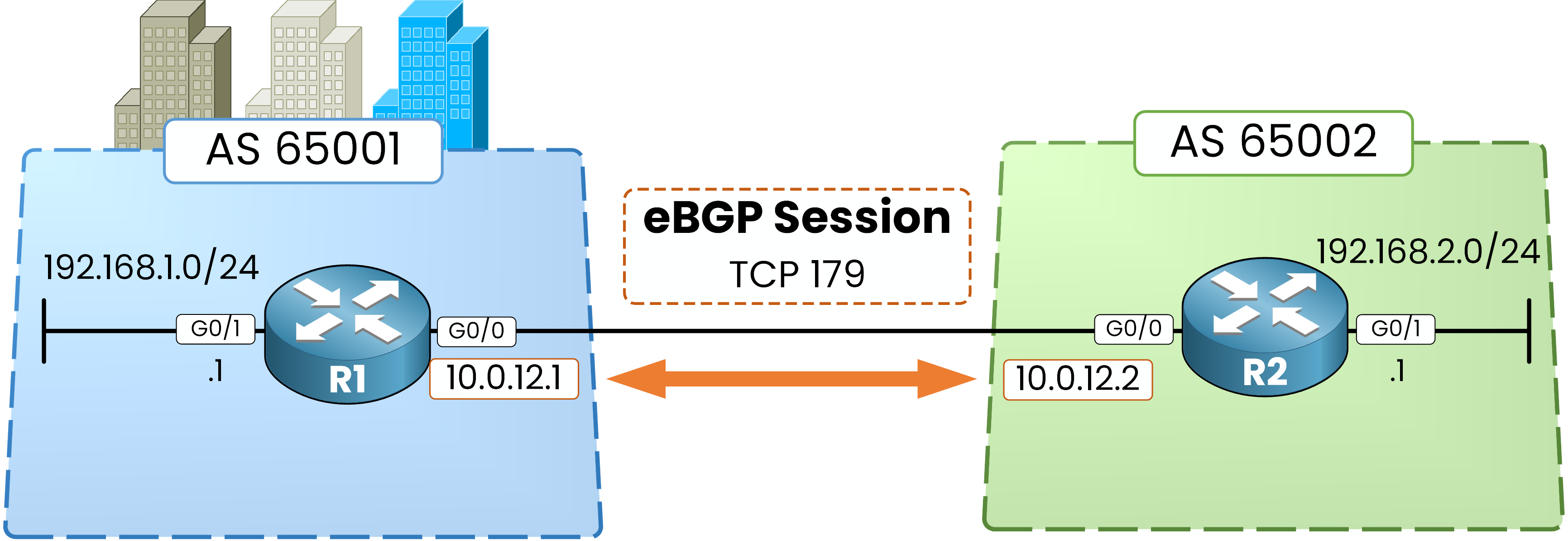
Figure 1 – One eBGP session, one long-lived TCP connection
The TCP Hijacking Vulnerability
Launch the lab below to jump into hands-on practice! Execute the required configurations directly in the terminal, complete each task, and claim your flag.
Because a BGP TCP session often stays open for months or years, an attacker capable of sniffing traffic or spoofing IP addresses can inject a malicious TCP
RST(Reset) packet.Upon receiving the spoofed reset, the router assumes the neighbor initiated a teardown, immediately killing the BGP session and dropping all associated routes.
To mitigate this attack, BGP leverages TCP MD5 Authentication (RFC 2385).
Answer the question below
Enter the flag:
How BGP MD5 Authentication Works
When authentication is enabled on a BGP peering:
The Mechanism: Every TCP segment carries an MD5 hash digest computed from a shared secret password combined with the TCP/IP header fields.
Silent Drop: The receiving router recalculates the hash. If the signature is missing or invalid, the packet is silently dropped at the TCP layer before BGP ever processes it.
Zero Wire Exposure: The actual secret password is never transmitted across the wire.
Let's configure this in a lab to analyze the exact error messages and behaviors when things break.
Answer the question below
On which TCP port does BGP establish its long-lived session?
Here is your topology: R1 in AS 65001 connected to R2 in AS 65002.
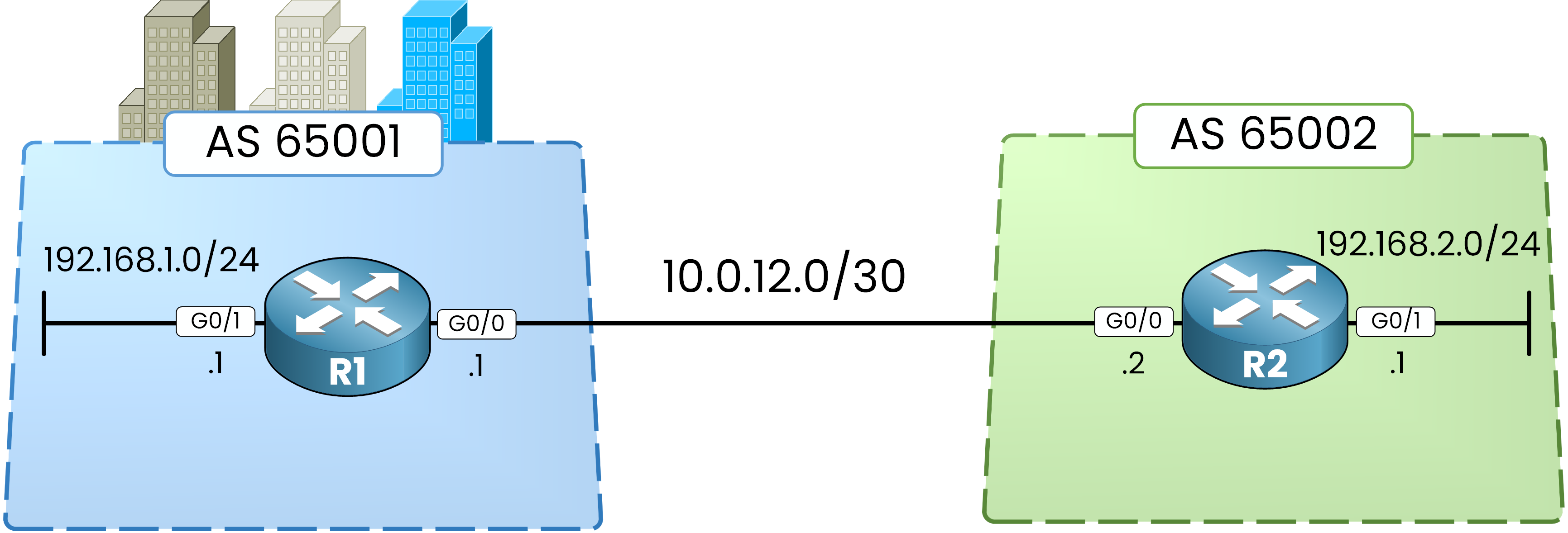
Figure 2 – The lab topology: R1 in AS 65001, R2 in AS 65002
Step 1 – Configure Router Interfaces
Start by configuring the interfaces on R1: the link to R2 on
g0/0, and the local LAN ong0/1.R1# conf t Enter configuration commands, one per line. End with CNTL/Z. R1(config)# int g0/0 R1(config-if)# ip address 10.0.12.1 255.255.255.252 R1(config-if)# no shut R1(config-if)# exit R1(config)# int g0/1 R1(config-if)# ip address 192.168.1.1 255.255.255.0 R1(config-if)# no shut R1(config-if)# endDo the same on R2 with its respective IP addresses:
R2# conf t
Enter configuration commands, one per line.  End with CNTL/Z.
R2(config)# int g0/0
R2(config-if)# ip address 10.0.12.2 255.255.255.252
R2(config-if)# no shut
R2(config-if)# exit

R2(config)# int g0/1
R2(config-if)# ip address 192.168.2.1 255.255.255.0
R2(config-if)# no shut
R2(config-if)# end
Step 2 – Establish the eBGP Peering
Next, bring up the eBGP session using the address-family model.
Configure one neighbor and advertise one prefix on each side:R1# conf t Enter configuration commands, one per line. End with CNTL/Z. R1(config)# router bgp 65001 R1(config-router)# no bgp default ipv4-unicast R1(config-router)# neighbor 10.0.12.2 remote-as 65002 R1(config-router)# address-family ipv4 R1(config-router-af)# neighbor 10.0.12.2 activate R1(config-router-af)# network 192.168.1.0 mask 255.255.255.0 R1(config-router-af)# endR2# conf t Enter configuration commands, one per line. End with CNTL/Z. R2(config)# router bgp 65002 R2(config-router)# no bgp default ipv4-unicast R2(config-router)# neighbor 10.0.12.1 remote-as 65001 R2(config-router)# address-family ipv4 R2(config-router-af)# neighbor 10.0.12.1 activate %BGP-5-ADJCHANGE: neighbor 10.0.12.1 Up R2(config-router-af)# network 192.168.2.0 mask 255.255.255.0 R2(config-router-af)# endThe neighbor
Uplog appears: the session is up.Step 3 – Verify Baseline Session State
Before enabling authentication, verify your baseline state to ensure the peering is healthy and prefixes are exchanged:
R1# show bgp ipv4 unicast summary
BGP router identifier 192.168.1.1, local AS number 65001
BGP table version is 3, main routing table version 3
<output omitted>

Neighbor        V           AS MsgRcvd MsgSent   TblVer  InQ OutQ Up/Down  State/PfxRcd
10.0.12.2       4        65002       5       5        3    0    0 00:00:10        1
The output confirms the session has been
Establishedfor 10 seconds and R1 is receiving 1 prefix from R2.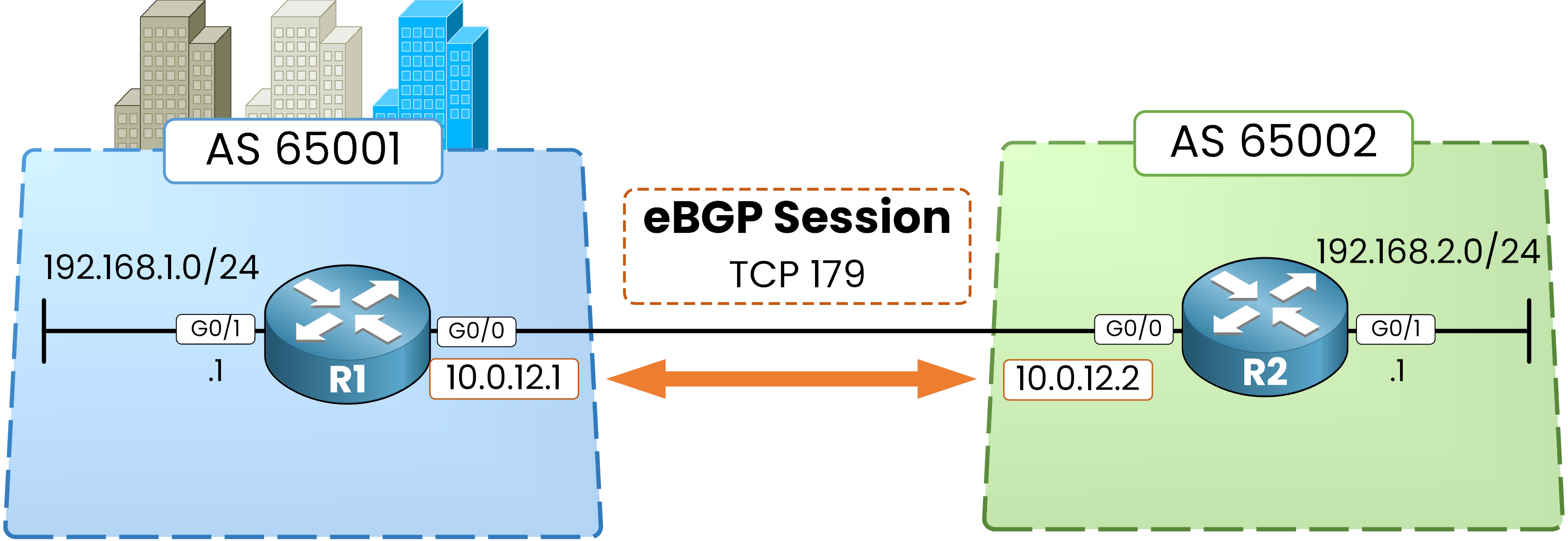
Figure 3 – The eBGP session runs over TCP port 179
Right now, this TCP connection is completely unprotected.
Any device capable of reaching these IP addresses can inject forged TCP segments.Time to lock it down.
Answer the question below
The whole BGP session lives inside one TCP connection. Which port does it use?
To understand how BGP authentication fails, configure the password on R1 only first.
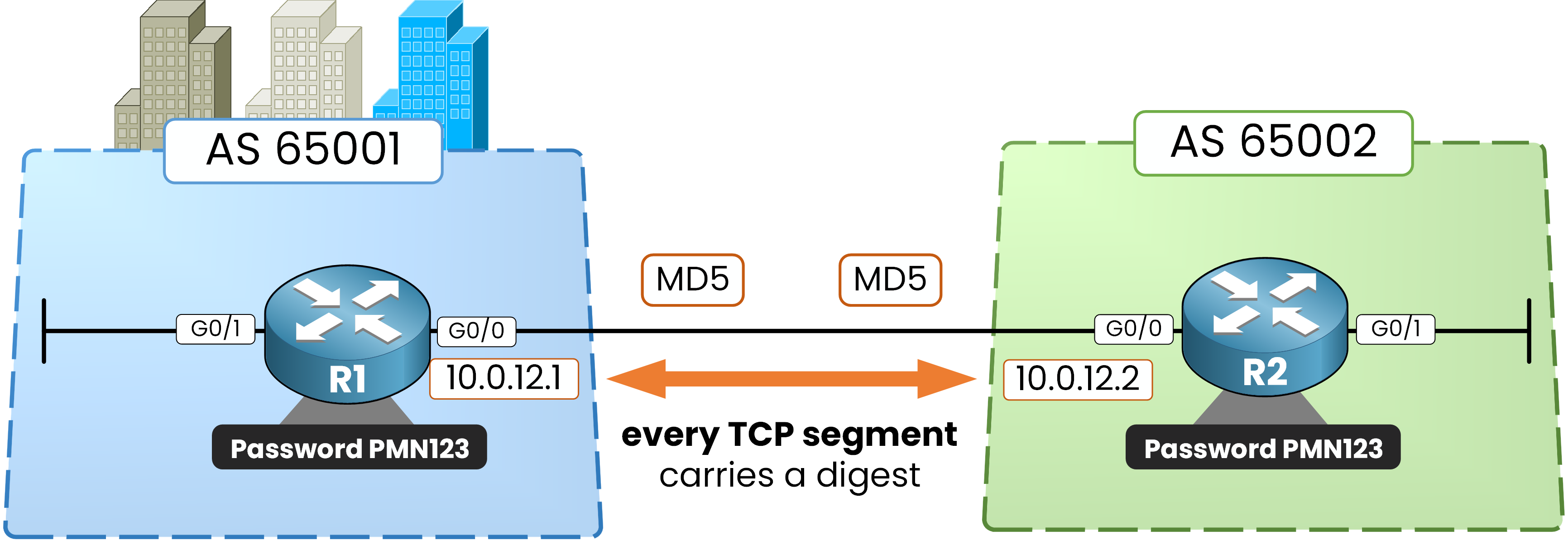
Figure 4 – With the same password on both sides, every TCP segment carries an MD5 digest
Step 4 – Trigger Authentication Mismatch
Configure a secret password on R1 only:
R1# conf t
Enter configuration commands, one per line.  End with CNTL/Z.
R1(config)# router bgp 65001
R1(config-router)# neighbor 10.0.12.2 password PMN123
R1(config-router)# end
And... nothing happens. No error logs appear, and the session remains
Established.Why didn't the session drop?
BGP authentication protects the TCP connection. The active TCP connection was established before you configured the password. IOS applies the new key to that live connection immediately, so R1 already signs what it sends and drops what arrives unsigned. Nothing looks different yet only because the Hold Timer has not expired. Resetting the session does not enable the authentication, it saves you the 180-second wait.
Reset the session on R1:
R1# clear ip bgp *
%BGP-5-ADJCHANGE: neighbor 10.0.12.2 Down User reset
%TCP-6-BADAUTH: No MD5 digest from 10.0.12.2(179) to 10.0.12.1(27792) tableid - 0
%TCP-6-BADAUTH: No MD5 digest from 10.0.12.2(62622) to 10.0.12.1(179) tableid - 0
The session goes down and fails to come back up. R1 repeatedly prints
%TCP-6-BADAUTHconsole logs.What happened: R1 now requires an MD5 signature on every incoming TCP segment. R2 sends unauthenticated segments, so R1 silently drops them at the transport layer.
Key takeaway: The error comes from TCP, not BGP. Because TCP drops these packets immediately, BGP never processes them and has nothing to report.
Key Diagnostic Logs
Log Message
Root Cause
%TCP-6-BADAUTH: No MD5 digestOne side requires MD5 authentication, but the peer is sending unauthenticated packets.
%TCP-6-BADAUTH: Invalid MD5 digestBoth sides have passwords configured, but they do not match (check for typos or case sensitivity).
Table 1 – The two BADAUTH logs
Check the BGP summary output on R1:
R1# show bgp ipv4 unicast summary
BGP router identifier 192.168.1.1, local AS number 65001
BGP table version is 1, main routing table version 1
<output omitted>

Neighbor        V           AS MsgRcvd MsgSent   TblVer  InQ OutQ Up/Down  State/PfxRcd
10.0.12.2       4        65002       0       0        1    0    0 00:00:40 Idle
The state shows
Idle, with zero messages received and zero sent. If you run the command multiple times, it may also flip toActiveas the router retries the TCP handshake, fails, and falls back.Exam Trap:
Do not rely on the
Statecolumn to diagnose authentication issues—it only shows that the connection is down. The true diagnostic smoking gun is always in the%TCP-6-BADAUTHconsole logs.Furthermore, if you configure a password on an established session without manually clearing it, the session won't drop instantly. It will simply stop accepting new BGP messages and silently freeze until the Hold Timer (180 seconds by default) expires and tears it down.
Answer the question below
R1 has the password, R2 does not. Which router prints the %TCP-6-BADAUTH logs?
Step 5 – Configure Matching Credentials on R2
Fixing this is simple: give R2 the exact same password.
R2# conf t
Enter configuration commands, one per line.  End with CNTL/Z.
R2(config)# router bgp 65002
R2(config-router)# neighbor 10.0.12.1 password PMN123
R2(config-router)# end
Wait about 30 seconds.
The session comes back up automatically without you touching anything. BGP keeps retrying the TCP connection in the background, and as soon as both sides sign their segments with the matching password, it connects:
%BGP-5-ADJCHANGE: neighbor 10.0.12.1 UpCheck R1 to confirm:
R1# show bgp ipv4 unicast summary
BGP router identifier 192.168.1.1, local AS number 65001
BGP table version is 3, main routing table version 3
<output omitted>

Neighbor        V           AS MsgRcvd MsgSent   TblVer  InQ OutQ Up/Down  State/PfxRcd
10.0.12.2       4        65002      11      12        3    0    0 00:06:26        1
The session is
Establishedagain and you are receiving the prefix.Step 6 – Verify Session Parameters & MD5 Signatures
To prove authentication is actually working, you need to check two places: your configuration and the active TCP socket.
The Running Configuration
R1# show run | s router bgp
router bgp 65001
 bgp log-neighbor-changes
 no bgp default ipv4-unicast
 neighbor 10.0.12.2 remote-as 65002
 neighbor 10.0.12.2 password PMN123
 !
 address-family ipv4
  network 192.168.1.0
  neighbor 10.0.12.2 activate
 exit-address-family
Socket-level Scope: Notice the
neighbor ... passwordcommand isn't underaddress-family ipv4. It secures the underlying TCP connection itself, so if you run IPv4 and IPv6 over this same session, one password protects both.
Plaintext Storage: Anyone looking over your shoulder can read
PMN123. In production, turn onservice password-encryptionglobally to obfuscate it.
The Live TCP Session
The real proof lives at the bottom of the detailed neighbor output, in the TCP section:
R1# show bgp ipv4 unicast neighbors 10.0.12.2
BGP neighbor is 10.0.12.2,  remote AS 65002, external link
  BGP version 4, remote router ID 192.168.2.1
  BGP state = Established, up for 00:02:07
  Last read 00:00:16, last write 00:00:17, hold time is 180, keepalive interval is 60 seconds
  Neighbor capabilities:
    Route refresh: advertised and received(new)
    Four-octets ASN Capability: advertised and received
    Address family IPv4 Unicast: advertised and received
    Enhanced Refresh Capability: advertised and received
<output omitted>
  Connections established 2; dropped 1
  Last reset 00:04:19, due to Active open failed
<output omitted>
Local host: 10.0.12.1, Local port: 24884
Foreign host: 10.0.12.2, Foreign port: 179
<output omitted>
Status Flags: active open
Option Flags: nagle, path mtu capable, md5
Focus on three key items here:
Last reset ... due to Active open failed: The trace left by the failure you triggered in Step 4.
Option Flags: ... md5: The only flag confirming that this live TCP socket is signing packets with MD5.
Timers:
hold time is 180, keepalive interval is 60 secondsdisplays the session's active timers. Tuning them is the subject of the next lesson.
Answer the question below
BGP authentication rejects the unsigned segments before BGP even sees them. Which protocol carries and verifies the MD5 digest?