In the previous lesson, you configured eBGP between the Enterprise and the ISP using the traditional method.
That approach works and is still supported.
However, modern Cisco IOS uses a structured configuration model based on address families.In this lab, you will rebuild the same eBGP session using this model.
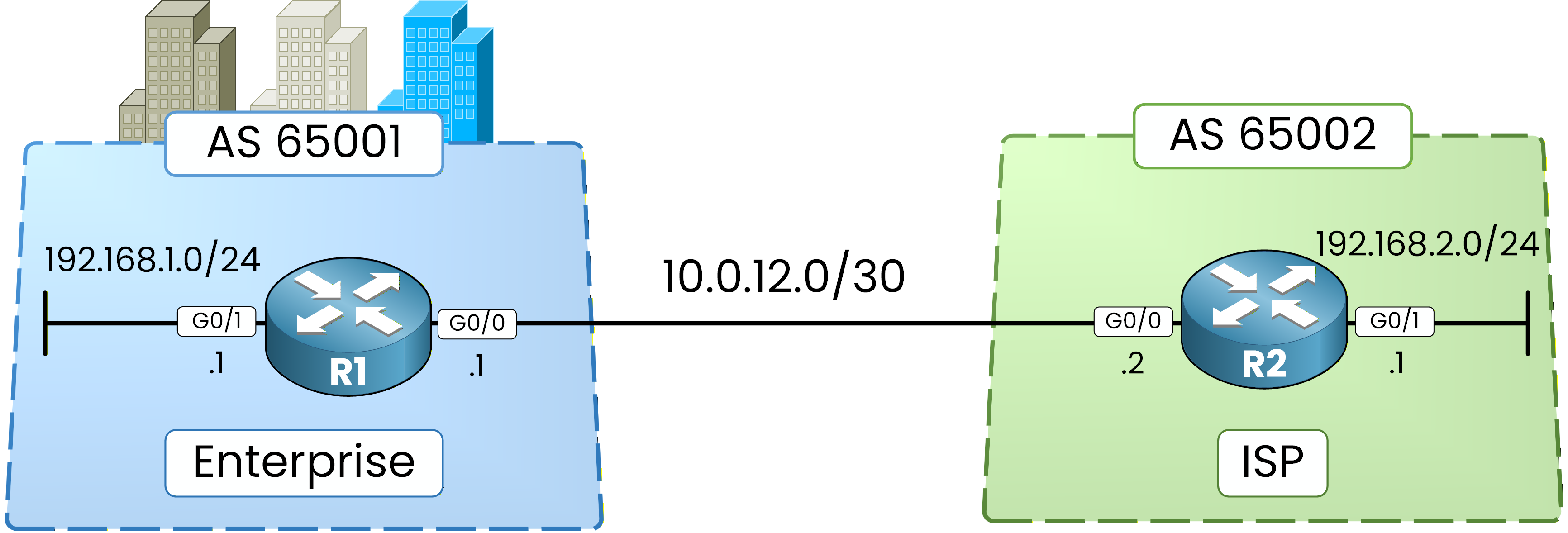
Figure 1 - Basic BGP Configuration Topology
Instead of automatically activating IPv4 for a neighbor, the address-family model requires explicit activation of each address family.
This configuration style supports scalable environments and multiple protocols (such as IPv6) and is the expected model at the CCNP ENCOR level.
Step 1 – Remove Previous BGP Configuration
Before applying the modern configuration model, we must remove the previous BGP configuration.
We delete the network statements and the neighbor relationship.R1# conf t Enter configuration commands, one per line. End with CNTL/Z. R1(config)# router bgp 65001 R1(config-router)# no network 192.168.1.0 mask 255.255.255.0 R1(config-router)# no neighbor 10.0.12.2 remote-as 65002 %BGP-3-NOTIFICATION: sent to neighbor 10.0.12.2 6/3 (Peer De-configured) 0 bytes %BGP_SESSION-5-ADJCHANGE: neighbor 10.0.12.2 IPv4 Unicast topology base removed from session Neighbor deleted %BGP-5-ADJCHANGE: neighbor 10.0.12.2 Down Neighbor deleted R1(config-router)# endWhen the neighbor is removed, the BGP session immediately goes down.
This is expected behavior.R2# conf t Enter configuration commands, one per line. End with CNTL/Z. R2(config)# router bgp 65002 R2(config-router)# no network 192.168.2.0 mask 255.255.255.0 R2(config-router)# no neighbor 10.0.12.1 remote-as 65001 R2(config-router)# endAt this point, BGP is no longer active between the routers.
Step 2 – Verify BGP Is Cleared
We now confirm that BGP has been fully removed.
R1# show ip bgp ipv4 unicast R1# R1# show ip bgp ipv4 unicast summary R1#R2# show ip bgp ipv4 unicast R2# R2# show ip bgp ipv4 unicast summary R2#Both routers show:
No neighbors
No prefixes
The BGP process is clean.
Answer the question below
When its neighbor statement is removed, the BGP session immediately goes ____
The process is empty.
You now rebuild the exact same session, but this time every address family is declared explicitly.Step 3 – Configure R1 with Address Families
We now rebuild the same eBGP session using the address-family model.
There are three key differences compared to the traditional configuration:
IPv4 is no longer implicitly activated.
We enter an address-family context.
We must explicitly activate the neighbor.
R1# conf t
Enter configuration commands, one per line.  End with CNTL/Z.
R1(config)# router bgp 65001
R1(config-router)# no bgp default ipv4-unicast
R1(config-router)# neighbor 10.0.12.2 remote-as 65002
R1(config-router)# address-family ipv4
R1(config-router-af)# neighbor 10.0.12.2 activate
R1(config-router-af)# network 192.168.1.0 mask 255.255.255.0
R1(config-router-af)# end
What changes compared to the traditional model:
no bgp default ipv4-unicastDisables automatic activation of the IPv4 unicast address-family for new neighbors.
neighbor 10.0.12.2 remote-as 65002Defines the BGP neighbor at the global BGP level.
At this stage, no address-family is activated yet.
address-family ipv4Enters the IPv4 unicast address-family configuration mode.
neighbor 10.0.12.2 activateActivates the IPv4 unicast address-family for this neighbor.
network 192.168.1.0 mask 255.255.255.0Advertises the local prefix within the IPv4 address-family.
Step 4 – Configure R2 and Bring Up the Session
Now mirror the configuration on R2.
R2# conf t
Enter configuration commands, one per line.  End with CNTL/Z.
R2(config)# router bgp 65002
R2(config-router)# no bgp default ipv4-unicast
R2(config-router)# neighbor 10.0.12.1 remote-as 65001
R2(config-router)# address-family ipv4
R2(config-router-af)# neighbor 10.0.12.1 activate
%BGP-5-ADJCHANGE: neighbor 10.0.12.1 Up
R2(config-router-af)# network 192.168.2.0 mask 255.255.255.0
R2(config-router-af)# end
%SYS-5-CONFIG_I: Configured from console by console
When the neighbor is activated under the IPv4 address-family, the BGP session comes up.
Answer the question below
Which address family is no longer activated automatically for new neighbors?
The configuration looks different, so you must prove the result is not.
Same checks as before: session, BGP table, RIB, ping, then a manual session reset to finish.Step 5 – Verify BGP Session
We now verify that the session is established and that prefixes are exchanged.
R1# show ip bgp ipv4 unicast summary
BGP router identifier 192.168.1.1, local AS number 65001
BGP table version is 7, main routing table version 7
2 network entries using 288 bytes of memory
2 path entries using 168 bytes of memory
2/2 BGP path/bestpath attribute entries using 320 bytes of memory
1 BGP AS-PATH entries using 24 bytes of memory
0 BGP route-map cache entries using 0 bytes of memory
0 BGP filter-list cache entries using 0 bytes of memory
BGP using 800 total bytes of memory
BGP activity 4/2 prefixes, 4/2 paths, scan interval 60 secs

Neighbor        V           AS MsgRcvd MsgSent   TblVer  InQ OutQ Up/Down  State/PfxRcd
10.0.12.2       4        65002       9       9        7    0    0 00:00:19        1
Check the following:
Neighbor: 10.0.12.2
Remote AS: 65002
PfxRcd: 1
After verifying on R1, confirm the same behavior on R2:
R2# show ip bgp ipv4 unicast summary
BGP router identifier 192.168.2.1, local AS number 65002
BGP table version is 7, main routing table version 7
2 network entries using 288 bytes of memory
2 path entries using 168 bytes of memory
2/2 BGP path/bestpath attribute entries using 320 bytes of memory
1 BGP AS-PATH entries using 24 bytes of memory
0 BGP route-map cache entries using 0 bytes of memory
0 BGP filter-list cache entries using 0 bytes of memory
BGP using 800 total bytes of memory
BGP activity 4/2 prefixes, 4/2 paths, scan interval 60 secs

Neighbor        V           AS MsgRcvd MsgSent   TblVer  InQ OutQ Up/Down  State/PfxRcd
10.0.12.1       4        65001       9       9        7    0    0 00:00:43        1
Step 6 – Verify BGP Table
Now inspect the BGP table to confirm route exchange.
R1# show ip bgp ipv4 unicast BGP table version is 7, local router ID is 192.168.1.1 Status codes: s suppressed, d damped, h history, * valid, > best, i - internal, r RIB-failure, S Stale, m multipath, b backup-path, f RT-Filter, x best-external, a additional-path, c RIB-compressed, t secondary path, Origin codes: i - IGP, e - EGP, ? - incomplete RPKI validation codes: V valid, I invalid, N Not found Network Next Hop Metric LocPrf Weight Path *> 192.168.1.0 0.0.0.0 0 32768 i *> 192.168.2.0 10.0.12.2 0 0 65002 iR2# show ip bgp ipv4 unicast BGP table version is 7, local router ID is 192.168.2.1 Status codes: s suppressed, d damped, h history, * valid, > best, i - internal, r RIB-failure, S Stale, m multipath, b backup-path, f RT-Filter, x best-external, a additional-path, c RIB-compressed, t secondary path, Origin codes: i - IGP, e - EGP, ? - incomplete RPKI validation codes: V valid, I invalid, N Not found Network Next Hop Metric LocPrf Weight Path *> 192.168.1.0 10.0.12.1 0 0 65001 i *> 192.168.2.0 0.0.0.0 0 32768 iThe BGP table content is exactly the same as before.
Only the configuration structure changed.Step 7 – Verify Routing Table
Now confirm that BGP has installed the learned routes into the routing table (RIB).
R1# show ip route bgp Codes: L - local, C - connected, S - static, R - RIP, M - mobile, B - BGP D - EIGRP, EX - EIGRP external, O - OSPF, IA - OSPF inter area N1 - OSPF NSSA external type 1, N2 - OSPF NSSA external type 2 E1 - OSPF external type 1, E2 - OSPF external type 2 i - IS-IS, su - IS-IS summary, L1 - IS-IS level-1, L2 - IS-IS level-2 ia - IS-IS inter area, * - candidate default, U - per-user static route o - ODR, P - periodic downloaded static route, H - NHRP, l - LISP a - application route + - replicated route, % - next hop override, p - overrides from PfR Gateway of last resort is not set B 192.168.2.0/24 [20/0] via 10.0.12.2, 00:01:19R2# show ip route bgp Codes: L - local, C - connected, S - static, R - RIP, M - mobile, B - BGP D - EIGRP, EX - EIGRP external, O - OSPF, IA - OSPF inter area N1 - OSPF NSSA external type 1, N2 - OSPF NSSA external type 2 E1 - OSPF external type 1, E2 - OSPF external type 2 i - IS-IS, su - IS-IS summary, L1 - IS-IS level-1, L2 - IS-IS level-2 ia - IS-IS inter area, * - candidate default, U - per-user static route o - ODR, P - periodic downloaded static route, H - NHRP, l - LISP a - application route + - replicated route, % - next hop override, p - overrides from PfR Gateway of last resort is not set B 192.168.1.0/24 [20/0] via 10.0.12.1, 00:02:15Both routers have installed the remote LAN network in their RIB.
Step 8 – Test Connectivity
Finally, verify end-to-end communication.
R1# ping 192.168.2.1 Type escape sequence to abort. Sending 5, 100-byte ICMP Echos to 192.168.2.1, timeout is 2 seconds: !!!!! Success rate is 100 percent (5/5), round-trip min/avg/max = 1/2/4 msR2# ping 192.168.1.1 Type escape sequence to abort. Sending 5, 100-byte ICMP Echos to 192.168.1.1, timeout is 2 seconds: !!!!! Success rate is 100 percent (5/5), round-trip min/avg/max = 1/2/4 msAll packets should be successful.
Answer the question below
In the BGP summary output, which column shows the number of received prefixes?
One last tool before closing the lab: forcing BGP to renegotiate without touching the configuration.
Step 9 – Reset BGP Session
Before finishing the lab, it is important to see how to manually reset a BGP session.
The commandclear ip bgp *resets all BGP neighbor sessions on the router.R1# clear ip bgp * %BGP-3-NOTIFICATION_MANY: sent to 1 sessions 6/4 (Administrative Reset) for all peers %BGP-5-ADJCHANGE: neighbor 10.0.12.2 Down User reset %BGP_SESSION-5-ADJCHANGE: neighbor 10.0.12.2 IPv4 Unicast topology base removed from session User reset %BGP-5-ADJCHANGE: neighbor 10.0.12.2 UpIt performs a hard reset of the BGP session, forcing a new TCP connection and full route re-exchange.
Answer the question below
In the BGP address-family model, what must you explicitly activate for each peer?