In this lesson on Spanning Tree Port Roles, we continue building our Spanning Tree topology by assigning roles to each switch port.
In the previous lesson on configuring STP, we set up our topology so that SW1 was elected as the Root Bridge, based on its lowest Bridge ID (32769:AABB.CCDD.EE01). With the Root Bridge now established, the next step is to assign roles to each port in the switches to ensure the topology remains loop-free.
Figure 1 – SW1 is Root; SW2 is second-best; SW3 is non-root
Answer the question below
Click 'Complete' to continue
The second step in the process is to elect the Root Ports. Each non-root switch selects its Root Port, the single port that provides the most efficient path to the Root Bridge.
But you might ask, how does a switch decide which port is the best path to the Root Bridge?
It's the Root Path Cost metric that provides this critical information.What is the Root Path Cost?
The Root Path Cost is the metric used to determine the shortest and most efficient path to the Root Bridge. It is calculated by summing the individual port costs of all the links along the path to the Root Bridge.
Default Port Cost Values
The cost of a port depends on the speed of the link it connects to. The IEEE 802.1D standard defines the following default values:
Link Speed
Port Cost
10 Gbps
2
1 Gbps
4
100 Mbps
19
10 Mbps
100
Table 1 – Default STP port costs based on link speed (IEEE 802.1D)
These values are cumulative, meaning the total cost of a path is the sum of the costs for all links in the path. Lower Path Costs are always preferred, ensuring that STP selects the most efficient route.
Topology Overview with Path Costs
The following diagram illustrates the Path Costs associated with each interface in the topology:

Figure 2 – Each 1 Gbps link has a default STP path cost of 4 in this topology
Electing the Root Port
The Root Port is the port on each non-root switch that offers the shortest path to the Root Bridge.
The election process follows these steps:
Lowest Path Cost: The port with the lowest cumulative Path Cost to the Root Bridge becomes the Root Port.
Tiebreaker - Lowest Sender Bridge ID: If two ports have the same Path Cost, the port connected to the switch with the lowest Bridge ID is selected.
Tiebreaker - Lowest Port ID: If the Bridge IDs are identical, the port with the lowest Port ID is chosen.
Root Port Election in Our Topology
SW2
G0/1 connects directly to SW1 (the Root Bridge) with a Path Cost of 4.

Figure 3 – STP Path Cost Calculation for SW2
G0/2 connects to SW3 → SW1.
This indirect path has a total Path Cost of 8 (4 for SW2 → SW3 and 4 for SW3 → SW1).

Figure 4 – Indirect STP Path Cost Evaluation for SW2
G0/1 is selected as the Root Port because it provides the lowest Path Cost to the Root Bridge.
SW3
G0/1 connects directly to SW1 (the Root Bridge) with a Path Cost of 4.

Figure 5 – STP Path Cost Calculation for SW3
G0/2 connects to SW2 → SW1.
This indirect path has a total Path Cost of 8 (4 for SW3 → SW2 and 4 for SW2 → SW1).

Figure 6 – Indirect STP Path Cost Evaluation for SW3
G0/1 is selected as the Root Port because it provides the lowest Path Cost to the Root Bridge.
Final Summary of Root Port Election

Figure 7 – STP Final Root Port Election
SW1 (Root Bridge): No Root Port.
SW2: G0/1 is the Root Port (Path Cost: 4).
SW3: G0/1 is the Root Port (Path Cost: 4).
We can check the spanning tree port roles on SW2:
SW2# show spanning-tree
VLAN0001
  Spanning tree enabled protocol ieee
  Root ID    Priority    24577
             Address     00D0.588B.29BB
             Cost        4
             Port        25(GigabitEthernet0/1)
             Hello Time  2 sec  Max Age 20 sec  Forward Delay 15 sec

  Bridge ID  Priority    28673  (priority 28672 sys-id-ext 1)
             Address     00E0.F750.C610
             Hello Time  2 sec  Max Age 20 sec  Forward Delay 15 sec
             Aging Time  20

Interface        Role Sts Cost      Prio.Nbr Type
---------------- ---- --- --------- -------- --------------------------------
Gi0/1            Root FWD 4         128.25   P2p
Gi0/2            Desg FWD 4         128.26   P2p
On SW3:
SW3# show spanning-tree
VLAN0001
  Spanning tree enabled protocol ieee
  Root ID    Priority    24577
             Address     00D0.588B.29BB
             Cost        4
             Port        25(GigabitEthernet0/1)
             Hello Time  2 sec  Max Age 20 sec  Forward Delay 15 sec

  Bridge ID  Priority    32769  (priority 32768 sys-id-ext 1)
             Address     0001.422A.4217
             Hello Time  2 sec  Max Age 20 sec  Forward Delay 15 sec
             Aging Time  20

Interface        Role Sts Cost      Prio.Nbr Type
---------------- ---- --- --------- -------- --------------------------------
Gi0/1            Root FWD 4         128.25   P2p
Gi0/2            Altn BLK 4         128.26   P2p
As shown in the output, the role assigned to interface Gi0/1 on both SW2 and SW3 is Root Port.
You can verify this directly from the command prompt.Answer the question below
In Table 1, what default port cost does the IEEE 802.1D standard assign to a 100 Mbps link?
Answer the question below
In SW3's show spanning-tree output, what value does the Sts column show for Gi0/2?
The third step in Spanning Tree Protocol (STP) is to elect the Designated Ports for each network segment. A Designated Port is responsible for forwarding traffic on the segment toward the Root Bridge.
Every segment has one Designated Port, ensuring efficient traffic flow and keeping the network connected.
Case 1 : Designated Ports on the Root Bridge
All ports on the Root Bridge are automatically Designated Ports. This is because the Root Bridge has the lowest cost to itself and serves as the central point for traffic forwarding.
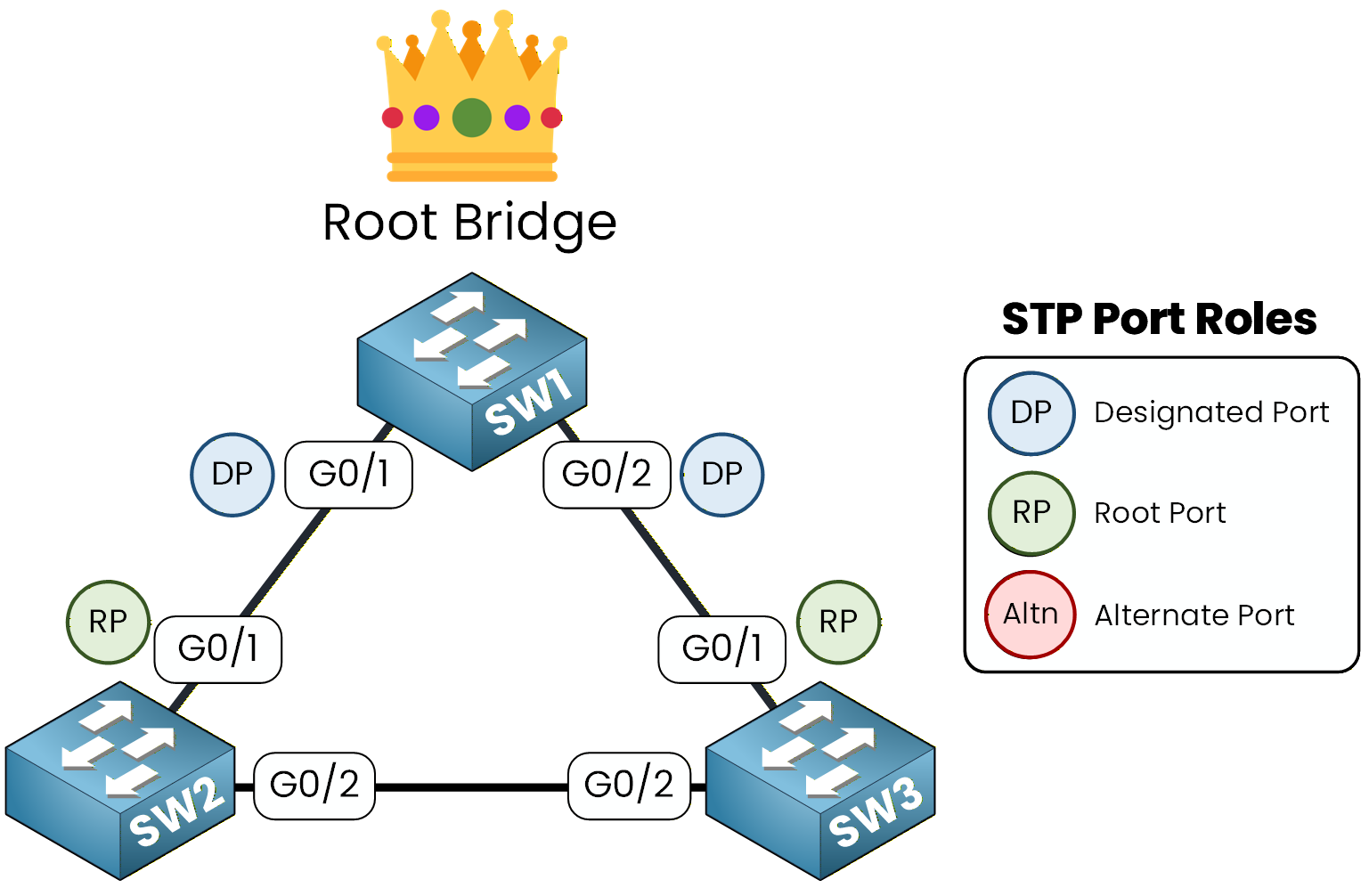
Figure 8 – Designated Ports on the Root Bridge
All ports on SW1 (the Root Bridge) are Designated Ports.
SW1# show spanning-tree
VLAN0001
  Spanning tree enabled protocol ieee
  Root ID    Priority    24577
             Address     00D0.588B.29BB
             This bridge is the root
             Hello Time  2 sec  Max Age 20 sec  Forward Delay 15 sec

  Bridge ID  Priority    24577  (priority 24576 sys-id-ext 1)
             Address     00D0.588B.29BB
             Hello Time  2 sec  Max Age 20 sec  Forward Delay 15 sec
             Aging Time  20

Interface        Role Sts Cost      Prio.Nbr Type
---------------- ---- --- --------- -------- --------------------------------
Gi0/1            Desg FWD 4         128.25   P2p
Gi0/2            Desg FWD 4         128.26   P2p
As shown in the output, all interfaces on the Root Bridge are in the Desg role, which stands for Designated Port, confirming that every port on the Root Bridge forwards traffic.
Case 2 : Designated Port When There is a Root Port
On a segment where one switch has a Root Port, the other switch's port on that segment becomes the Designated Port.
Example: Adding SW4
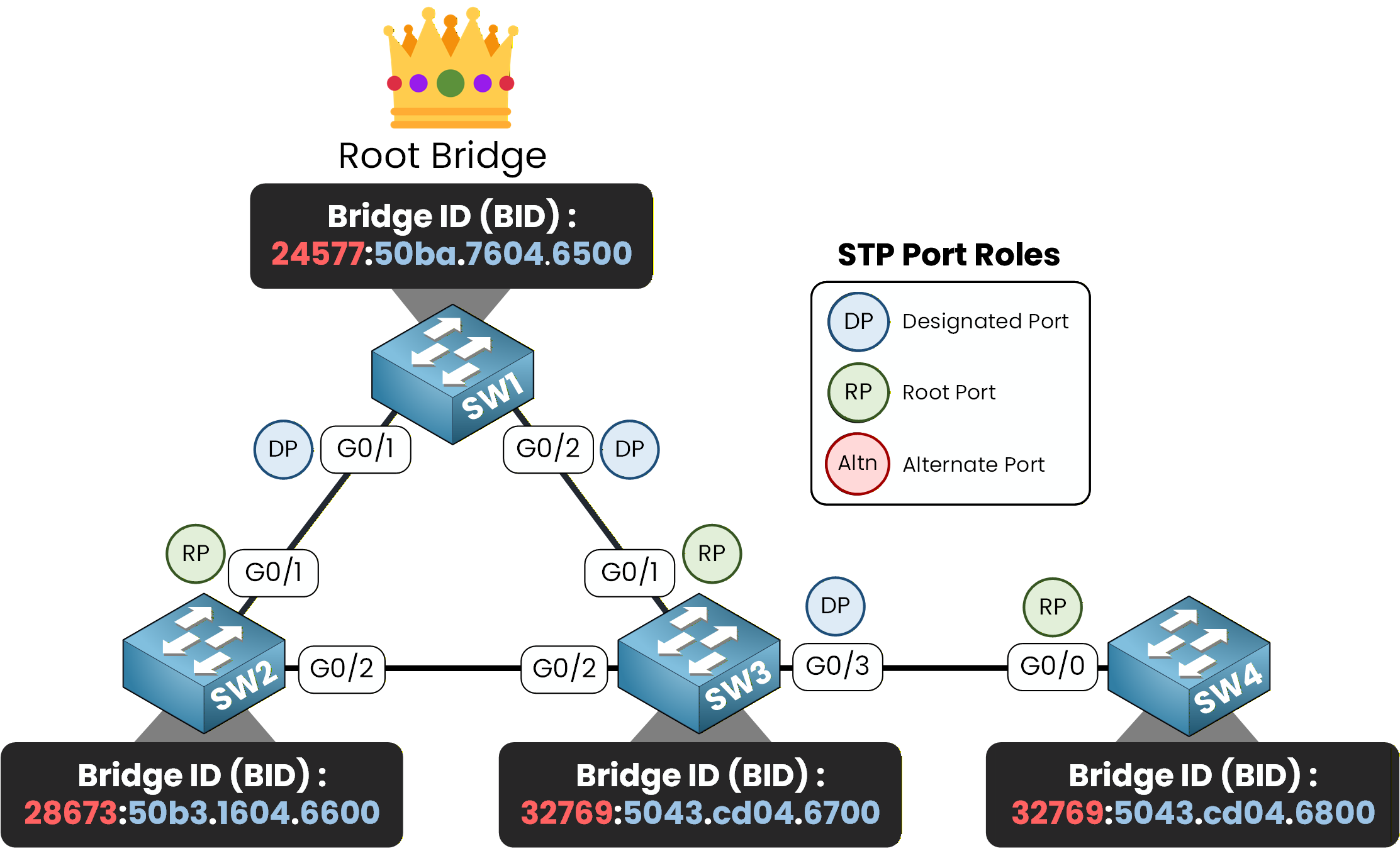
Figure 9 – Designated Port When There Is a Root Port
Let's imagine a new switch, SW4, is added to the topology and connected to SW3 via G0/3. In this case:
SW4's G0/0 becomes its Root Port, as it provides the shortest path to the Root Bridge (via SW3 → SW1).
The port at the opposite end of the link, SW3's G0/3, automatically becomes the Designated Port for that segment.
SW3# show spanning-tree
VLAN0001
  Spanning tree enabled protocol ieee
  Root ID    Priority    24577
             Address     00D0.588B.29BB
             Cost        4
             Port        25(GigabitEthernet0/1)
             Hello Time  2 sec  Max Age 20 sec  Forward Delay 15 sec

  Bridge ID  Priority    32769  (priority 32768 sys-id-ext 1)
             Address     0001.422A.4217
             Hello Time  2 sec  Max Age 20 sec  Forward Delay 15 sec
             Aging Time  20

Interface        Role Sts Cost      Prio.Nbr Type
---------------- ---- --- --------- -------- --------------------------------
Gi0/1            Root FWD 4         128.25   P2p
Gi0/2            Altn BLK 4         128.26   P2p
Gi0/3            Desg FWD 4         128.27   P2p
As shown in the output, Gi0/3 is in the Desg role (Designated Port) because it is connected to SW4, whose interface on this segment is a Root Port.
Case 3: Designated Port When There is No Root Port
When a network segment connects two switches, and neither switch has a Root Port, the Spanning Tree Protocol (STP) must elect a Designated Port for that segment.
Election Process
The election of the Designated Port follows these rules:
Lowest Path Cost: The port on the switch with the lowest cumulative Path Cost to the Root Bridge becomes the Designated Port.
Tiebreaker - Lowest Bridge ID: If both switches have the same Path Cost, the switch with the lower Bridge ID wins.
Tiebreaker - Lowest Port ID: If the Bridge IDs are identical, the port with the lowest Port ID is selected.
Example: Designated Port Between SW2 and SW3
Let's analyze the segment between SW2 and SW3:
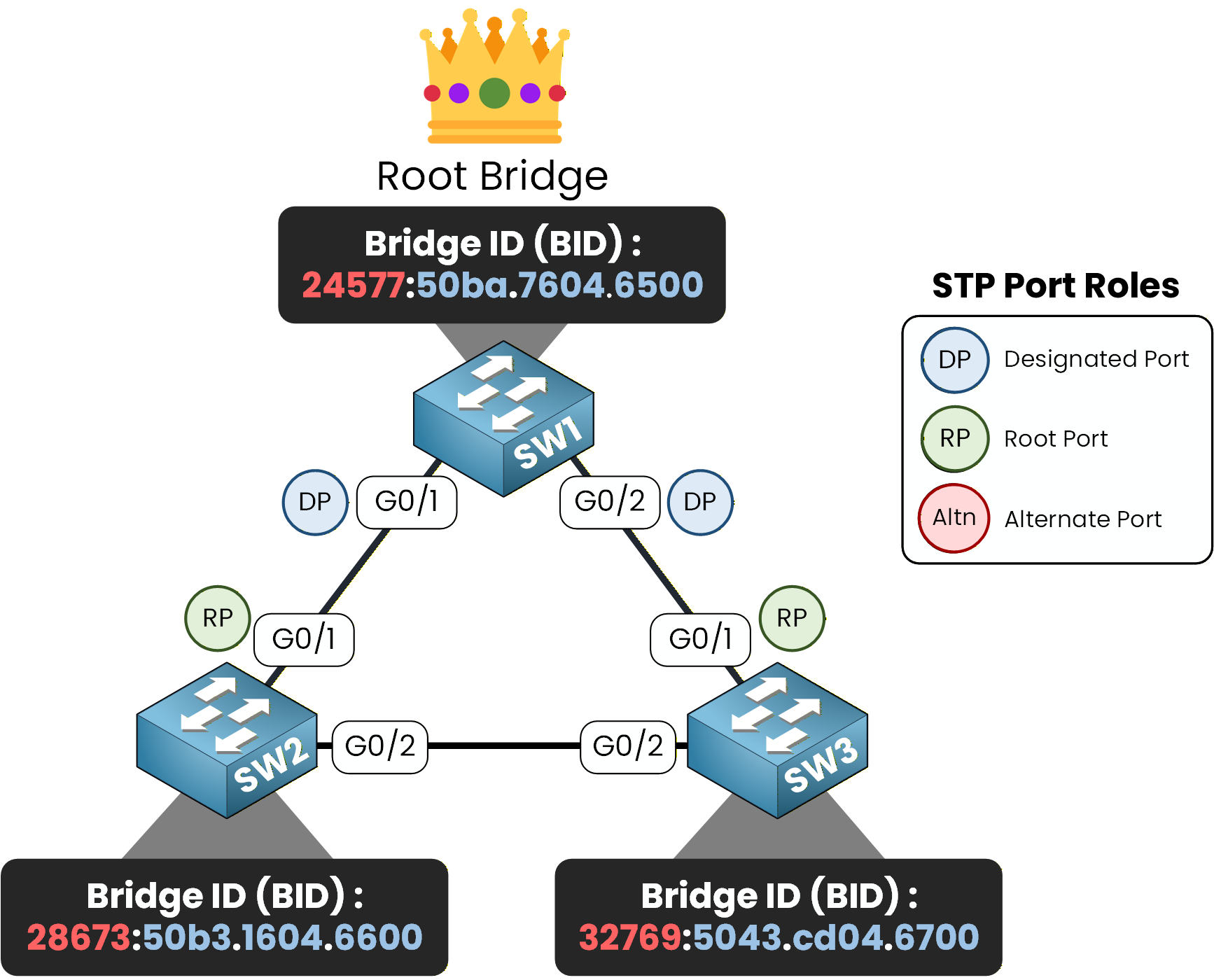
Figure 10 – STP Designated Port Election Between SW2 and SW3
Neither switch has a Root Port on this segment.
Both switches have the same Path Cost to the Root Bridge.
SW2 has a lower Bridge ID than SW3.
Therefore, SW2's G0/2 becomes the Designated Port.
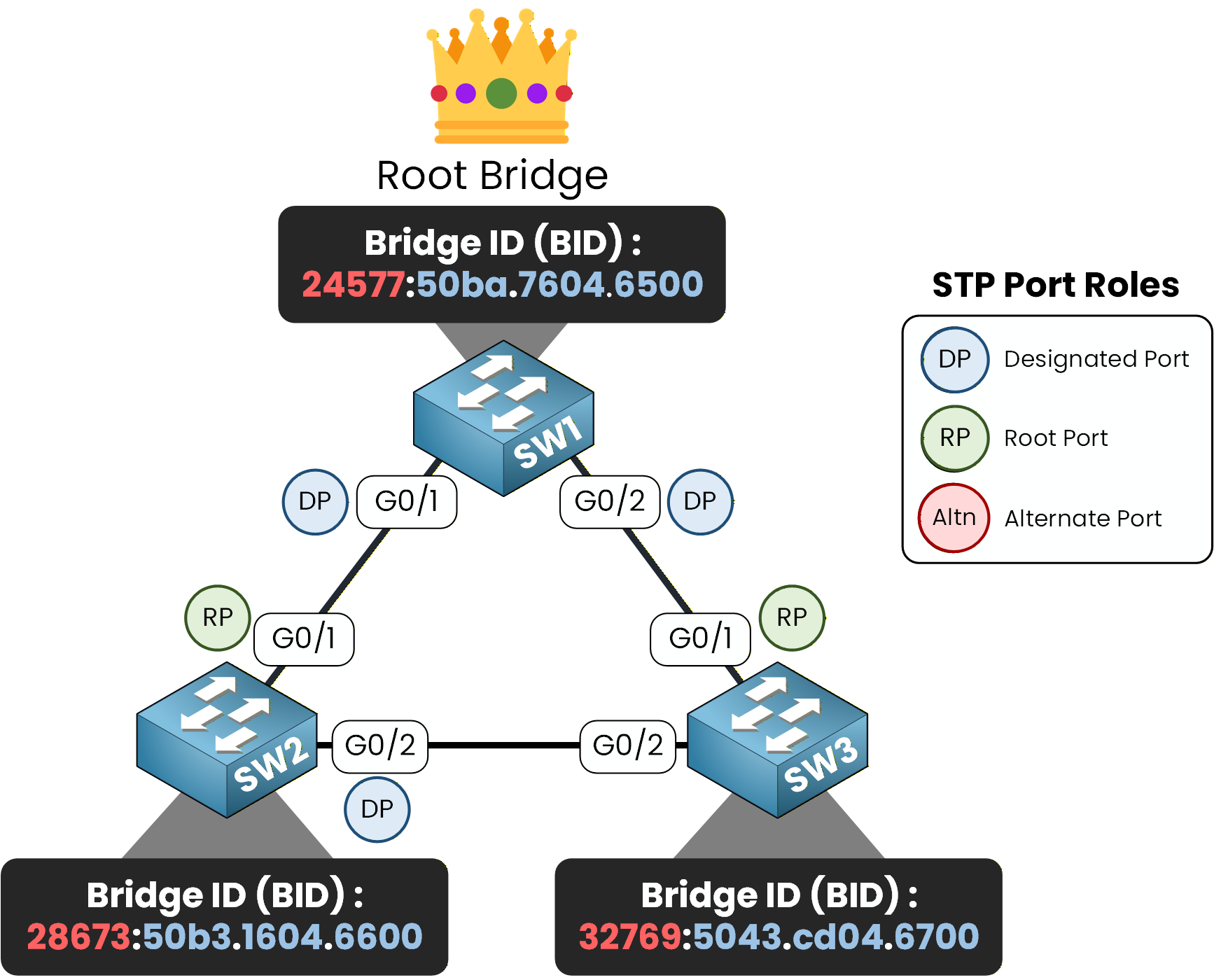
Figure 11 – SW2 Wins Designated Port Election on Shared Segment
SW2# show spanning-tree
VLAN0001
  Spanning tree enabled protocol ieee
  Root ID    Priority    24577
             Address     00D0.588B.29BB
             Cost        4
             Port        25(GigabitEthernet0/1)
             Hello Time  2 sec  Max Age 20 sec  Forward Delay 15 sec

  Bridge ID  Priority    28673  (priority 28672 sys-id-ext 1)
             Address     00E0.F750.C610
             Hello Time  2 sec  Max Age 20 sec  Forward Delay 15 sec
             Aging Time  20

Interface        Role Sts Cost      Prio.Nbr Type
---------------- ---- --- --------- -------- --------------------------------
Gi0/1            Root FWD 4         128.25   P2p
Gi0/2            Desg FWD 4         128.26   P2p
As shown in the output, Gi0/2 is in the Desg role (Designated Port) because SW2 has a lower Bridge ID than SW3 on this shared segment.
Case 4 : Designated Ports Connected to End Devices
Ports that are connected to end devices, such as PCs, servers, or other hosts, are always Designated Ports.
These ports must forward traffic to ensure proper communication between the devices and the rest of the network.Example
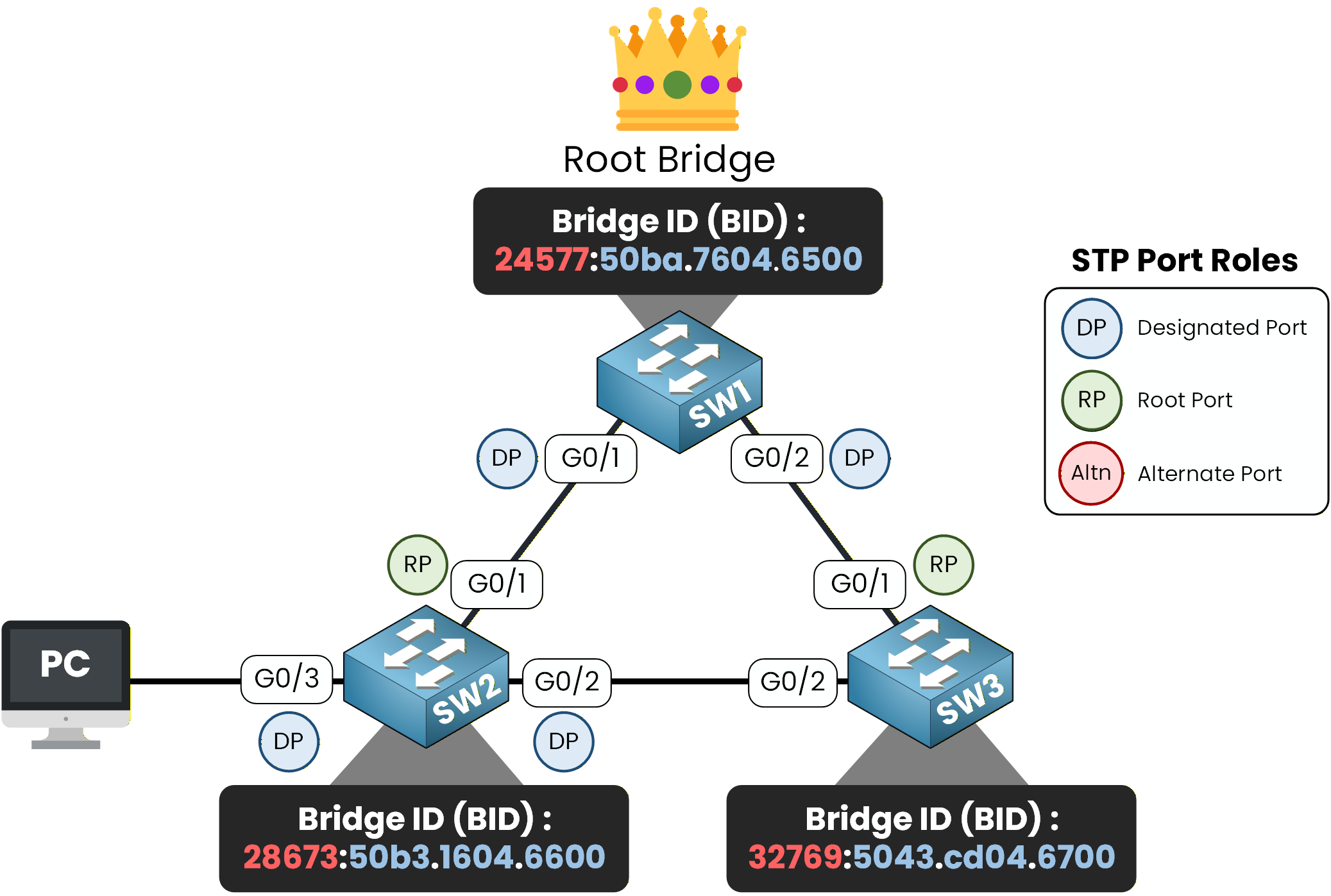
Figure 12 – Designated Ports Connected to End Devices
SW2's G0/3, which connects to PC1, is automatically a Designated Port.
SW2# show spanning-tree
VLAN0001
  Spanning tree enabled protocol ieee
  Root ID    Priority    24577
             Address     00D0.588B.29BB
             Cost        4
             Port        25(GigabitEthernet0/1)
             Hello Time  2 sec  Max Age 20 sec  Forward Delay 15 sec

  Bridge ID  Priority    28673  (priority 28672 sys-id-ext 1)
             Address     00E0.F750.C610
             Hello Time  2 sec  Max Age 20 sec  Forward Delay 15 sec
             Aging Time  20

Interface        Role Sts Cost      Prio.Nbr Type
---------------- ---- --- --------- -------- --------------------------------
Gi0/1            Root FWD 4         128.25   P2p
Gi0/2            Desg FWD 4         128.26   P2p
Gi0/3            Desg FWD 4         128.27   P2p
As shown in the output, the interface connected to an end device is in the Desg role (Designated Port), since ports facing hosts always forward traffic in STP.
Summary of Designated Ports
All ports on the Root Bridge are Designated Ports.
If one end of a segment has a Root Port, the other end becomes the Designated Port.
On segments without a Root Port, the Designated Port is elected based on Path Cost, then Bridge ID, and finally Port ID if there is a tie.
Ports connected to end devices (such as PCs or hosts) are always Designated Ports to ensure proper traffic forwarding.
Answer the question below
What port role forwards traffic for a network segment?
If a port is not selected as a Root Port or a Designated Port, it becomes an Alternate Port.
An Alternate Port is placed in the blocking state, preventing loops while serving as a backup path to the Root Bridge.These ports are placed in the blocking state to prevent Layer 2 loops while remaining ready to transition if the topology changes.
Example: Alternate Port in Our Topology
Let's examine the link between SW2 and SW3:
SW2's G0/2 is the Designated Port for this segment, as it has the lower Bridge ID.
SW3's G0/2 becomes the Alternate Port because it is not a Root Port or Designated Port.
It enters the blocking state, preventing traffic loops.
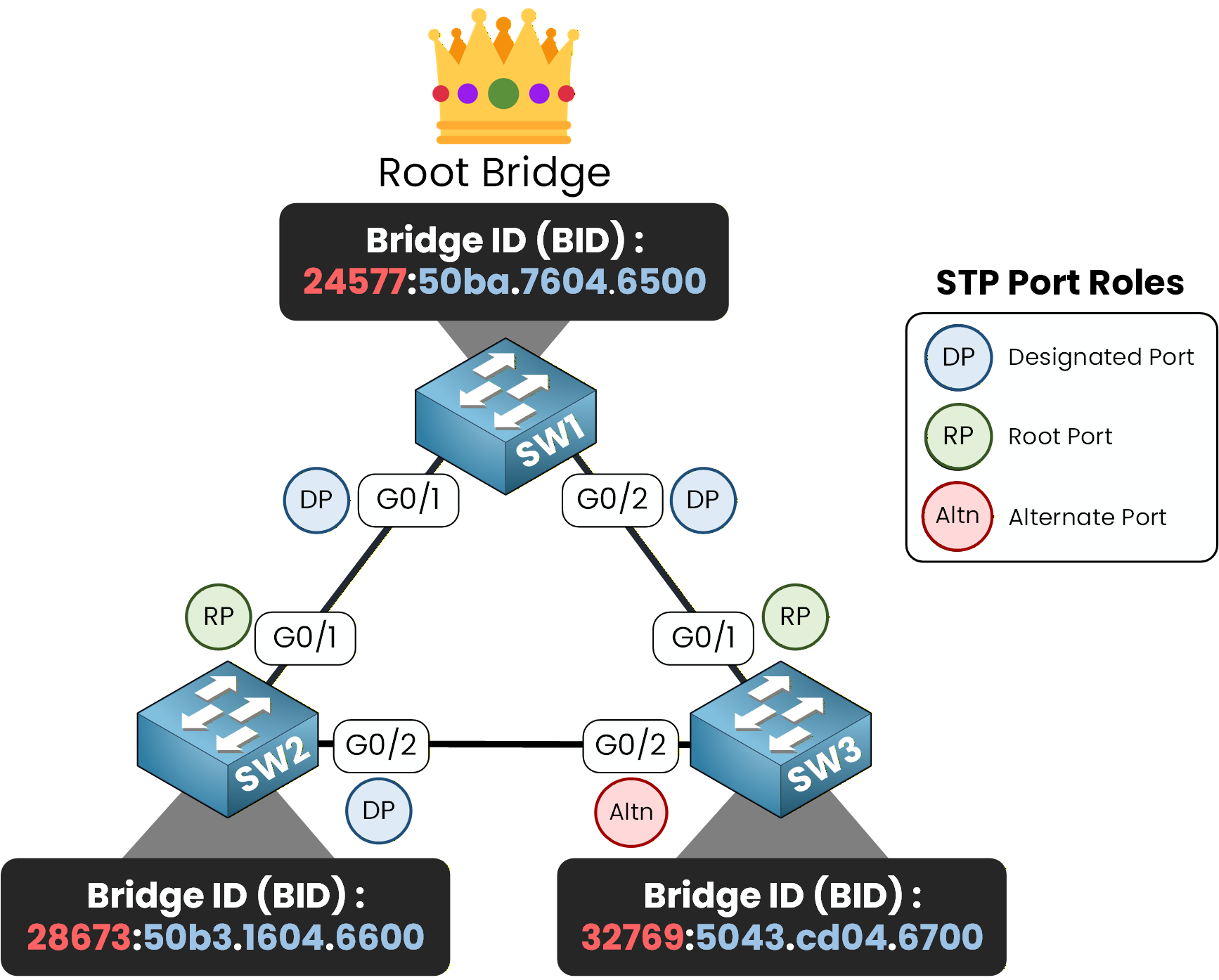
Figure 13 – Blocked Port Election
SW3# show spanning-tree
VLAN0001
  Spanning tree enabled protocol ieee
  Root ID    Priority    24577
             Address     00D0.588B.29BB
             Cost        4
             Port        25(GigabitEthernet0/1)
             Hello Time  2 sec  Max Age 20 sec  Forward Delay 15 sec

  Bridge ID  Priority    32769  (priority 32768 sys-id-ext 1)
             Address     0001.422A.4217
             Hello Time  2 sec  Max Age 20 sec  Forward Delay 15 sec
             Aging Time  20

Interface        Role Sts Cost      Prio.Nbr Type
---------------- ---- --- --------- -------- --------------------------------
Gi0/1            Root FWD 4         128.25   P2p
Gi0/2            Altn BLK 4         128.26   P2p
In this configuration, SW3's G0/2 remains ready to switch to the forwarding state if the network topology changes, such as a failure in another link.
Answer the question below
Which port role acts as a backup path and does not forward traffic unless the primary path fails?
Port roles in Spanning Tree Protocol (STP) are essential for creating a loop-free, efficient, and redundant network topology:
Root Port (RP):
The port on a non-root switch with the shortest path to the Root Bridge. It forwards traffic toward the Root Bridge, ensuring all switches stay connected to the network's central point.Designated Port (DP):
The port responsible for forwarding traffic onto a segment. It ensures that the segment has an active path toward the Root Bridge. Each segment has exactly one Designated Port, which is either on the Root Bridge or the switch with the best path to the Root Bridge. Ports connected to end devices are always designated ports.Alternate Port (Altn):
A backup port that provides an alternate path to the Root Bridge and is placed in the blocking state to prevent loops.
In the following lesson, we'll explore STP Timers & Port States and how they help maintain stability and adapt to changes in the network.
Answer the question below
Click 'Complete' to continue