In the previous lesson, R2 took over the moment R1 stopped sending Hellos.
R1 comes back online with its priority of 110. Does it reclaim the Active role?
Without Preemption
R1 runs priority 110 and is the Active router; R2 sits at the default priority of 100 and stays in Standby.
Now imagine R1 fails: R2 takes over as Active, just like in the previous lesson. R1 then comes back online.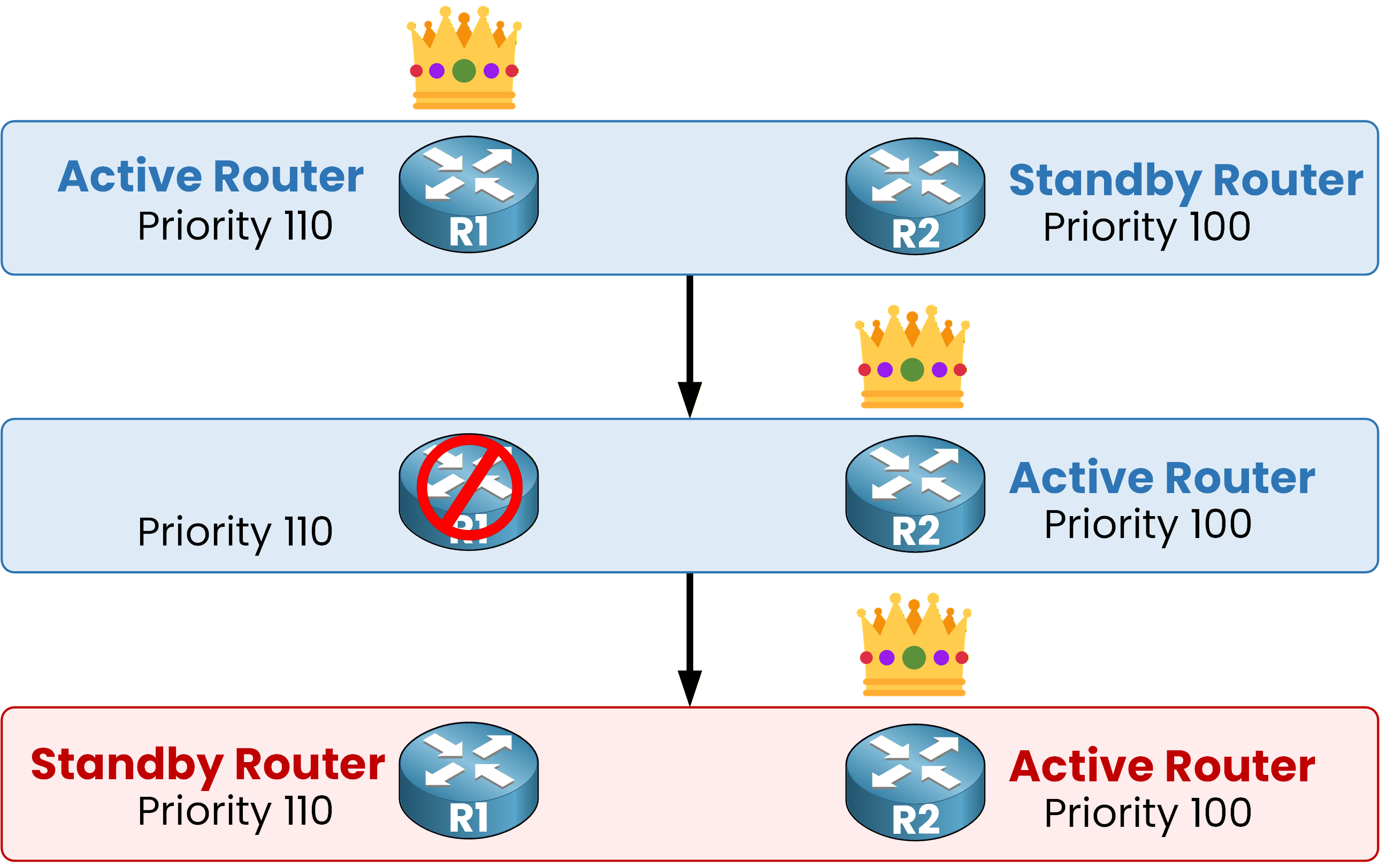
Figure 1 – Without preemption, R1 stays Standby after recovery
By default, no: R2 stays Active even after R1 recovers.
A role only changes when the current Active router disappears, never just because a higher-priority router shows up.
Preemption is disabled by default, so R1 rejoins as Standby and waits there, regardless of its priority.Answer the question below
Without preemption, which router stays Active after R1 recovers?
With Preemption
Now enable preemption on R1:
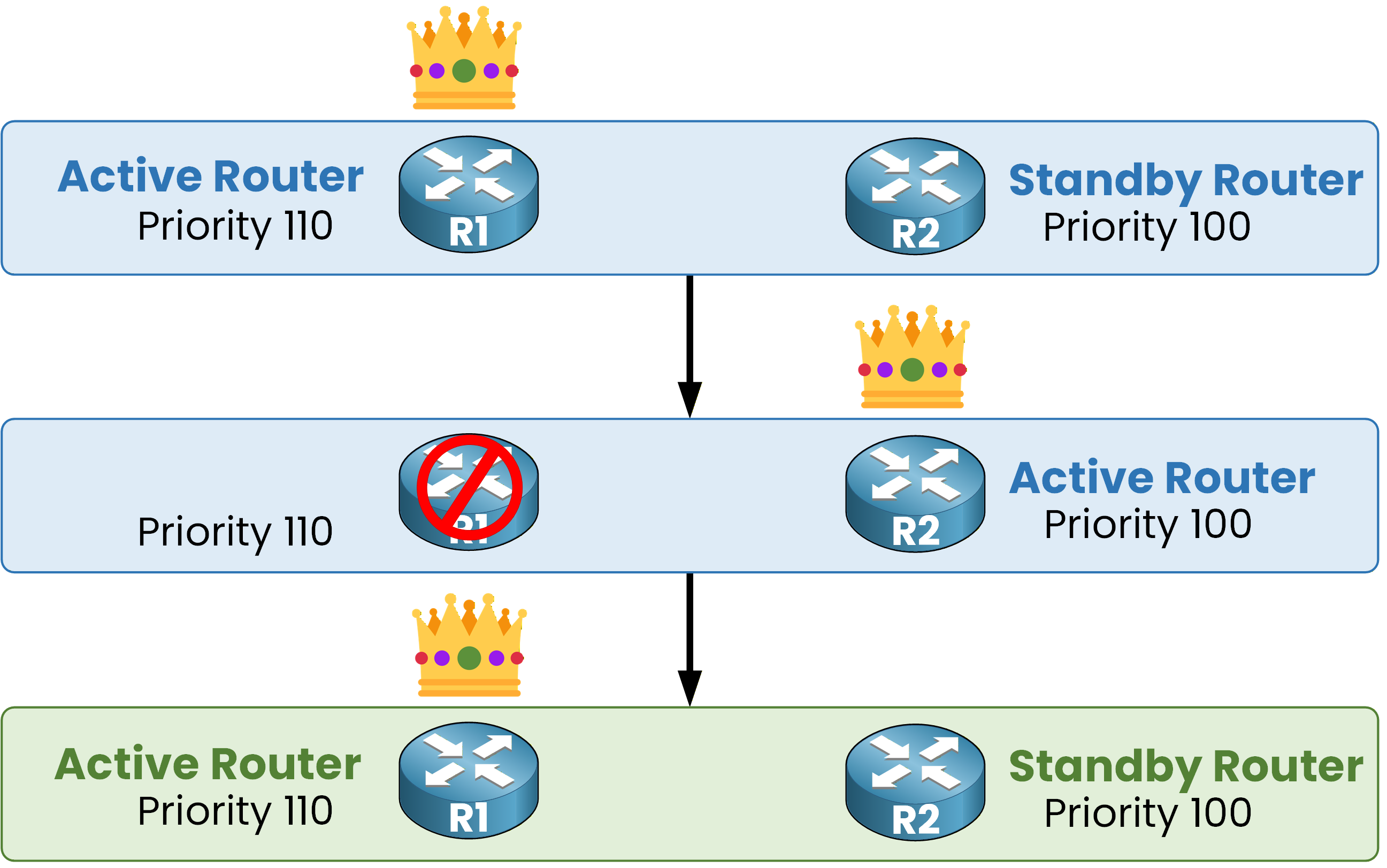
Figure 2 – With preemption, R1 reclaims the Active role
As soon as R1 recovers, it compares priorities, sees 110 against 100, and takes the Active role back.
Let's configure preempt on R1 to see this in action:
R1# conf t
Enter configuration commands, one per line.  End with CNTL/Z.
R1(config)# int g0/0
R1(config-if)# standby 1 preempt
Preemption is a per-router, per-group setting.
Enabling it on R1 only allows R1 to reclaim the Active role; it has no effect on how R2 behaves.In most designs, you enable preemption on every router whose priority is high enough to justify becoming Active, so the group always converges back to the intended router. If a router should keep the Active role even after a higher-priority peer comes back online, simply leave preemption disabled on that peer.
Answer the question below
Does enabling preempt on R1 also enable it on R2?
In Real World Scenario
In production you rarely want an instant takeover.
A router that just booted may still be converging its routing protocols.
If it takes the Active role too early, it attracts traffic it cannot route yet, and that traffic is dropped.
You can add a delay so the router waits before preempting:R1(config-if)# standby 1 preempt delay minimum 60 R1(config-if)# endAnswer the question below
Which feature lets the highest-priority router reclaim the Active role?
HSRP has two versions.
They do not interoperate, and the virtual MAC address tells you instantly which one a group runs.HSRP Version 1
HSRPv1 builds its virtual MAC as 0000.0C07.ACxx.
The last byte carries the group number in hexadecimal: group 10 gives AC0A.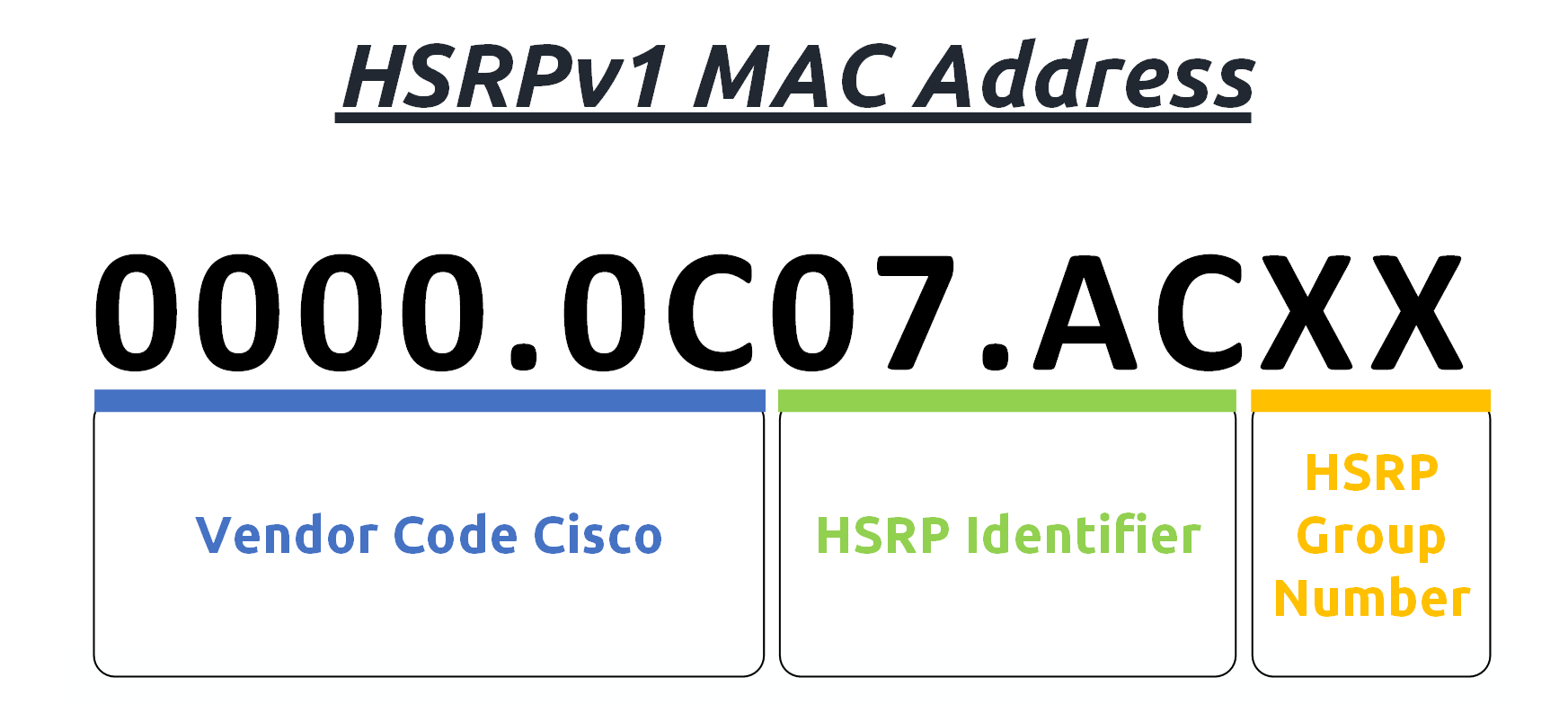
Figure 3 – HSRPv1 virtual MAC address format
Version 1 sends its Hellos to multicast 224.0.0.2 and supports 256 groups, numbered 0 to 255.
It has no IPv6 support.Answer the question below
Which multicast address does HSRPv1 use for its Hellos?
HSRP Version 2
HSRPv2 extends the format to 0000.0C9F.Fxxx.
The last three hex digits carry the group number: group 500 gives F1F4.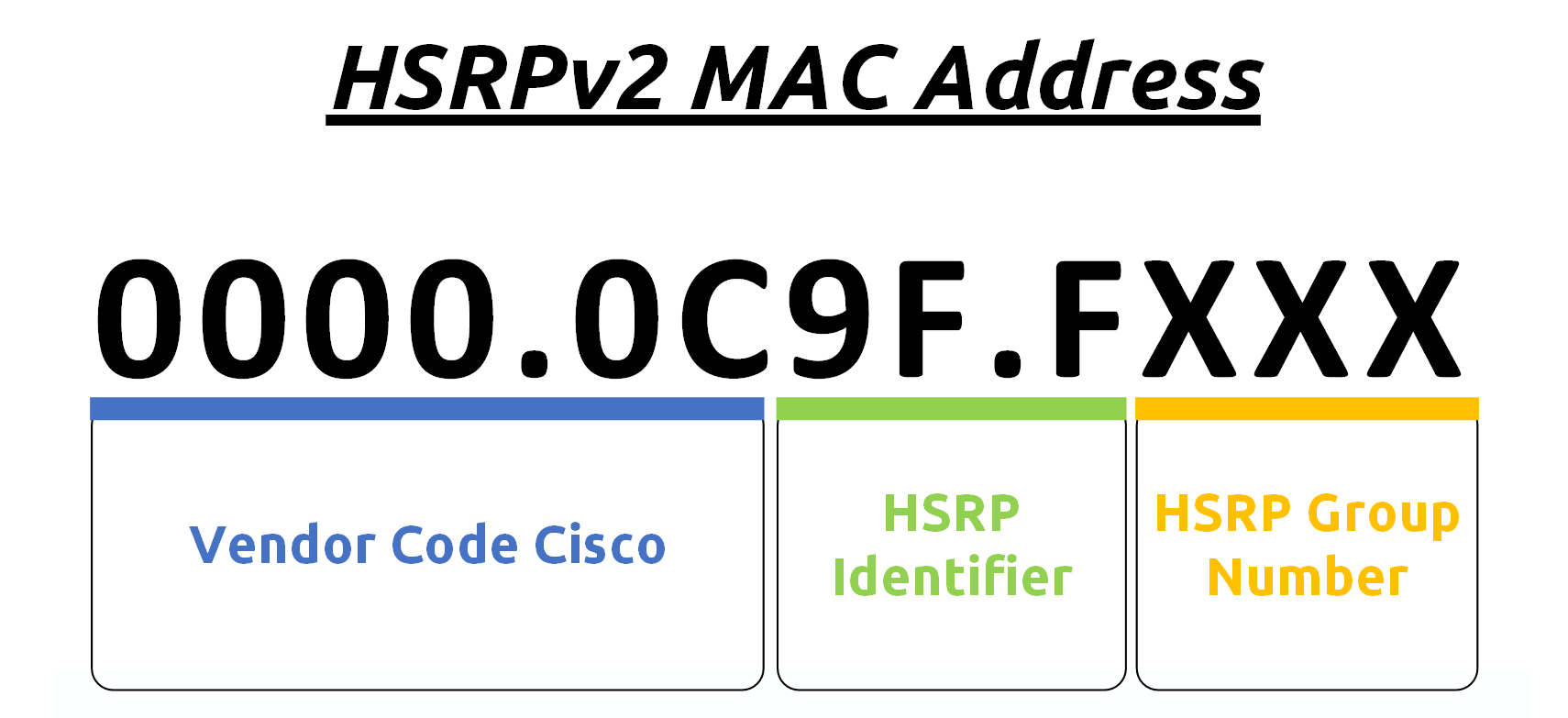
Figure 4 – HSRPv2 virtual MAC address format
Version 2 moves its Hellos to 224.0.0.102 to avoid conflicts with other protocols listening on 224.0.0.2.
It supports 4096 groups, numbered 0 to 4095, and fully supports IPv6.Here's a quick side-by-side comparison:
HSRPv1HSRPv2
Group Numbers
0 – 255
0 – 4095
Virtual MAC address
0000.0c07.acXX (XX = group number)
0000.0c9f.fxxx (xxx = group number)
Multicast Address
224.0.0.2
224.0.0.102
Millisecond Timers
Not advertised or learned
Advertised and learned
IPv6 Support
No
Yes
Table 1 – HSRPv1 vs HSRPv2 comparison
Answer the question below
Which HSRP version supports IPv6?
Configuring the HSRP Version
The version is set per interface.
Your demo group still runs version 1: every show standby so far displayed HSRP-V1 and the 0000.0c07.ac01 virtual MAC.
Switch R1 to version 2:R1# conf t Enter configuration commands, one per line. End with CNTL/Z. R1(config)# int g0/0 R1(config-if)# standby version 2 %HSRP-6-STATECHANGE: GigabitEthernet0/0 Grp 1 state Active -> Init R1(config-if)# endThe group dropped to Init: R1 now speaks a language R2 does not understand.
All routers in the same group must run the same version.
With a mismatch, the two routers can no longer read each other's Hellos.
If left unattended, R2 will eventually stop hearing from R1 and take over as well, doubling the VIP on the same segment.
Fix R2 before that happens:R2# conf t Enter configuration commands, one per line. End with CNTL/Z. R2(config)# int g0/0 R2(config-if)# standby version 2 %HSRP-6-STATECHANGE: GigabitEthernet0/0 Grp 1 state Standby -> Init %HSRP-6-STATECHANGE: GigabitEthernet0/0 Grp 1 state Speak -> Standby R2(config-if)# endThe group is stable again, both routers on version 2.
Now look at the virtual MAC:R1# show standby GigabitEthernet0/0 - Group 1 (version 2) State is Active 4 state changes, last state change 00:00:41 Virtual IP address is 192.168.10.3 Active virtual MAC address is 0000.0c9f.f001 Local virtual MAC address is 0000.0c9f.f001 (v2 default) Hello time 250 msec, hold time 800 msec Next hello sent in 0.208 secs Preemption enabled Active router is local Standby router is 192.168.10.2, priority 100 (expires in 0.652 sec) Priority 110 (configured 110) Group name is "hsrp-Gi0/0-1" (default)Compare with the very first show standby of the HSRP Fundamentals lesson.
0000.0c07.ac01 became 0000.0c9f.f001: same group, new version, new MAC format.
Every setting you configured earlier survived the change: priority 110, the millisecond timers, and preemption.Verifying the Version Change
Confirm the same virtual MAC appears on R2:
R2# show standby
GigabitEthernet0/0 - Group 1 (version 2)
  State is Standby
    5 state changes, last state change 00:00:41
  Virtual IP address is 192.168.10.3
  Active virtual MAC address is 0000.0c9f.f001
    Local virtual MAC address is 0000.0c9f.f001 (v2 default)
  Hello time 250 msec, hold time 800 msec
    Next hello sent in 0.112 secs
  Preemption disabled
  Active router is 192.168.10.1, priority 110 (expires in 0.652 sec)
  Standby router is local
  Priority 100 (default 100)
  Group name is "hsrp-Gi0/0-1" (default)
Both routers now agree: same group, same version, same virtual MAC, 0000.0c9f.f001.
You now have every piece of the puzzle: the group, the roles, the failover, preemption and the version. Time to put it all together in a full configuration.Answer the question below
How many groups does HSRPv2 support?