Now that we've answered the question of what a DHCP relay agent is, let's look at how to configure one on a Cisco router.
PC1 Before the Relay
Before configuring the relay, let's look at PC1:
C:\> ipconfig

FastEthernet0 Connection:(default port)

   Connection-specific DNS Suffix..:
   Link-local IPv6 Address.........: FE80::2E0:F9FF:FE23:D3B5
   IPv6 Address....................: ::
   IPv4 Address....................: 0.0.0.0
   Subnet Mask.....................: 0.0.0.0
   Default Gateway.................: ::
                                     0.0.0.0
No IPv4 address, no subnet mask, no default gateway. PC1 sent a DHCP DISCOVER, but the broadcast did not cross the router and never reached the server.
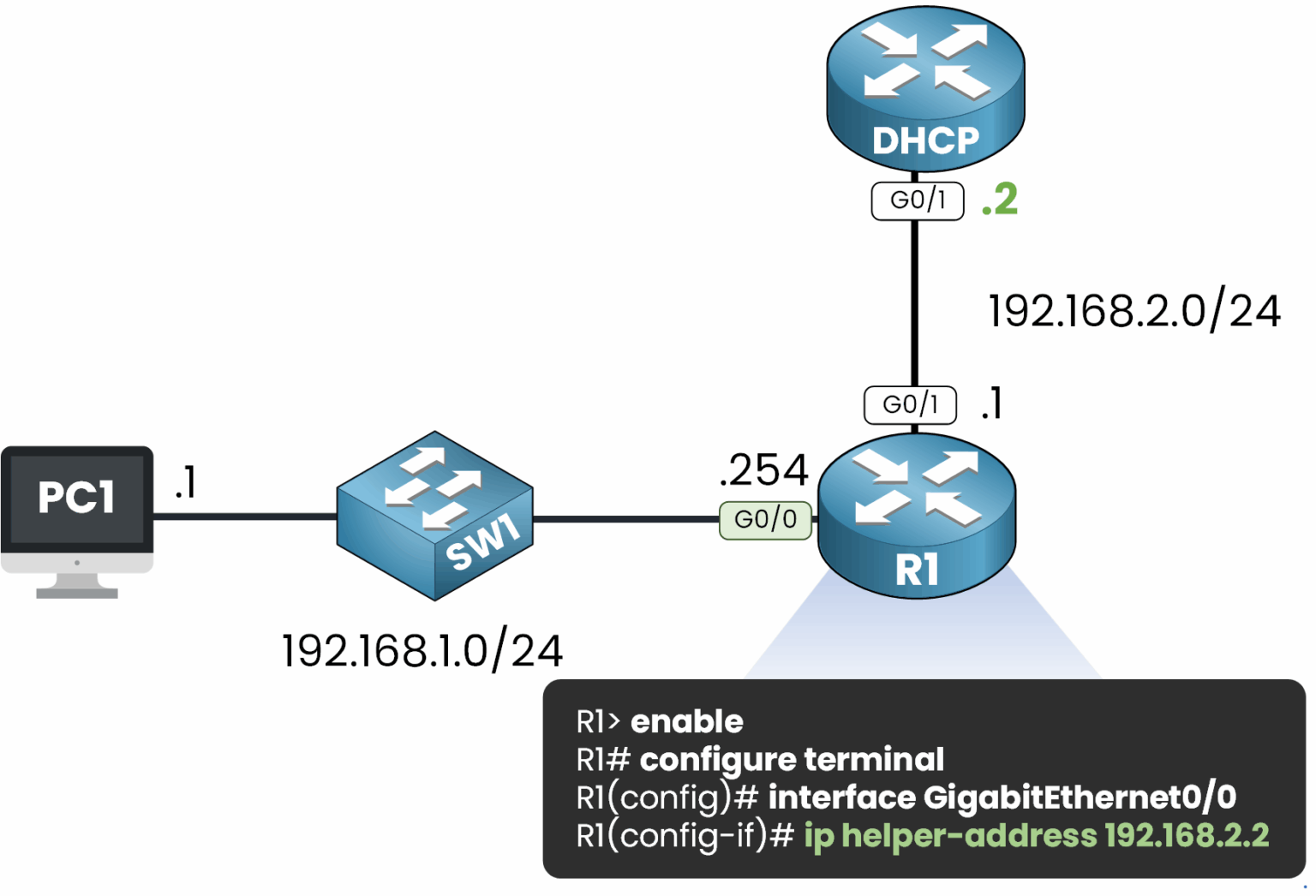
Figure 1 – DHCP Relay Configuration on a Cisco Router
The configuration is straightforward.
Configuring a DHCP Relay Agent on Cisco Devices
Access the router's configuration mode:
R1# conf t
Enter configuration commands, one per line.  End with CNTL/Z.
Navigate to the interface connected to the local subnet (where the client resides):
R1(config)# int G0/0Set the IP address of the DHCP server as the helper address:
R1(config-if)# ip helper-address 192.168.2.2
R1(config-if)# end
The
ip helper-addresscommand enables the router to forward DHCP requests received on the interface to the server at 192.168.2.2.Answer the question below
Which command enables a DHCP relay on a Cisco router?
After setting up your DHCP relay agent, it's essential to verify that it's functioning as expected.
Let's explore how you can confirm your configuration and troubleshoot any issues.Verifying the DHCP Relay Agent Configuration
To verify that your configuration is working correctly, use the
show ip dhcp relaycommand.R1# show ip dhcp relay Interface Helper address VRF --------------------------------------------------- GigabitEthernet0/0 192.168.2.2 globalHere we can see that the relay agent configured on GigabitEthernet0/0 will forward DHCP requests to the server at 192.168.2.2.
Monitor DHCP Events in Real-Time
You can monitor DHCP activity as the relay agent facilitates communication between the DHCP Client and DHCP Server. Let's walk through the process using the
debug ip dhcp eventscommand:R1# debug ip dhcp events DHCPD: DHCPDISCOVER received from client 0100.1c42.4c39.91 on interface GigabitEthernet0/0 DHCPD: Forwarding DHCPDISCOVER to helper address 192.168.2.2 DHCPD: DHCPOFFER received from server 192.168.2.2 DHCPD: Forwarding DHCPOFFER to client 0100.1c42.4c39.91 on interface GigabitEthernet0/0 DHCPD: DHCPREQUEST received from client 0100.1c42.4c39.91 on interface GigabitEthernet0/0 DHCPD: Forwarding DHCPREQUEST to helper address 192.168.2.2 DHCPD: DHCPACK received from server 192.168.2.2 DHCPD: Forwarding DHCPACK to client 0100.1c42.4c39.91 on interface GigabitEthernet0/0This detailed output confirms that the entire DORA process (DISCOVER, OFFER, REQUEST, ACK) has been completed successfully.
Answer the question below
Which command verifies the configured DHCP relay helper address?
Let's go back to PC1 and check the result.
Check the IP Configuration
C:\> ipconfig

FastEthernet0 Connection:(default port)

   Connection-specific DNS Suffix..:
   Link-local IPv6 Address.........: FE80::2E0:F9FF:FE23:D3B5
   IPv6 Address....................: ::
   IPv4 Address....................: 192.168.1.1
   Subnet Mask.....................: 255.255.255.0
   Default Gateway.................: ::
                                     192.168.1.254
Same command, different result. PC1 now has an address, a mask and a gateway, assigned by a DHCP server located in another subnet.
Test Connectivity
C:\> ping 192.168.1.254

Pinging 192.168.1.254 with 32 bytes of data:

Request timed out.
Reply from 192.168.1.254: bytes=32 time<1ms TTL=255
Reply from 192.168.1.254: bytes=32 time<1ms TTL=255
Reply from 192.168.1.254: bytes=32 time<1ms TTL=255

Ping statistics for 192.168.1.254:
    Packets: Sent = 4, Received = 3, Lost = 1 (25% loss),
The first packet times out. This has nothing to do with DHCP: PC1 does not know the MAC address of its gateway yet, so it sends an ARP request first. The following packets go through.
The gateway answers. Next, the DHCP server itself, in 192.168.2.0/24.
C:\> ping 192.168.2.2

Pinging 192.168.2.2 with 32 bytes of data:

Reply from 192.168.2.2: bytes=32 time<1ms TTL=127
Reply from 192.168.2.2: bytes=32 time<1ms TTL=127
Reply from 192.168.2.2: bytes=32 time<1ms TTL=127
Reply from 192.168.2.2: bytes=32 time<1ms TTL=127

Ping statistics for 192.168.2.2:
    Packets: Sent = 4, Received = 4, Lost = 0 (0% loss)
No timeout this time: the gateway MAC address is already in PC1's ARP cache. PC1 now reaches a host in 192.168.2.0/24, the subnet its DHCP broadcast could not cross.
What's Next?
In the next lesson, you will put everything together in a lab: a DHCP server, a relay, and a client to fix.
Answer the question below
Which request makes the first ping to the gateway time out?